


Photographers are always searching for one thing: tack-sharp images. Whether you’re shooting wildlife, landscapes, travel scenes, or fast-moving subjects, sharpness is often the difference between a good photo and a portfolio-worthy one. That’s why many photographers have turned to Topaz Photo AI, a tool designed specifically to improve image quality using artificial intelligence.
Now, Topaz has introduced a major update with a new model called Wonder 2—a powerful AI system that can denoise, sharpen, and upscale images in a single step, dramatically simplifying the editing workflow for photographers.
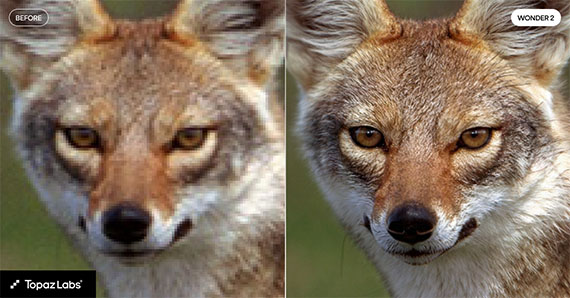
The New Wonder 2 Model
At its core, Wonder 2 is designed to handle several image-enhancement tasks at once. Traditionally, photographers had to apply noise reduction, sharpening, and upscaling separately, adjusting sliders and fine-tuning settings along the way.
Wonder 2 changes that process.
Instead of multiple tools and manual adjustments, the model automatically analyzes your image and performs three enhancements simultaneously:
- Noise reduction – Cleans up high-ISO noise and grain
- Sharpening – Restores lost detail and edge clarity
- Upscaling – Increases resolution while preserving detail
Perhaps the most interesting part is that there are no sliders or tuning controls required. The AI model determines the optimal enhancement automatically based on the image content.
For photographers who want quick results without spending time experimenting with settings, this approach can dramatically speed up editing.
Running a Massive AI Model—Locally
One of the most impressive aspects of Wonder 2 is its size and complexity. It’s a very large AI model, capable of analyzing fine image structures and reconstructing detail that would normally be lost to noise, motion blur, or lens softness.
Normally, models of this scale require heavy GPU memory or cloud processing. But Topaz solved this with a new technology called NeuroStream.
NeuroStream dramatically reduces VRAM usage, allowing the Wonder 2 model to run locally on standard creator hardware—meaning photographers can get powerful AI processing without needing a high-end workstation or sending their photos to the cloud.
This local processing has several advantages:
- Faster performance
- No upload times
- Greater privacy for your images
- Works even without internet access
For many photographers working with large RAW files, these improvements make AI enhancement far more practical in everyday workflows.
Why This Matters for Photographers
Sharpness problems come from many sources:
- High ISO noise
- Motion blur
- Lens softness
- Cropping or upscaling
- Small sensors (common in smartphones)
Traditionally, fixing these issues required careful adjustments and sometimes multiple editing tools.
With Wonder 2, the goal is to simplify that entire process into one step. The model evaluates the photo and applies the necessary improvements automatically.
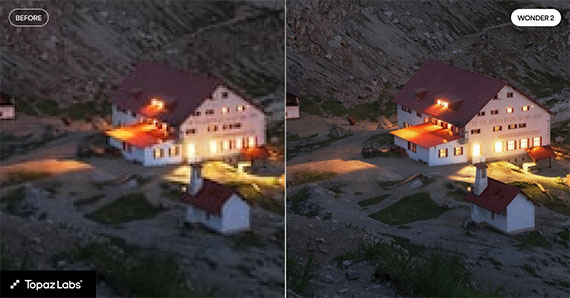
For example, a wildlife image shot at high ISO might receive aggressive noise reduction while still preserving feather detail. A slightly soft landscape might get edge enhancement and subtle upscaling to restore clarity.
The result can be images that look significantly sharper and cleaner, even when the original capture wasn’t perfect.
A Faster Editing Workflow
Another benefit of this approach is workflow speed.
Many photographers spend a large portion of their editing time toggling between sharpening tools, denoise settings, and resolution adjustments. Wonder 2 compresses all of that into a single automated step.
That means:
- Less time tweaking sliders
- Fewer export tests
- Faster turnaround on large batches of photos
For photographers processing hundreds of images from a shoot, that efficiency can add up quickly.
Should Photographers Try It?
AI tools are becoming a regular part of modern editing workflows, and updates like Wonder 2 show how quickly the technology is improving.
Because it combines denoise, sharpening, and upscaling automatically, the new model is particularly appealing for photographers dealing with:
- High-ISO images
- Slightly soft shots
- Heavy crops
- Smartphone photos
- Older camera files
If your goal is getting clean, tack-sharp photos with minimal editing effort, tools like the Photo AI Editor are becoming increasingly worth exploring.
With Wonder 2 now running locally inside Topaz Photo, photographers can experiment with powerful AI enhancement while keeping their workflow fast, simple, and completely under their control.
from PictureCorrect https://ift.tt/pT47I0c
via IFTTT


0 kommenttia:
Lähetä kommentti