


When photographers talk about “sharpening,” it’s easy to assume editing software is restoring lost detail or magically fixing soft images. In reality, most sharpening techniques don’t create new detail at all. Instead, they manipulate contrast at the pixel level, particularly around edges. By exaggerating the difference between neighboring pixels, sharpening tools create the perception of greater clarity.
However, modern AI-based tools have begun to push sharpening beyond simple edge contrast. Software such as Topaz Photo AI uses machine learning models to analyze patterns in the image and attempt to reconstruct realistic detail. Understanding both approaches helps explain what sharpening really does behind the scenes.
Related: only 1 day left for the Photo Editing Cheat Sheets  March Markdown Sale
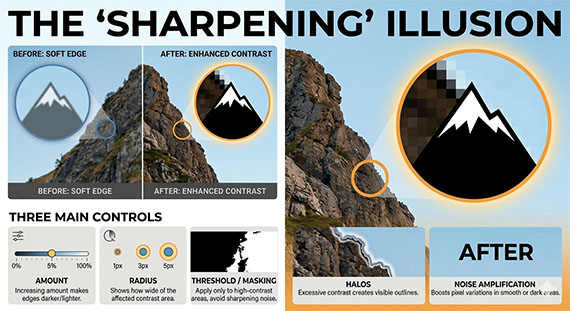
The Traditional Approach: Edge Contrast
A digital photo is made up of millions of pixels, each containing brightness and color information. When an edge appears in a photo—such as the border between a dark object and a bright background—the pixels gradually transition from darker values to lighter ones.
If that transition becomes too gradual, the edge appears soft. Traditional sharpening algorithms look for these transitions and increase the contrast between pixels on either side of the edge.
Imagine a row of pixels across an edge:
Dark side → 40, 45, 50, 60, 70 ← Light side
A sharpening tool might adjust the values to something like:
Dark side → 35, 42, 50, 65, 78 ← Light side
The transition becomes steeper, which makes the edge appear sharper—even though the image contains exactly the same underlying information.
This is the core principle behind classic tools such as Unsharp Mask, High Pass sharpening, and most sharpening sliders found in photo editing software.
Why Images Often Start Slightly Soft
Many digital photos benefit from sharpening because several factors naturally soften edges during capture:
- Anti-aliasing filters in some cameras blur fine detail slightly to prevent moiré patterns
- Lens limitations reduce sharpness, especially near the edges of the frame
- Motion blur from camera shake or subject movement
- Noise reduction applied during processing
Sharpening is often used as a finishing step to restore the crisp edge transitions that were softened earlier in the imaging pipeline.
The Rise of AI Sharpening
Traditional sharpening simply boosts contrast around edges. Modern AI tools attempt something more sophisticated.
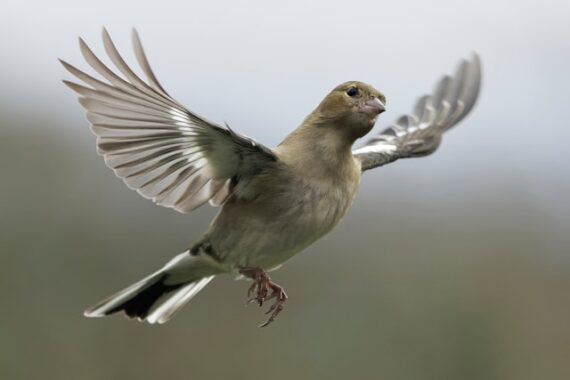
Software like Topaz Photo AI uses deep learning models trained on large datasets of sharp and degraded images. The neural network learns patterns that represent real photographic details—such as hair strands, feathers, foliage, or architectural lines.
When processing an image, the AI analyzes these patterns and predicts what the sharper version of the image might look like. In some cases, it can even reconstruct fine texture that was softened by motion blur, noise reduction, or missed focus.
Instead of simply increasing edge contrast, AI sharpening works more like a detail reconstruction system.
Why Oversharpening Causes Problems
Because traditional sharpening exaggerates contrast, too much of it can create visible artifacts. The most common is haloing, where bright or dark outlines appear along edges.
Sharpening can also enhance image noise, especially in shadows or high-ISO photos. Since noise consists of tiny pixel variations, sharpening algorithms may treat it like real detail and amplify it.
AI-based sharpening tools can reduce these issues by selectively enhancing recognized structures rather than boosting contrast everywhere—but they can still produce unnatural textures if pushed too far.
The Three Stages of Sharpening
In most professional editing workflows, sharpening is applied in stages:
Capture sharpening
Applied early to compensate for softness introduced by the camera sensor and lens.
Creative sharpening
Selective sharpening applied to key elements such as eyes in a portrait or textures in a landscape.
Output sharpening
Final sharpening optimized for the image’s destination, whether that’s print, web, or social media.
Each stage adjusts pixel contrast slightly differently to ensure the image appears crisp in its final form.
The Bottom Line
At its core, sharpening works by manipulating pixel relationships—increasing contrast where brightness values change rapidly so that edges appear more defined.
Traditional sharpening enhances the edges that already exist in the image. AI-powered tools, on the other hand, attempt to reconstruct believable detail based on learned patterns.
In both cases, sharpening doesn’t truly create original detail captured by the camera sensor. Instead, it refines the way pixels transition across edges—making the image appear clearer, more textured, and ultimately sharper to the human eye.
For Further Training:
The March Markdown Sale on the Photo Editing Cheat Sheets is wrapping up soon, making this a great time to bring clarity to your editing workflow. If editing often feels scattered or uncertain, these cheat sheets provide a clear, repeatable process for tackling exposure, color, masking, retouching, and finishing touches in the right order.

Paired with time-saving keyboard shortcuts, they help you edit faster, stay consistent, and know when an image is truly finished.
Only 1 day left: The Photo Editing Cheat Sheets March Markdown Sale
from PictureCorrect https://ift.tt/z9YujdD
via IFTTT


0 kommenttia:
Lähetä kommentti