maanantai 2. helmikuuta 2026

PictureCorrect.com: Training Your Eye with Winter Texture Photography

One of the fastest ways to improve your photography isn’t learning a new camera feature—it’s learning how to see. This exercise removes obvious subjects entirely and forces your attention onto texture, light, and composition. By stripping away recognizable objects, you train your eye to notice visual qualities that often get overlooked when you’re focused on “what” you’re photographing instead of how it looks.

Texture photography is especially effective during winter months, when surfaces like ice, frost, and worn materials naturally reveal detail and contrast. But the skill you build here applies year-round, across every genre of photography.

Relevant note: only a little while left for the Photography Exercises ❄ Winter Sale

ice texture

The Goal of the Exercise

The purpose of this exercise is simple: train your eye for detail. You’re learning to recognize strong compositions based on texture, tone, pattern, and light—without relying on a clear subject to carry the image.

When you remove obvious context, every decision matters more:

  • Where light falls
  • How shadows create depth
  • How lines and patterns guide the eye

These are the same skills that elevate landscapes, portraits, and street photography—but here, they’re isolated and strengthened.

What to Photograph

Look for surfaces that naturally reveal texture when viewed up close. Good starting points include:

  • Ice or melting frost
  • Road salt on pavement
  • Cracked sidewalks or asphalt
  • Wool, knit fabric, or heavy coats
  • Tree bark, weathered wood, or stone

These subjects are everywhere, but the key is how you photograph them—not what they are.

snow macro

How to Shoot It

Move in close. Very close.

Your goal is to make the surface itself the subject, removing any visual clues that explain what the viewer is looking at. Think abstract rather than documentary.

Rules to Follow

  • Fill the frame completely
    No empty space, no background context. Let texture dominate.
  • Avoid recognizable objects unless intentional
    If the viewer instantly knows what the object is, you’re probably too far away. If recognition happens only after a second look, you’re on the right track.

Pay attention to:

  • Direction of light (side light reveals texture best)
  • Micro-contrast between highlights and shadows
  • Repeating patterns or subtle irregularities

Camera and Lens Tips

You don’t need specialized gear for this exercise, but a few choices can help:

  • Use a macro lens if you have one, or the closest-focusing lens you own
  • Stop down slightly (around f/8–f/11) to retain texture depth
  • Use manual focus if autofocus struggles with low contrast
  • A tripod helps when working very close or in low light

Smartphone photographers can do this exercise just as effectively—use the phone’s closest lens and move slowly until texture snaps into clarity.

Why This Exercise Works

This exercise strengthens several core photography skills at once:

Macro and close-focus control
You learn how small changes in distance and angle dramatically affect detail.

Composition without obvious subjects
Without a clear focal point, balance, rhythm, and visual flow become essential.

Better photo editing later
When you learn to see subtle tonal differences in-camera, you naturally become more restrained and intentional in post-processing—avoiding over-sharpening, excessive clarity, or heavy-handed contrast.

frost

How to Review Your Results

After shooting, don’t ask, “What is this a photo of?”
Ask instead:

  • Does the texture feel tactile?
  • Is the frame visually balanced?
  • Does light enhance or flatten the surface?
  • Would this image still work in black and white?

The strongest images from this exercise often feel timeless and abstract—more about sensation than subject.

Final Thought

Texture photography teaches you to slow down and notice what’s right in front of you. When you return to more traditional subjects, you’ll find that your compositions are stronger, your use of light more deliberate, and your editing more subtle.

Seeing texture is seeing photography at its foundation.

If you want more exercises like this—clearly structured, easy to follow, and designed to build real shooting instincts—the Winter Sale on the Photography Exercises is wrapping up soon. It’s a practical way to keep improving, even when winter limits your time and motivation to shoot.

photographer exercises

A practical way to build confidence for challenging shooting situations that often trip photographers up. Each exercise focuses on real-world scenarios—difficult light, motion, exposure decisions, and creative problem-solving—so you learn how to take control instead of relying on auto settings.

Deal ending soon: PictureCorrect Photography Exercises ❄ Winter Sale


from PictureCorrect https://ift.tt/GKC3M60
via IFTTT

sunnuntai 1. helmikuuta 2026

PictureCorrect.com: How to Nail Exposure for Portraits in the Snow

Snowy environments can produce some of the most striking portrait images—but they’re also one of the easiest ways to end up with dull, underexposed photos. If you’ve ever reviewed your images after a winter shoot and wondered why the snow looks gray and skin tones feel lifeless, the issue usually isn’t your camera or your settings. It’s your camera meter doing exactly what it was designed to do—just not what you want it to do.

Understanding how exposure meters behave in snow, and knowing when to override them, is the key to consistently strong winter portraits.

Related reminder: only a little while left for the Lighting Cheat Sheets ❄ Winter Sale

snow portrait

35mm, f/1.6, 1/8000s, ISO 1000; captured by Will McClintock

Why Snow Fools Your Camera’s Meter

Most camera meters are designed to expose scenes as a middle gray—roughly 18% gray. In average conditions, this works well. But snow-covered scenes are anything but average.

When your frame is dominated by bright white snow, your camera assumes the scene is too bright and tries to compensate by darkening the exposure. The result is predictable:

  • Snow turns dull gray
  • Shadows deepen unnecessarily
  • Skin tones lose brightness and life

The camera isn’t broken—it’s just trying to force a very bright scene into a neutral exposure. For portraits in the snow, that behavior works against you.

Using Exposure Compensation (The Simple Fix)

One of the easiest ways to correct this problem is by using exposure compensation.

In aperture priority or shutter priority modes, dial in +1 to +2 stops of exposure compensation as a starting point. The exact amount depends on:

  • How much of the frame is snow
  • Whether the light is sunny or overcast
  • The subject’s clothing and skin tone

A lightly snow-dusted background may only need +1 EV. A scene that’s nearly all white snow often benefits from closer to +2 EV.

The goal is simple: tell the camera that the brightness you’re seeing is intentional and should not be darkened.

Why Slightly Overexposing Skin Tones Matters

For portraits, skin tones matter more than the snow.

In winter scenes, underexposed skin tones are especially unforgiving. Cold light, reflective snow, and darker exposures combine to make faces look flat, gray, or muddy. Slightly brighter skin tones:

  • Look healthier and more natural
  • Preserve more usable detail
  • Are easier to fine-tune in post-processing

This doesn’t mean blowing highlights or losing texture. It means prioritizing exposure for the subject’s face, even if that pushes the snow close to the right side of the histogram.

A good rule of thumb:
If you’re choosing between perfect snow and good skin tones, choose the skin tones every time.

snow exposure

35mm, f/1.8, 1/2000s, ISO 800; captured by June Andrei George

Watch the Histogram, Not the LCD

Snow can make your camera’s rear screen misleading—especially outdoors in bright conditions. Instead of judging exposure by eye, rely on the histogram.

For well-exposed snow portraits:

  • Highlights should be close to the right edge, but not clipped
  • Skin tones should sit comfortably in the upper midtones
  • Avoid large gaps on the right side of the histogram (a sign of underexposure)

This approach helps you stay consistent even as lighting conditions change throughout a winter shoot.

Manual Mode: Helpful, Not Required

You don’t need to shoot in full manual mode to get good results in the snow—but it can help in consistent lighting.

If the light isn’t changing much:

  • Set exposure manually based on the snow
  • Lock it in
  • Focus entirely on posing, expression, and composition

If clouds are moving or the subject shifts between sun and shade, exposure compensation is often faster and more flexible.

Final Takeaway

Snowy portraits fail exposure-wise for one main reason: cameras don’t understand that white scenes are supposed to be white. Once you accept that and take control—through exposure compensation, histogram checks, and prioritizing skin tones—the problem disappears.

Get the exposure right in-camera, and snow portraits go from frustrating to effortless.

For Further Training:

Lighting is arguably the most important aspect of photography; but do you know how to use it? These Photography Lighting Cheat Sheets are designed to help. With critical information on ALL the types of natural light and artificial light you can use. They are currently 80% off today for a Winter Sale ❄

lighting cheat sheets

New! Cheat Sheets for Photography Lighting (see how they work)

Whether you’re a seasoned professional or just starting out, photography cheat sheets can be a valuable resource for improving your skills and taking your photography to the next level. By having all the key information you need in one place, you can focus on what’s important – capturing amazing photos.

Winter sale ending soon: Photo Lighting Cheat Sheets at 80% Off


from PictureCorrect https://ift.tt/FGghZYL
via IFTTT

lauantai 31. tammikuuta 2026

PictureCorrect.com: The Most Photogenic Clouds and Where to Find Them

Clouds are nature’s masterpiece on the canvas of the sky. Their constantly evolving forms and ethereal presence create some of the most captivating images for photographers. Whether you’re a seasoned pro or a beginner, capturing clouds can elevate your photography game. Here’s a guide to the most interesting types of clouds to photograph and the best places to find them.

Relevant: deal ending soon for the Photo Adventure Cheat Sheets ❄ Winter Sale

1. Cumulus Clouds:

  • Appearance: These are the classic, fluffy white clouds that often resemble cotton balls. They are relatively low in the sky and have well-defined edges.
  • Best for: Daytime landscapes, creating contrast against a deep blue sky.
  • Where to find them: Almost everywhere, especially in fair weather. Mid-day is often a good time.
  • Formation: Cumulus clouds form due to vertical convection currents caused by warming at the Earth’s surface. As warm air rises, it cools and condenses into these puffy clouds.
cumulus clouds

Cumulus Clouds captured by Brett Jordan

2. Cirrus Clouds:

  • Appearance: Wispy and thin, cirrus clouds often look like feathery strokes painted high in the sky.
  • Best for: Sunsets and sunrises, as their ice crystals can reflect vibrant colors.
  • Where to find them: They are high-altitude clouds, so they are pretty much everywhere. Look up on clear days.
  • Formation: Cirrus clouds form at high altitudes where the atmospheric pressure is low. Here, water vapor freezes into ice crystals. They are often formed from the outflow of other clouds or can be remnants of cumulonimbus clouds.
cirrus clouds

Cirrus Clouds captured by Simon Fitall

3. Stratus Clouds:

  • Appearance: These clouds form uniform layers, often covering the sky like a blanket, leading to overcast conditions.
  • Best for: Creating moody, atmospheric shots. Great for black and white photography.
  • Where to find them: Common in coastal areas or during foggy mornings inland.
  • Formation: Stratus clouds are typically formed through the gentle lifting of a large, relatively flat air mass. This lifting can be due to subtle features in the landscape or even an incoming weather front. They can also form from fog lifting off the ground.
stratus clouds

Stratus Clouds captured by Koes nadi

4. Cumulonimbus Clouds:

  • Appearance: Towering giants, they can develop anvil tops and can produce severe weather, including thunderstorms.
  • Best for: Capturing dramatic weather events like lightning or a storm’s approach.
  • Where to find them: Regions with frequent thunderstorms, like the American Midwest or tropical areas during the monsoon.
  • Formation: Cumulonimbus clouds are the result of vigorous convection currents. These are initiated by intense heating at the Earth’s surface. The warm air rises rapidly, and as it does, it cools and condenses. If the rising air is moist and unstable enough, it can lead to the formation of these towering storm clouds.
cumulonimbus-clouds

Cumulonimbus Clouds captured by Daniel Bernard

5. Mammatus Clouds:

  • Appearance: They are bubble-like pouches hanging underneath the base of a cloud, often associated with severe weather.
  • Best for: Adding drama and intrigue to your photos.
  • Where to find them: Often seen after severe thunderstorms have passed.
  • Formation: The exact cause is still debated, but one theory suggests that they form when cold air sinks down, creating pockets contrary to the usual puffy cloud formation. They’re often associated with severe weather and can appear after a storm.
mammatus clouds

Mammatus Clouds captured by John Dame

6. Lenticular Clouds:

  • Appearance: They resemble UFOs or lens shapes and form over mountains or other geographical features that disrupt the flow of the air.
  • Best for: Surreal landscapes, especially during sunset or sunrise when they can take on brilliant hues.
  • Where to find them: Mountainous regions like the Rockies or the Andes.
  • Formation: These form when moist air flows along the surface of the Earth and encounters obstructions like mountains or hills. These obstructions force the air to rise, and lenticular clouds form at the crest of the wave of rising air. Once the air passes over the obstruction and descends again, the cloud dissipates.
lenticular clouds

Lenticular Clouds captured by Marc Thunis

7. Nacreous (Mother of Pearl) Clouds:

  • Appearance: They shimmer with iridescent colors and form in the lower stratosphere over polar regions.
  • Best for: Ethereal, other-worldly shots.
  • Where to find them: Polar regions during winter, especially after sunset or before sunrise.
  • Formation: They form in the winter polar stratosphere at altitudes of 15,000–25,000 meters (49,000–82,000 ft). They’re made up mostly of ice crystals. The clouds’ iridescence is due to the diffraction of sunlight around the ice crystals.
nacreous clouds

Nacreous Clouds captured by Kym MacKinnon

Tips for Cloud Photography:

  • Golden Hour Glory: The time just after sunrise or before sunset provides a soft, golden light that can make clouds look especially breathtaking.
  • Use Filters: Polarizing filters can enhance the contrast between clouds and the sky.
  • Patience Pays: Cloud formations can change rapidly. Waiting can sometimes reward you with a magical shot.

General Principles of Cloud Formation:

The foundation of cloud formation is the Water Cycle. Here’s a brief overview:

  1. Evaporation: Sun heats the Earth’s surface, causing water to evaporate from oceans, lakes, and rivers into the atmosphere.
  2. Condensation: As the warm, moist air rises, it cools. When the air temperature drops to its dew point, the water vapor condenses into tiny droplets around particulates in the air, forming clouds.
  3. Precipitation: When these water droplets combine and become heavy enough, they fall as precipitation.

In essence, clouds form when warm, moist air rises and cools, causing the water vapor in the air to condense around tiny particles, such as dust or smoke. Different atmospheric conditions, temperatures, altitudes, and more can result in the various cloud formations we see in the sky.

The world is full of breathtaking cloudscapes waiting to be captured. With patience, the right timing, and a bit of luck, photographers can capture the ethereal beauty of clouds in all their glory. So the next time you’re looking up, remember, the sky isn’t the limit—it’s the canvas!

For Further Training:

For help remembering the camera settings for difficult situations like this, this set of Photography Adventure Cheat Sheets are designed to help. They are currently 80% off for a Winter Sale which ends soon if you want to check them out.

photography adventure

New! Cheat Sheets for Your Photography Adventures (see how they work)

The perfect companion for any photographer. Print one out whenever you need it. Whether you’re going on vacation or seeking out a specific photography adventure, these cheat sheets can provide you with the knowledge and inspiration you need to create your best work yet.

Deal ending soon: The Photography Adventure Cheat Sheets ❄ Winter Sale


from PictureCorrect https://ift.tt/mQ1Ja89
via IFTTT

torstai 29. tammikuuta 2026

PictureCorrect.com: Why Manual Mode Makes You a Better Photographer Faster

Many photographers put off learning Manual mode, assuming it’s only for professionals or that modern cameras can handle exposure decisions just fine. While automatic and semi-automatic modes are incredibly capable, relying on them for too long can slow your growth. Manual mode isn’t about control for control’s sake — it’s about accelerating understanding. When used intentionally, it can shorten the learning curve and make you a more confident photographer faster.

Related: Want to level up your photography fast? PictureCorrect Premium is designed to be an accelerator with lessons, exercises, and more — and it’s only $1 to try for 1 more day!

manual mode faster

Manual Mode Forces You to Understand Light

In automatic modes, the camera quietly solves problems for you. Manual mode removes that safety net. You must consciously decide how bright or dark the image should be, how motion is rendered, and how much depth of field you want. Each adjustment directly affects the image, and mistakes become immediate lessons. Over time, this repetition builds an intuitive understanding of how light behaves and how your camera responds to it.

You Learn Cause and Effect, Not Guesswork

Manual mode teaches photography as a system rather than a collection of rules. Change shutter speed and motion blur appears or disappears. Adjust aperture and background separation shifts. Raise ISO and noise becomes visible. Instead of memorizing settings for specific situations, you start recognizing patterns. This cause-and-effect learning is what allows photographers to adapt quickly in unfamiliar or fast-changing conditions.

It Builds Confidence Instead of Dependency

Photographers who rely heavily on auto modes often hesitate when the camera struggles — harsh backlighting, night scenes, snow, or stage lighting. Manual mode removes that uncertainty. You’re no longer waiting for the camera to “figure it out.” When you know how to override exposure decisions intentionally, you trust your own judgment more than the meter, and that confidence shows in your work.

Faster Problem Solving in Real Situations

Manual mode may feel slower at first, but it ultimately speeds you up. Once exposure fundamentals are internalized, adjustments become instinctive. Instead of fighting exposure compensation or switching modes mid-shoot, you make small, deliberate changes and move on. This is especially valuable in genres like street photography, landscapes, and portrait work where lighting conditions shift constantly.

It Improves Your Use of Other Modes

Ironically, learning Manual mode also makes you better at using Aperture Priority, Shutter Priority, and even Auto. When you understand what the camera is likely to do — and why — you can anticipate mistakes before they happen. Manual mode sharpens your judgment, and that skill carries over to every shooting mode.

Manual Mode Isn’t About Always Shooting Manual

Shooting in Manual mode doesn’t mean abandoning convenience or automation forever. It’s a training tool as much as a shooting mode. Spending time in Manual accelerates learning by making exposure decisions visible and deliberate. Once that foundation is solid, switching modes becomes a strategic choice instead of a crutch.

Final Thought

Manual mode doesn’t make photography harder — it makes learning clearer. By forcing you to engage with light, exposure, and creative intent directly, it compresses years of passive experience into focused, hands-on understanding. If your goal is to improve faster, few tools are as effective as taking full control of your camera — at least for a while.

Early Subscribers Are Already Ahead:

Every week, more photographers are joining PictureCorrect Premium to level up their craft — and you could be next. Inside, you’ll find expert-led tutorials, creative challenges, and printable exercises that make each lesson stick.

picturecorrect premium

Whether you’re working to improve composition, lighting, or manual control, Premium gives you the structure to make steady progress. The special $1 intro offer is ending soon, and once it’s gone, so is your chance to lock in early access.

Only 1 day left: January Discount Enrollment PictureCorrect Premium


from PictureCorrect https://ift.tt/HXskhbD
via IFTTT

keskiviikko 28. tammikuuta 2026

PictureCorrect.com: Light Pillars: Photographing Nature’s Vertical Luminescence

The phenomenon of light pillars plucks at the strings of our imagination, creating a visual symphony that seems almost otherworldly. These ethereal columns of light, reaching skyward in the cold air, offer photographers a chance to capture a rare and mesmerizing spectacle. In this guide, we’ll delve into the science behind light pillars, explore the best locations and conditions for witnessing them, and share expert tips on how to photograph these luminous structures effectively.

Relevant: only a little while left for the Photo Adventure Cheat Sheets Winter Sale

light pillars

Photo captured by Raivis Razgals; 11mm, f/2.8, 8 sec, ISO 400

Understanding Light Pillars:

Light pillars appear when natural or artificial light bounces off the flat surfaces of ice crystals suspended in the Earth’s atmosphere. This optical phenomenon is most common in polar regions but can occur anywhere provided the conditions are right. Typically, light pillars are seen during cold, calm, and clear nights when ice crystals can form close to the ground and reflect the light sources—be it the sun, moon, or artificial lighting—creating a pillar-like illusion.

How They Form:

The magic of light pillars begins with tiny, hexagonally shaped ice crystals floating horizontally in the air. When a light source illuminates these crystals, the light reflects off their surfaces. Because the crystals are oriented horizontally, they reflect light vertically, creating the illusion of a column of light extending upward or downward from the source. The size, intensity, and color of light pillars can vary depending on the light source and atmospheric conditions.

Where to Find Them:

  1. Polar Regions: The Arctic and Antarctic regions are prime locations for observing natural light pillars, especially during the winter months when the conditions are most favorable.
  2. Cold Climates: Northern countries such as Canada, Norway, Sweden, and Russia offer great opportunities to witness this phenomenon, particularly in areas away from city lights.
  3. Urban Environments: Even in cities, photographers can capture artificial light pillars created by streetlights, billboards, or other sources of light. However, finding a spot with minimal light pollution will enhance the clarity and intensity of the pillars.
light pillars sky

Photo captured by Marc Linnemann; 16mm, f/4.0, 10 sec, ISO 1600

Photographing Light Pillars:

  1. Gear Up: Use a camera that allows manual control of settings. A tripod is essential to stabilize your camera during long exposures, and a remote shutter release can help avoid any camera shake.
  2. Camera Settings: Opt for manual mode or aperture priority to have full control over your exposure. Start with a moderately low ISO (around 400) to keep the noise minimal, but don’t be afraid to raise it higher depending on how dark it is. Use a wide aperture (f/2.8-f/4) to allow enough light in and adjust the shutter speed accordingly. Depending on the intensity of the light, you might need exposure times ranging from a few seconds up to 30 seconds.
  3. Composition: Since light pillars are vertical, a portrait orientation often works best. Include some context in your frame—urban landscapes, silhouetted trees, or mountains can add depth and interest to your image.
  4. Focus: In low light conditions, autofocus might struggle. Use manual focus if necessary, and if you’re photographing artificial light pillars, focus on the light source itself.
  5. Experiment: Try different exposure times and compositions. Capturing the movement of the crystals can add a dynamic element to your photos, so consider longer exposures to experiment with this effect.

Summary:

Photographing light pillars is an exercise in patience and perseverance, but the reward is a breathtaking image that captures a fleeting moment of natural splendor. By understanding how light pillars form and following these tips, photographers can enhance their chances of successfully capturing this elusive phenomenon. Whether you’re in a remote polar region or an urban setting, the dance of light and ice in the cold night air is a spectacle that’s well worth the effort to document. So, bundle up, venture out, and be ready to capture the magic of light pillars through your lens.

For Further Training:

For help remembering the camera settings for difficult situations like this, a set of Photography Adventure Cheat Sheets are designed to help. They are currently 80% off for a winter sale which ends soon if you want to check them out.

photography adventure

New! Cheat Sheets for Your Photography Adventures (see how they work)

The perfect companion for any photographer. Print one out whenever you need it. Whether you’re going on vacation or seeking out a specific photography adventure, these cheat sheets can provide you with the knowledge and inspiration you need to create your best work yet.

Deal ending soon: The Photography Adventure Cheat Sheets Winter Sale


from PictureCorrect https://ift.tt/8ELBO4S
via IFTTT

tiistai 27. tammikuuta 2026

PictureCorrect.com: How Pros Use Manual Mode (And When They Don’t)

If you’ve spent any time learning photography, you’ve probably heard this advice more than once:

“If you’re serious, you need to shoot in Manual mode.”

It’s usually delivered with good intentions — but also with a fair amount of oversimplification. The truth is, professional photographers use Manual mode strategically, not religiously. They choose it when it gives them control, consistency, or predictability — and they avoid it when it gets in the way of getting the shot.

Let’s break down how Manual mode is actually used in the real world, when it matters, and when other modes are simply smarter tools.

Related: Ready to make serious progress with your camera? PictureCorrect Premium works like a photography bootcamp — structured, practical, and just $1 to try right now

manual uses

What Manual Mode Really Gives You

Manual mode gives you full control over the exposure triangle:

  • Aperture – depth of field and light intake
  • Shutter speed – motion blur or freezing action
  • ISO – sensor sensitivity and noise

What it doesn’t automatically give you is better photos.

Manual mode is about intentional consistency, not superiority.

Professionals reach for it when:

  • Lighting conditions are stable
  • Exposure needs to stay locked frame to frame
  • The camera’s meter is likely to be fooled
  • Creative decisions matter more than speed

When Pros Do Use Manual Mode

1. Controlled Lighting Situations

Studio portraits, product photography, food photography, and many flash setups rely heavily on Manual mode.

Why?

  • Lights aren’t changing
  • Exposure needs to match across images
  • Flash output, not ambient light, is doing the work

Once exposure is dialed in, Manual mode ensures nothing drifts.

2. Landscapes With Tricky Light

Scenes with snow, beaches, sunsets, fog, or dark forests can confuse a camera’s meter.

Pros often use Manual mode to:

  • Prevent exposure from shifting as composition changes
  • Protect highlights during sunrise or sunset
  • Maintain consistent exposure across panoramas

In these cases, Manual mode is about removing variables, not showing skill.

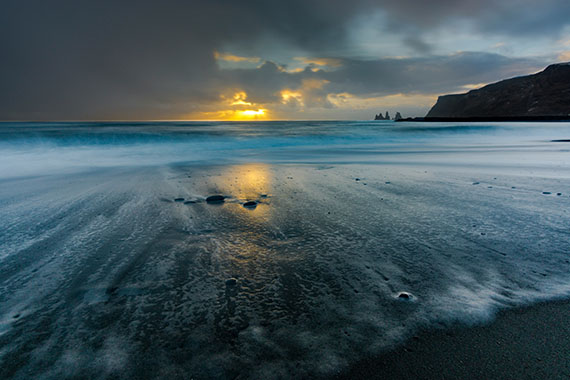
3. Night Photography & Long Exposures

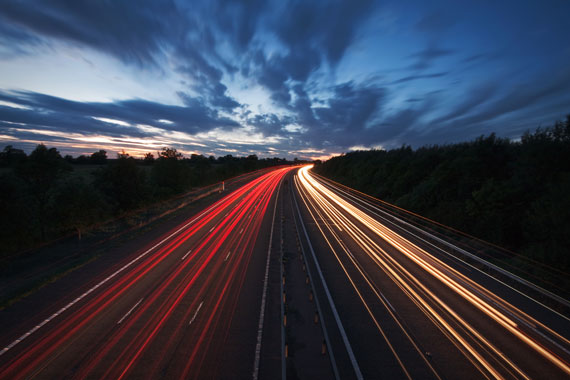
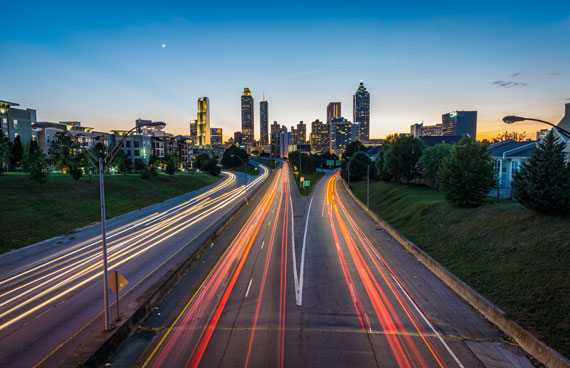
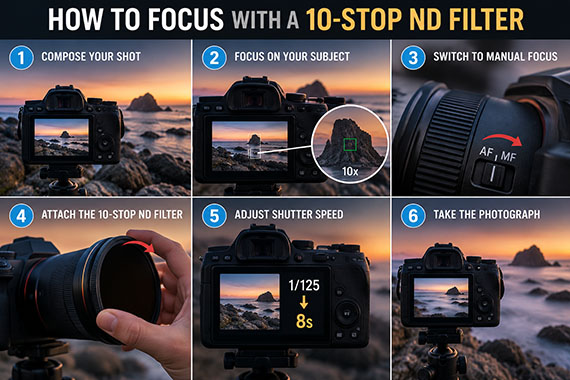
Astrophotography, city light trails, and creative long exposures almost always require Manual mode.

The camera simply can’t:

  • Meter stars reliably
  • Guess intentional motion blur
  • Choose exposures longer than standard limits

Here, Manual mode isn’t optional — it’s necessary.

When Pros Don’t Use Manual Mode

This is where things get interesting.

1. Fast-Moving, Unpredictable Subjects

Sports, wildlife, events, street photography — these often demand speed over precision.

sports photographer

Pros frequently use:

  • Aperture Priority for depth-of-field control
  • Shutter Priority for motion control
  • Auto ISO even when other settings are manual

The goal isn’t perfect exposure math — it’s capturing the moment.

2. Rapidly Changing Light

Weddings, concerts, documentary work, and outdoor events can shift lighting every few seconds.

In these situations:

  • Manual mode can slow you down
  • Missed shots matter more than imperfect exposure
  • Modern cameras meter extremely well

Many professionals use semi-manual setups: locking one or two settings and letting the camera handle the rest.

3. When Consistency Isn’t the Priority

If each frame is unique and independent, strict manual control may not add value.

Pros ask:

  • “Do I need identical exposures?”
  • “Is the light stable?”
  • “Will automation help me react faster?”

If the answer favors speed or flexibility, they switch modes without hesitation.

The Pro Mindset: Control What Matters, Automate the Rest

This is the part most advice skips.

Professional photographers don’t ask:

“Should I always use Manual mode?”

They ask:

“Which variables matter right now?”

Examples:

  • Lock aperture for consistent background blur, let ISO float
  • Lock shutter speed to freeze action, let the camera adjust exposure
  • Use Manual exposure + Auto ISO for consistency with flexibility

Manual mode is a tool, not a badge of honor.

The Real Skill Isn’t Manual Mode — It’s Decision-Making

Knowing how to use Manual mode is important.
Knowing when not to use it is what separates confident photographers from anxious ones.

Pros aren’t afraid of automation because:

  • They understand what the camera is doing
  • They know when it helps and when it hurts
  • They prioritize results over rules

The camera doesn’t care how “pure” your settings are.
Your audience only cares about the photo.

A Better Way to Practice Manual Mode

Instead of forcing Manual mode everywhere, try this approach:

  • Use Manual mode in stable lighting
  • Switch to priority modes in dynamic environments
  • Review images and ask why exposure worked or failed
  • Learn how the meter reacts — don’t fight it blindly

Manual mode becomes powerful when it’s chosen, not enforced.

Final Thoughts

Manual mode isn’t the final boss of photography.
It’s just one of many tools professionals use intentionally.

Master it. Respect it.
But don’t let dogma cost you great shots.

The best photographers aren’t loyal to modes — they’re loyal to outcomes.

Others Are Already Ahead:

While you’re reading this, other photographers are already diving into hands-on tutorials and lessons from PictureCorrect Premium — and seeing results. Don’t let this $1 opening pass you by.

picturecorrect premium

With guided exercises, clear lessons, and printable cheat sheets, it works like a photography accelerator — helping you practice the right things, in the right order, without wasting time.

📷 Try it for $1 (ending soon) and start mastering your camera


from PictureCorrect https://ift.tt/sVCLntj
via IFTTT

maanantai 26. tammikuuta 2026

PictureCorrect.com: What Actually Happens to Image Data When You Move a Slider

When you move a slider in photo-editing software—Exposure, Contrast, Highlights, Clarity—it feels immediate and visual. But underneath that simple motion, your software is performing a series of mathematical transformations on your image data. Understanding what actually happens when you move a slider helps you edit more intentionally, avoid image degradation, and get better results with less trial and error.

This article breaks down what editing sliders really do at a data level, why some adjustments are safer than others, and how small changes can have surprisingly large consequences.

Relevant note: only a little while left for the Photo Editing Guide 🎉 New Year Sale

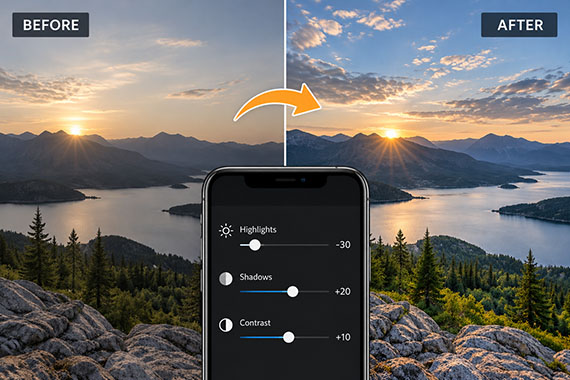
photo editing sliders

Your Photo Is Just Numbers

At its core, a digital photo is a grid of pixels, and each pixel contains numerical values that represent brightness and color. In a RAW file, those values are captured directly from the sensor with minimal processing. In a JPEG, many of those values have already been altered, compressed, and discarded.

When you move a slider, you’re not “adding light” or “boosting color.” You’re instructing the software to remap pixel values—essentially telling it how to reinterpret the numbers that already exist.

Global Sliders: Re-Mapping the Entire Image

Sliders like Exposure, Contrast, Whites, and Blacks are global adjustments. They affect every pixel in the image, just in different ways.

Exposure

Exposure shifts pixel brightness values up or down across the tonal range. Brighter pixels get brighter, darker pixels get darker—but this also stretches the data. Push it too far, and you can force pixels beyond the available range, causing clipping or noise amplification.

Contrast

Contrast doesn’t simply “add punch.” It redistributes pixel values—pushing bright tones brighter and dark tones darker—while compressing midtones. This redistribution is why excessive contrast can cause loss of subtle detail.

Highlights and Shadows

These sliders work on specific ranges of pixel values, not fixed parts of the image. Highlights target the brighter portion of the histogram, while Shadows focus on darker values. When you lift shadows, you’re often stretching weak signal data—this is why noise becomes more visible.

Curves: Precision Data Control

The tone curve is one of the most powerful—and misunderstood—tools in editing.

Rather than applying a uniform adjustment, curves allow you to remap specific input values to new output values. Every point on the curve defines how a range of pixel values is transformed.

A subtle curve adjustment can preserve highlight detail better than aggressive slider moves because it targets fewer pixels and avoids unnecessary redistribution.

Color Sliders: Channel-Level Changes

Color adjustments operate on individual color channels—typically Red, Green, and Blue.

  • Saturation increases the distance between color values and neutral gray, often affecting all colors equally.
  • Vibrance is more selective, targeting lower-saturation colors first and protecting skin tones.
  • HSL sliders modify hue, saturation, or luminance within specific color ranges, which can introduce artifacts if pushed too far.

When color channels are stretched unevenly, you may see banding, color shifts, or unnatural transitions—especially in skies and gradients.

Local Adjustments: Smaller Area, Bigger Risk

Masks and local adjustments feel safer because they affect only part of the image—but they can actually degrade quality faster.

Why? Because localized edits often involve stronger adjustments over fewer pixels, increasing the chance of visible transitions, halos, or noise. Edge detection and AI masking help, but they’re still approximations built on contrast and color differences.

Non-Destructive Doesn’t Mean Unlimited

Most modern editors are labeled “non-destructive,” meaning your original file isn’t overwritten. But that doesn’t mean there are no limits within the file.

  • Extreme edits can push data beyond recoverable ranges (such as clipping).
  • Re-editing exported JPEGs compounds compression loss.
  • Some operations permanently discard information during export.

Think of non-destructive editing as reversible instructions, not infinite image quality.

Why Editing Order Matters

Because each slider modifies data that other sliders depend on, order matters more than many photographers realize. Large global changes early in your workflow can limit how much flexibility you have later.

In general:

  • Adjust white balance and exposure first
  • Shape tones before adding contrast or clarity
  • Apply sharpening and noise reduction last

This minimizes unnecessary data stretching and preserves more usable information throughout the edit.

Editing With Intent, Not Guesswork

Once you understand that sliders are mathematical transformations—not magic—you start editing differently. You make fewer extreme adjustments, rely more on targeted corrections, and recognize when a photo is running out of usable data.

The best editors aren’t the ones who know every slider—they’re the ones who know when to stop.

For Further Training:

The New Year Sale on the Photo Editing Cheat Sheets is wrapping up soon, making this a great time to bring clarity to your editing workflow. If editing often feels scattered or uncertain, these cheat sheets provide a clear, repeatable process for tackling exposure, color, masking, retouching, and finishing touches in the right order.

Paired with time-saving keyboard shortcuts, they help you edit faster, stay consistent, and know when an image is truly finished.

Deal ending soon: The Photo Editing Cheat Sheets 🎉 New Year Sale


from PictureCorrect https://ift.tt/HURt1WV
via IFTTT