


If you’ve ever taken a night photo on your phone and thought, “How did it make this look so bright?” — it’s not just a longer exposure.
Modern smartphone Night Mode is building your photo from multiple images, using software to enhance detail, reduce noise, and brighten the scene in ways a single shot can’t.
Related: only a little while left for the Smartphone Photo Guide  March Reset Sale
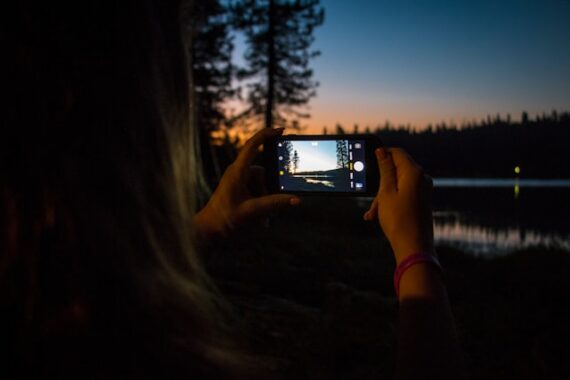
Photo captured by Mike Bowman
It’s Not One Photo — It’s Many
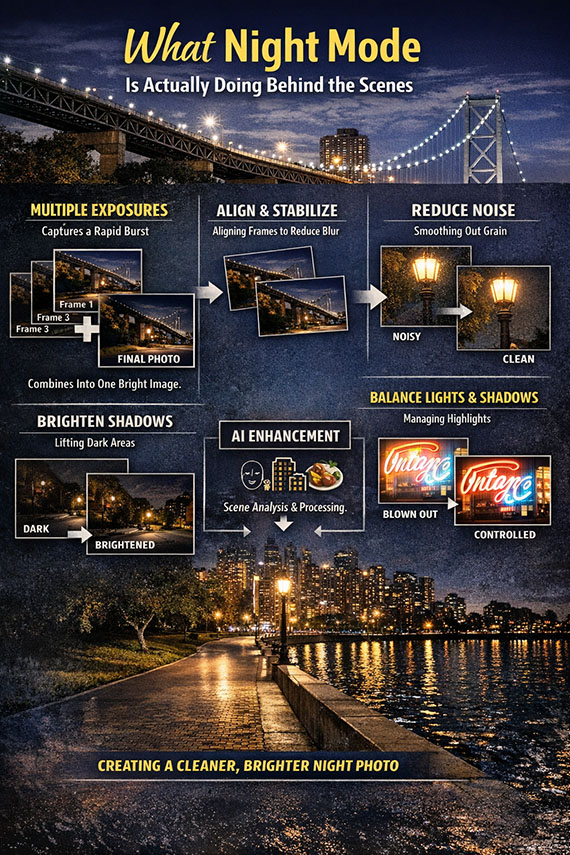
When you tap the shutter in low light, your phone usually captures a rapid burst of images at different exposures.
It then combines them into a single final photo, pulling the best detail from each frame.
This is how your phone “collects” more light than its tiny sensor normally could.
It Aligns and Stabilizes Everything
Because those frames aren’t perfectly identical (your hands move, the scene shifts), your phone works to align them precisely.
If this step works well, you get a sharp image.
If it doesn’t, you’ll see:
- ghosting
- blur
- smeared details
That’s why Night Mode often asks you to hold still for a moment.
It Reduces Noise (Sometimes Too Much)
Low light creates grainy, noisy images. Night Mode compares multiple frames and removes what it thinks is noise.
The result:
- cleaner shadows
- smoother skies
- more visible detail
But sometimes it goes too far, creating that soft, “waxy” look in textures and skin.
It Brightens the Scene More Than Reality
One of the biggest surprises with Night Mode:
It often makes scenes look much brighter than they actually were.
Dark streets, dim interiors, and night skies are often lifted significantly so the image looks clear and usable.
That’s helpful—but it can also remove the natural mood of the scene.
It Balances Highlights and Shadows
Night scenes are full of contrast: bright lights and deep shadows.
Night Mode blends exposures to try to keep both:
- readable highlights (like signs and lamps)
- visible shadow detail
It doesn’t always succeed, but it’s far better than a single exposure.
It May Be Using AI to Interpret the Scene
Your phone may also recognize what you’re shooting—faces, buildings, food—and adjust things like:
- color
- sharpness
- contrast
So the final image isn’t just captured…
It’s interpreted.
Why Night Mode Sometimes Fails
Night Mode works best when things are still.
It struggles with:
- moving people
- pets
- action
- low-light motion
Because it’s combining multiple frames, movement can cause blur or ghosting.
In those cases, regular photo mode can actually look better.
The Bottom Line
Night Mode isn’t magic—it’s computational photography.
Your phone is:
- capturing multiple exposures
- aligning them
- reducing noise
- brightening shadows
- balancing highlights
- building a final image from all of it
That’s why night photos today can look so good—and sometimes a little unrealistic.
Want to Take Even More Control?
Night Mode is powerful—but it’s still automatic.
If you want to go beyond what your phone decides for you and start getting consistently better results in any lighting, it helps to understand what’s really happening and how to control it.
The Smartphone Photography Guide (currently 78% off for a March Reset Sale) walks through exactly that—showing you how to:
- unlock hidden camera features on iPhone and Android
- control exposure, focus, and light intentionally
- shoot sharper, cleaner low-light photos
- capture images that look the way you want—not just what your phone decides

If you’re ready to move beyond “point and hope,” it’s a great next step.
Deal ending soon: Smartphone Photography Guide March Reset Sale
from PictureCorrect https://ift.tt/fniU2LW
via IFTTT


0 kommenttia:
Lähetä kommentti