lauantai 24. helmikuuta 2018

PictureCorrect.com: Depth of Field: A Major Player in Creative Control

When you hear the phrase Depth of Field (also called DOF) you may wonder why you should care as long as your pictures are in focus. Well since DOF is generally referred to as the range of a pictures over all sharpness; and most people are instinctively drawn to the sharpest part of the picture first, I would say that it is indeed a major player in the game of creative control.

depth of field

Photo by Julien Sanine

Most articles or books you will read on this subject immediately jump into talking about f-stops. These are numbers like f-1.4 to say f-22 that represent how much light the aperture is letting into the camera. Although I will explain that more in detail in a few minutes, it is not where I want to start.

3 basic things that affect DOF:

  1. the lens aperture (f-stops)
  2. the lens focal length (the size like: 35mm vs. 200mm)
  3. the subject difference (how far it is from the camera)

Keep in mind that most digital cameras do not have f-stops as per say. In fact if you have a straight point and shoot camera with a set lens, it may feel like you have no control at all. Although it does take a little more effort there are still things you can do to enhance your Depth of Field experience.

Both the point and shoot and even many of the more advance digital cameras are based on a false premise. They assume that all people want all their pictures, all the way in focus, all the time. “Now wait a minute”, you may be saying to yourself. “Of course I want my pictures in focus, don’t I?”

When we say in focus, we are not talking about the results of a 110 year old lady who can not hold the camera steady. Depending on where you focus in any given picture; so much in front of the subject and so much behind the subject will also be in focus. Generally, more will be in focus behind the subject than in front of it. Keep this in mind when you are choosing your focus point; you may want to focus about 1/3 of the way into your scenic shot as opposed to automatically focusing ½ the way in to the scene.
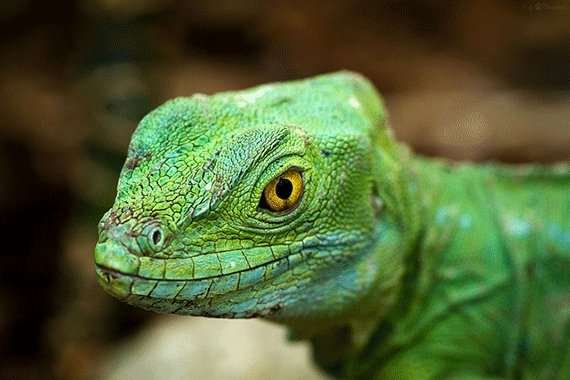
when to use depth of field technique in photography

Photo by Cloudtail the Snow Leopard; ISO 400, f/5.0, 1/100-second exposure.

There are several really good reasons for wanting to choose a narrow DOF verses a wide DOF. Remember Wide DOF means everything in focus all the time. For those who are not quote “into” photography then this mode will indeed satisfy their needs 90% of the time. But for the rest of us; here are some examples of when you may NOT want to shoot that way.

A) Portraits: focus on the person and blur the background. This is helpful when there are distracting elements behind the subject.

B) At the zoo: focus on only one animal. The idea here is to obscure the fact that you actually took the picture in the zoo. You want to make it look like you took this animal in its own natural environment.

C) Flower shots: focus on one flower or better yet even just part of a flower and let the others around it become like a painted background.
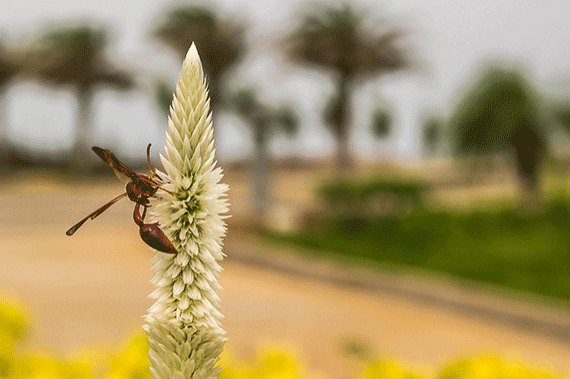
using depth of field technique in photos

Photo by Thangaraj Kumaravel; ISO 200, f/8.0, 1/640-second exposure.

D) Sporting Events: focus in on the one who crossed the line first, or jumped the highest. Separate the leader from the pack by using creative DOF.

Back to the basic problem, how exactly do we control Depth of Field? Shooting an object that is 10 feet from the camera will have a much smaller DOF range than shooting an object 100 feet away. So, move in closer!!

If your camera has a zoom lens ( say 35mm -200mm) the smaller the size, the wider depth of field. Most set lens are in the range of 28mm – 38mm, so there is less to adjust, less to think about, and unfortunately less control. However, even without getting into the f-stops; if you photograph someone with using the 35mm end of the scale a lot will be in focus, but if you do the same using the 200mm length of your lens much less of the total image will in sharp focus.

If you are into doing close-up photography (flowers, insects, etc) the close-focus or macro mode of your camera will already give you a fairly narrow amount of depth of field. But you can push that even further by considering the use of filters. Most cameras, will now accept filters. But even if yours does not (set lens again); you can actually hold the filter in place and shoot. Close up filters allow you to shoot much closer than the lens will by itself. They also usually narrow the depth of field and require a little more light.
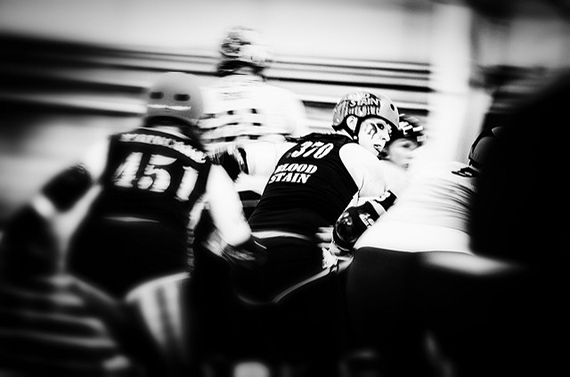
learn about depth of field in photography

Photo by Pat Kight; ISO 1600, f/4.0, 1/30-second exposure.

Many of today’s cameras have more than one auto mode. In a fully automatic camera you have not gained much if any control, but if you have the option for Aperture priority or Shutter Priority you are back in the driver’s seat. Basically put: Aperture Priority means that you control the aperture (or f-stop) and the camera picks the right shutter speed to get a proper exposure. Conversely, Shutter Priority does the exact opposite, you control the speed and it will pick the correct aperture for the given light conditions.

Now we will mention the world of f-stops. The words aperture and f-stop are referring to the same thing. I have absolutely no idea why we don’t call them A-stops, but just so I don’t confuse anybody, I will call them f-stops. The f-stop controls how much light enters the camera. Many books and magazine confuse people by referring to how big the opening is and how small the depth of field is. In my world, I like to keep things as simple as possible.

A small number (like f-1.4) means only a small amount will be in sharp focus. A large number (like f-22) means a large amount will be in sharp focus. To me, that is a whole lot easier to remember than the way many people explain it. Small number = small amount in focus, and large number = large amount.

But wait, you’re saying to yourself, “I don’t even have an aperture mode.” Maybe you do, and don’t realize it. If you’re camera has little pictures or icons on it like, many cameras do, you may have more control than you realized. The picture of the small head means portrait mode. (IE the subject will be in sharp focus but the background will not) The picture of the little mountain means landscape mode. (IE most of the picture will be in sharp focus from front to back.)

how to use depth of field in photos

Photo by Merlijn Hoek; ISO 160, f/2.8, 1/80-second exposure.

Remembering that most people are attracted to the thing that is in the sharpest focus, it becomes very hard (visually) to be attracted if the entire picture is in complete focus. There is nothing specific to draw the viewers’ attention. By using the creative possibilities that depth of field offers; no matter what kind of camera you have, your images will be much more powerful and interesting.

About the Author:
Award winning writer / photographer Tedric Garrison has 30 years experience in photography (better-photo-tips.blogspot.com). As a Graphic Art Major, he has a unique perspective. His photo eBook “Your Creative Edge” proves creativity can be taught. Today, he shares his wealth of knowledge with the world through his website.

For Further Training on Composition, Deal Ending Soon:

So many new photographers think the key to great images is going to beautiful places and pressing the shutter button. But how you compose a shot is actually one of the most important parts of the equation. This in-depth composition guide is designed to give you a complete understanding of fundamentals, taught through 81 easy-to-follow pages of training, illustrations, and assignments. We were able to negotiate a 75% discount which ends soon.

understanding composition

Understanding Composition

When you create a photograph, you’re forcing a three-dimensional view onto a two-dimensional medium. This befuddles the brain- It WANTS to see in three-dimensions! Basically, what’s happening is that composition fools the brain into seeing what it wants to see. Composition leads the brain through the photograph. It IS the road map of your images. This is why composition is crucial to incredible photography.

Deal found here: The Understanding Composition eBook at 75% Off


Go to full article: Depth of Field: A Major Player in Creative Control

What are your thoughts on this article? Join the discussion on Facebook

PictureCorrect subscribers can also learn more today with our #1 bestseller: The Photography Tutorial eBook

The post Depth of Field: A Major Player in Creative Control appeared first on PictureCorrect.


from PictureCorrect http://ift.tt/2BOZTSk
via IFTTT

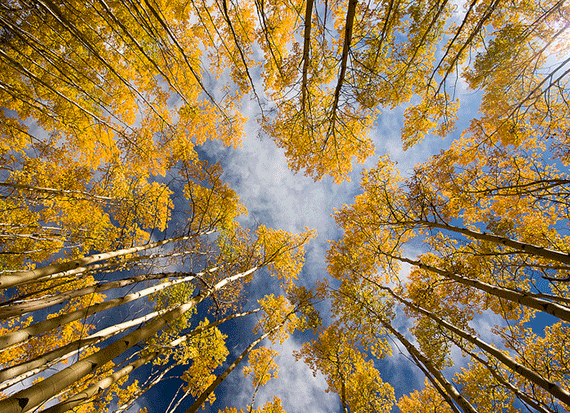
NASA Astronomy Picture of the Day: Facing NGC 6946


via APOD http://ift.tt/2sKUlW4

perjantai 23. helmikuuta 2018

PictureCorrect.com: Finding Fresh Angles to Shoot From in Photography

How on earth do you find a fresh angle to shoot from when they’ve all been taken? That’s not what I mean. I do not mean discovering a new angle but using new angles you don’t usually shoot from. By changing your angles you’ll add a whole new dimension to your photography.

fresh angles for better photos

Photo by Sathish J; ISO 400, f/14.0, 1/100-second exposure.

The question I get asked as a photography teacher is how do the pros do it? Why are their images so different from mine? Simple, one of the techniques they use is angles or viewpoints. Implement them in your images and you are one step nearer to a great image. The key here is varying the angles and trying to think outside the box.

1. Don’t stand in front of your subject

Everyone shoots an image from directly in front of their subjects or objects. They line everyone up, tell them to say cheese, and push the shutter button. Then they wonder later why their images all look the same. The reason they all look the same is because most people shoot from eye level, which, on average, is about 1.5 meters or 5 feet above the ground. Boring because everyone does it. So think before you shoot, and use your feet to move around.

2. Use your stomach not your head

How low can you go is the chant when attempting to belly dance under a balancing pole. Get down low on the ground and shoot from that angle looking up at the subject. Immediately the perspective has changed and the image is dramatically different. How many people do you ever see in a tourist spot lying on their stomachs getting a shot. No need to answer. I have never seen one. If you are prepared to forgo embarrassment, then you are the one who will get the unique shot. Logical, isn’t it? But how many people do it?

3. Vary your height

This is just a little less embarrassing than point two. Using your knees, sitting down, or resting on your haunches all help you to vary your height. More people do this, so it’s not as unique as using your stomach. But, you will still get great images. Do this exercise: Choose a subject and then shoot it from 3 meters on your stomach, sitting on your bum, kneeling, crouching, and standing straight up. Then move in a few feet or a meter and do it all again. Do this until your are as near as you can get. Then view all of your images and see how many of them are better than a normal standing image.

4. Out cold

This is a variation of point two. Try lying flat on your back. Try it. It will give you a totally new perspective on life and your photography. Again you never see photographers lying on their backs in public places. Why? Same old reasons: embarrassment and shyness. But, the one who tries this gets the better shot. Ever seen those shots looking up into tall trees? How do you think they were taken? Right! Use this angle more often, and you’ll find that more than half your shots will improve dramatically. You can even try this for family shots to get that unique extra photo that nobody else has.

5. Bird’s eye view

Now don’t get all dangerous and attempt to climb too high and damage yourself and your gear. Just get a vantage point that is above the normal eye level images that everyone shoots. Get a different perspective. It may be great to get the odd high shot but really all you want to do is get a higher, different viewpoint. Again, something that is unique and not the norm.

finding creative angles for better pictures

Photo by Tambako The Jaguar; ISO 200, f/13.0, 1/1000-second exposure.

6. On the move

One of the best pieces of advice I can give you is to use your feet. Forget about zooms and move around. Walk around your subject or the object you’re shooting and find a different viewpoint or angle. Vary your height, lie on your back, get higher or even lower but find something that is different. At the same time though, use your head to visualize the final image and work toward that.

These are just a few tips for shooting more creative images from different angles. I think that this is one the best tips you can use as you learn  photography. Don’t be afraid to experiment or get embarrassed. Keep practicing, and before you know it you will be shooting like a pro.

About the Author:
Wayne Turner has been teaching photography for 25 years and has written three books on photography. He has produced 21 Steps to Perfect Photos; a program of learner-based training using outcomes based education.


Go to full article: Finding Fresh Angles to Shoot From in Photography

What are your thoughts on this article? Join the discussion on Facebook

PictureCorrect subscribers can also learn more today with our #1 bestseller: The Photography Tutorial eBook

The post Finding Fresh Angles to Shoot From in Photography appeared first on PictureCorrect.


from PictureCorrect http://ift.tt/2osw2qE
via IFTTT

PictureCorrect.com: Interesting Photo of the Day: Sunrise in Rangarvallasysla, Iceland

Nothing beats relaxation time while watching and listening to a cascading waterfall. The feeling is hypnotic, especially in the presence of beautiful terrain and a complementary sunrise. This image successfully captures that feeling, giving the viewer a sneak peek of the captivating landscapes strewn throughout Iceland:

sunlight photography waterfall landscape

“Behind the Waterfall: Seljalandsfoss, Iceland” by Adrian Chandler (Via Reddit. Click image to see full size.)

This waterfall named Seljalandsfoss, located in the Rangarvallasysla region of Iceland, is a very popular destination for photographers and travelers. Photographer Adrian Chandler captured this photo of the waterfall at sunrise from behind the fall itself. This perspective offers a breathtaking view of Iceland’s famous natural beauty. Many viewers have remarked that when you’re planning a trip to Iceland, this destination should definitely be at the top of your list.


Go to full article: Interesting Photo of the Day: Sunrise in Rangarvallasysla, Iceland

What are your thoughts on this article? Join the discussion on Facebook

PictureCorrect subscribers can also learn more today with our #1 bestseller: The Photography Tutorial eBook

The post Interesting Photo of the Day: Sunrise in Rangarvallasysla, Iceland appeared first on PictureCorrect.


from PictureCorrect http://ift.tt/2sTqUBA
via IFTTT

PictureCorrect.com: 3 Tips on How to Capture Moon Pictures

In the wake of January’s Super Blue Blood Moon Eclipse, you might be wondering how so many photographers captured perfectly stunning photos of the rare astronomical event. Shooting the moon can be frustrating since it’s so deceptively difficult. Even though you clearly see a big, bright, and beautiful moon hanging in the sky, your camera seems to only see an amorphous white blob surrounded by darker blobs. However, with these three tips from David Bergman, your moon photographs can go from mediocre to positively dazzling:

1. Create an Interesting Composition

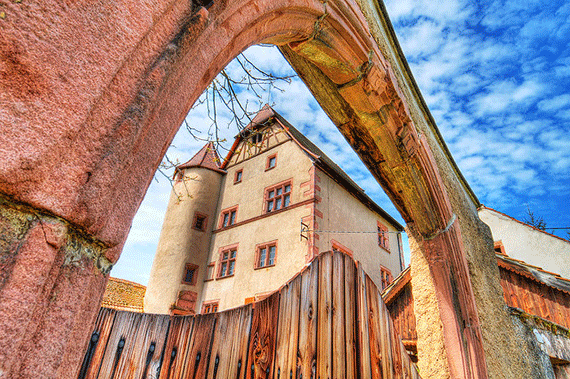
One way to take your lunar photography to the next level is by creating an interesting composition. In general, you should use something in your visual field to frame the moon. This will give the moon a sense of place in your frame and distinguish it from thousands of other photographs.

moon photograph composition

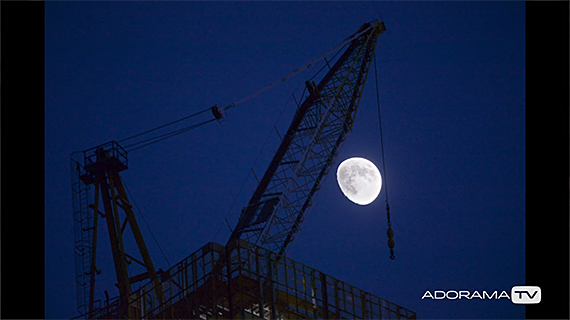
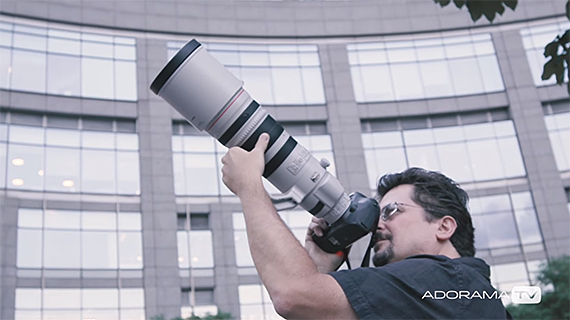
However, if you’re dead set on photographing the moon by itself, you should use the longest lens you have and shoot when there’s a bit of light left in the sky. By using your longest lens, you’ll eliminate a lot of the dark space around the moon, so you can more easily center it in your photograph. Shooting at dusk also helps enhance a photo of only the moon by adding some color to it.

2. Shoot When the Moon Isn’t Full

When the moon is full, the sun is directly reflecting onto its surface, which can obscure details. Therefore, you should aim to shoot when the moon isn’t full in order to allow the side light from the sun to bring out craters and other surface features on the moon. This goes double when you’re shooting tight; you want the only object in your photograph to be detailed and interesting. However, you can (and should) break this rule if there’s a picture-worthy astronomical event occurring during the full moon.

long lens photograph moon

3. Use Manual Exposure and the Looney 11 Rule

The most important step in snapping that perfect picture of the moon is correctly adjusting your exposure settings to ensure your camera captures just the right amount of light. The stark contrast between the brightness of the moon and darkness of the sky confuses automatic exposure settings, which is why it’s nearly impossible to snap a quality picture of the moon with just a smartphone. You should, therefore, shoot on manual exposure and use the Looney 11 Rule to adjust your exposure settings.

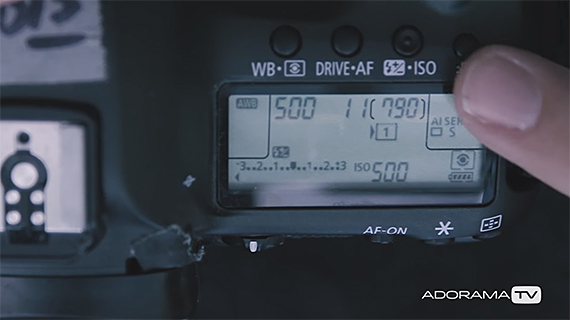
According to the Looney 11 Rule, you should set your aperture at f/11 and then match your shutter speed to your ISO setting. These settings may not always exactly match what you need, but unless you’ve invested in a light meter, they’ll give you a solid starting point from which you can adjust as needed.

moon photography manual settings

With Bergman’s tips, your moon photographs can go from bland and blurry to gorgeous and crystal clear, so you’ll be more than ready for the next blue moon or lunar eclipse. Do you have any tips, tricks, or gear recommendations for shooting the moon? Share your ideas and experiences below!


Go to full article: 3 Tips on How to Capture Moon Pictures

What are your thoughts on this article? Join the discussion on Facebook

PictureCorrect subscribers can also learn more today with our #1 bestseller: The Photography Tutorial eBook

The post 3 Tips on How to Capture Moon Pictures appeared first on PictureCorrect.


from PictureCorrect http://ift.tt/2FrGRkK
via IFTTT

torstai 22. helmikuuta 2018

PictureCorrect.com: Interesting Photo of the Day: A Deer at the Olympic Peninsula

Deer are fascinating animals to photograph because of their big, staring eyes and ability to dart away quicker than you can close the shutter. A landscape shot is often enhanced by the presence of one or more deer to show the remote location or scale. They also have a knack for staring into the camera since their incredible senses can detect the photographer from a long distance away. It can seem like they’re posing for your picture, but be prepared for them to lunge away at any moment:

nature animal photography mountain

“A Deer at the Olympic Peninsula” by Steven Luu (Via Imgur. Click image to see full size.)

Photographer Steven Luu captured this image at the Hurricane Ridge visitor center in Washington. The stunning detail shows individual hairs on the deer and the contours of its nose when you zoom in. Set against the majestic backdrop of Pacific Northwest mountains, this scene appears dreamlike with the deer ‘floating’ amongst the mountain range. Excellent shot, Steven!


Go to full article: Interesting Photo of the Day: A Deer at the Olympic Peninsula

What are your thoughts on this article? Join the discussion on Facebook

PictureCorrect subscribers can also learn more today with our #1 bestseller: The Photography Tutorial eBook

The post Interesting Photo of the Day: A Deer at the Olympic Peninsula appeared first on PictureCorrect.


from PictureCorrect http://ift.tt/2oqMN5G
via IFTTT

PictureCorrect.com: Easy Color Grading with LUTs in Luminar

One of the most useful features in Luminar 2018 is the LUT Mapping filter. It may seem innocuous, but it is a potent tool for quickly adding a “look” to your images without having to do a lot of work. By using the LUT mapping filter, you can achieve a variety of effects, from simply adding impact to your images to creating vintage film looks, to cinematic styles and more. You can accomplish all of this through the use of LUT files, of which there are hundreds available to download on the internet.

What are LUTs?

If you’re unfamiliar with the term, you may be wondering just what a LUT file is? The word “LUT” stands for “Look Up Table”. A LUT is a small file which can be used in software such as Luminar to alter the color and appearance of an image. As the name implies, a LUT consists of a table of color and brightness source and destination values.

In other words, the LUT file tells your software to make a particular shade of light blue, for example, become a shade of purple and so on. In some respects, they are similar to traditional presets or color profiles but have a much wider range of usage. In fact, LUTS can have the same effect as combining multiple and complex color adjustments into one single file. You can then apply this data to an image, and it will change the color and tone curve of the image based on the values in the LUT file.

LUTs in Luminar

So what does this mean in practical terms for Luminar users? You can use LUTs in Luminar for a variety of purposes when it comes to color grading. You can also combine multiple LUTs using either masks, layers or even blend modes. You can use them to add a color profile to RAW files or to create a stylized effect. To better explain this, here are some examples.

Example 1: Using a LUT as a Color Profile with a RAW File

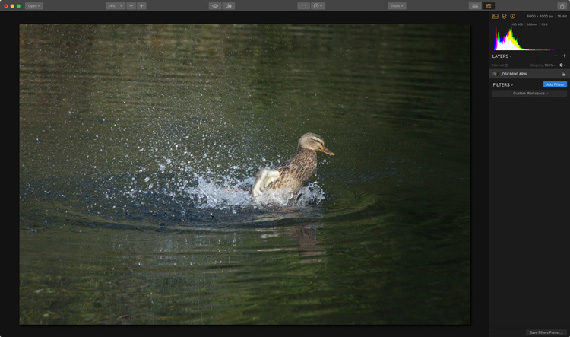
When you load a RAW file into Luminar, it may look a little flat at first. This is because it won’t have the same tone curve and color profile that would be applied to the image in the camera if you had shot JPEG. You could address this by using the various tools inside Luminar, such as adding a curves filter, tweaking the contrast and saturation, and so on. Or, you can use a LUT.

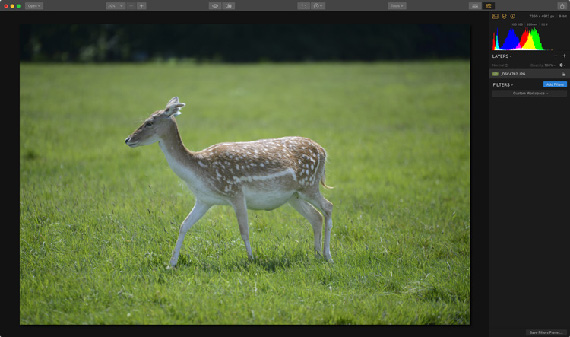
flat raw file before lut

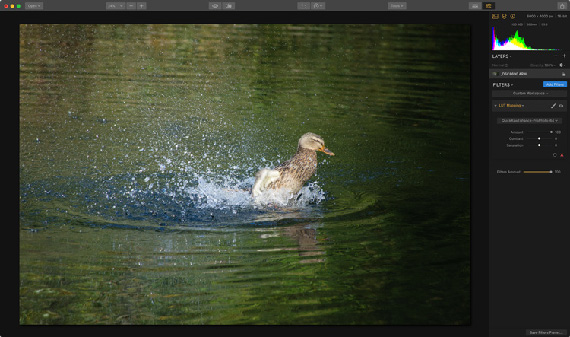
For this example, we have loaded a RAW file into Luminar. You can see from the screenshot above that the image is looking a little flat and lacking in contrast. We can fix this by using a LUT. Just add a LUT mapping filter from the Filters list, and then load the LUT file you want to use. In this case, we’re using a custom LUT file created for this purpose in Photoshop. This was designed to add a little contrast and color. Here is the same image with nothing else applied to it other than a LUT file.

luminar lut duck

Example 2: Creating a Vintage Film Effect

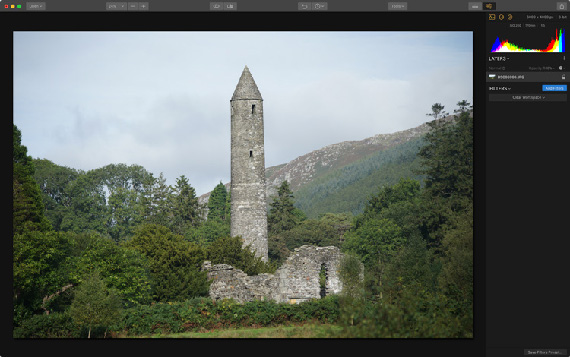
In this second example, we will work with a JPEG file that is straight out of a camera. In this case, we want to create a stylized look, which will be inspired by the “vintage film” style. To achieve this, we will look at combining the LUT Mapping filter with some other adjustments to create a faded film effect.

First, here’s the original image before we do any tweaking:

unedited image lur

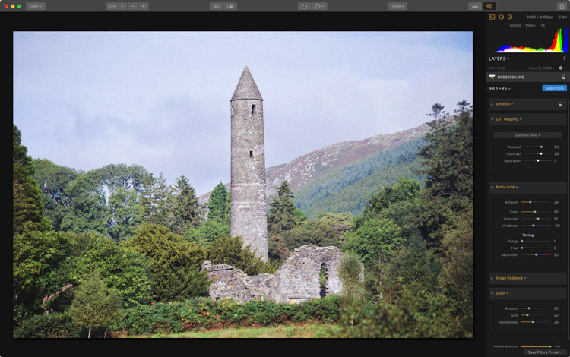
The first thing we will do is add a LUT. Applied at 100 percent, the effect is too strong, so we will reduce it by dropping the amount slider down to 65 percent. A tweak to the contrast will also help.

To further create the film look, we will add a few more filters. In order to enhance the faded film style, we will add the “Matte Look” filter. Then, to add some film like softness, add an Image Radiance filter, and increase the amount slightly. Finally, you can add the Grain filter to add that all-important film grain.

lut mapping film effect

Example 3: Creating a Black and White Look with LUTs

One of the things that you can use LUTs for is creating a black and white effect. While LUTs are often associated with stylized color effects, because they can control brightness levels as well as what colors will create what shade of grey, you can use them to produce a range of black and white styles. With a suitable LUT, you can create some really nice Monochrome images. The LUT, of course, should be a black and white LUT to begin with.

Here is an image, before adding any effects.

image before editing in luminar

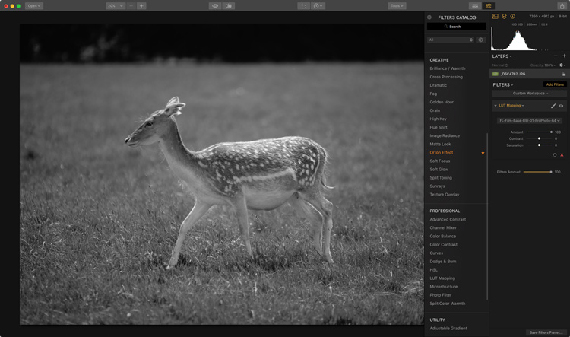
To create a rich black and white image, we don’t need to do anything more than adding a LUT designed specifically for black and white.

black and white luminar

The result above is purely from adding a LUT file. You could enhance this more by adding some additional filters, such as an Image Radiance filter for glow, and of course grain, but even on its own it creates a nice image.

These are just a very small few examples of the types of effect that you can achieve by using LUTs. In this article, I’ve just scratched the surface. The variety of looks that you can create is only limited by the variety of LUT files that you have access to. Of course, the important thing is to use your own creativity and to use LUTs as part of your overall artistic vision. They can provide a great starting point though, and used creatively they can be a valuable part of your workflow in Luminar.

To celebrate the company’s new brand, Skylum, they are currently offering Luminar at a discount with bonuses which end soon:

Luminar 2018 February Offer:

skylum photography software

Skylum Photo Editing Sofware

Pricing:

  • Current users of Luminar may upgrade for $49 ($39 using coupon code picturecorrect)
  • New users can purchase Luminar 2018 for $69 ($59 using coupon code picturecorrect)
  • A collection of bonuses will also be included with every purchase.

Bonuses:

  • 2 E-books from Andrew Gibson: “The Creative Photographer” and “Mastering Exposure”
  • Ultra Violet LUTs by Richard Harrington
  • Ultra Violet Preset Pack by Richard Harrington
  • Futuristic Preset Pack

Deal found here: Luminar February Offer


Go to full article: Easy Color Grading with LUTs in Luminar

What are your thoughts on this article? Join the discussion on Facebook

PictureCorrect subscribers can also learn more today with our #1 bestseller: The Photography Tutorial eBook

The post Easy Color Grading with LUTs in Luminar appeared first on PictureCorrect.


from PictureCorrect http://ift.tt/2FoPZXk
via IFTTT