


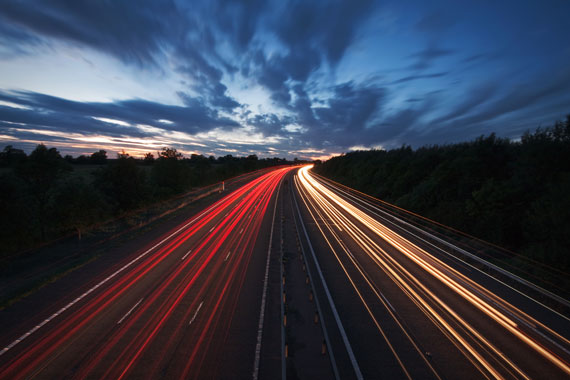
Capturing the dynamic motion of traffic streaks can transform an ordinary cityscape into a vibrant, energetic scene. These streaks, created by the movement of vehicles’ lights during long exposures, can add a sense of motion and drama to your photographs. Here’s a step-by-step guide on how to photograph traffic streaks effectively.
Reminder: only a little while left for the Long Exposure Guide  Autumn Afterglow Sale
1. Equipment You’ll Need
- Camera: A DSLR or mirrorless camera with manual mode capability.
- Tripod: Essential for stabilizing your camera during long exposures.
- Wide-angle lens: Ideal for capturing expansive cityscapes.
- Remote shutter release: To avoid camera shake when pressing the shutter.
- Neutral Density (ND) filter: Useful for longer exposures in brighter conditions.
2. Choosing the Right Location
- Overpasses and Bridges: These provide an elevated perspective, allowing you to capture the flow of traffic below.
- Busy Streets: Opt for streets with a consistent flow of traffic to ensure continuous light trails.
- Landmarks: Incorporating recognizable landmarks can add context and interest to your shot.
3. Camera Settings
- Mode: Switch to Manual mode (M) for complete control.
- Aperture: Use a small aperture (f/8 to f/16) for a deeper depth of field.
- Shutter Speed: Start with a 10-30 second exposure and adjust based on the traffic speed and desired streak length.
- ISO: Keep it low (ISO 100 or 200) to reduce noise.
- Focus: Use manual focus. Autofocus might struggle in low light. Focus on a point where the traffic will be, or use a distant light or landmark.
4. Shooting Techniques
- Time of Day: Blue hour, the period just after sunset or before sunrise, is ideal. The ambient light balances with the traffic lights, creating a harmonious blend.
- Composition: Use the rule of thirds, leading lines, and other compositional techniques to guide the viewer’s eye.
- Multiple Exposures: Take several shots and blend them in post-processing for denser light trails or to remove unwanted elements.
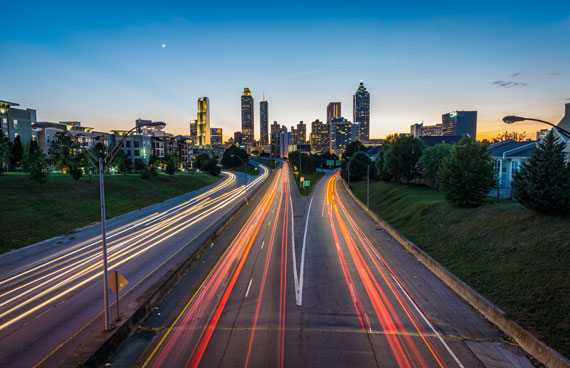
Photo captured by Joey Kyber
5. Post-Processing Tips
- Blending: Use software like Photoshop to blend multiple exposures for a composite image with richer light trails.
- Noise Reduction: Long exposures can introduce noise. Use noise reduction tools to clean up the image.
- Contrast and Saturation: Boosting these can make the light trails pop and give the image a more dynamic feel.
- Sharpening: Apply subtle sharpening to enhance details without introducing artifacts.
6. Challenges and Solutions
- Interrupted Light Trails: If a vehicle stops or changes lanes, it can break the light trail. Solution: Use multiple exposures and blend them for continuous trails.
- Overexposed Highlights: Bright areas, like streetlights, can become overexposed. Solution: Use an ND filter or blend exposures in post-processing.
- Camera Shake: Even slight movements can blur the image. Solution: Use a sturdy tripod and a remote shutter release.
7. Safety First
Always prioritize safety. If you’re on an overpass, bridge, or busy street, be aware of your surroundings. Avoid obstructing traffic or putting yourself in a dangerous position.
Photographing traffic streaks can be a rewarding experience, turning the mundane into the extraordinary. With the right equipment, settings, and techniques, you can capture the pulsating energy of city life in a single frame. So, venture out during the blue hour, set up your gear, and let the city’s lights paint your canvas.
For Further Training:
Some of the most breathtaking photographs reveal something the human eye can never see: the movement of time. Our new Long Exposure Photography Guide & Cheat Sheets (currently 70% off today for our Autumn Afterglow Sale) walks you through everything from choosing ND filters and camera settings to photographing waterfalls, oceans, clouds, and nighttime scenes.

You’ll also learn how to avoid common mistakes and edit your long exposure photographs for professional-looking results.
Deal ending soon: The Long Exposure Photography Guide at 70% Off
from PictureCorrect https://ift.tt/jbrQxgy
via IFTTT


0 kommenttia:
Lähetä kommentti