maanantai 2. helmikuuta 2026

PictureCorrect.com: Training Your Eye with Winter Texture Photography

One of the fastest ways to improve your photography isn’t learning a new camera feature—it’s learning how to see. This exercise removes obvious subjects entirely and forces your attention onto texture, light, and composition. By stripping away recognizable objects, you train your eye to notice visual qualities that often get overlooked when you’re focused on “what” you’re photographing instead of how it looks.

Texture photography is especially effective during winter months, when surfaces like ice, frost, and worn materials naturally reveal detail and contrast. But the skill you build here applies year-round, across every genre of photography.

Relevant note: only a little while left for the Photography Exercises ❄ Winter Sale

ice texture

The Goal of the Exercise

The purpose of this exercise is simple: train your eye for detail. You’re learning to recognize strong compositions based on texture, tone, pattern, and light—without relying on a clear subject to carry the image.

When you remove obvious context, every decision matters more:

  • Where light falls
  • How shadows create depth
  • How lines and patterns guide the eye

These are the same skills that elevate landscapes, portraits, and street photography—but here, they’re isolated and strengthened.

What to Photograph

Look for surfaces that naturally reveal texture when viewed up close. Good starting points include:

  • Ice or melting frost
  • Road salt on pavement
  • Cracked sidewalks or asphalt
  • Wool, knit fabric, or heavy coats
  • Tree bark, weathered wood, or stone

These subjects are everywhere, but the key is how you photograph them—not what they are.

snow macro

How to Shoot It

Move in close. Very close.

Your goal is to make the surface itself the subject, removing any visual clues that explain what the viewer is looking at. Think abstract rather than documentary.

Rules to Follow

  • Fill the frame completely
    No empty space, no background context. Let texture dominate.
  • Avoid recognizable objects unless intentional
    If the viewer instantly knows what the object is, you’re probably too far away. If recognition happens only after a second look, you’re on the right track.

Pay attention to:

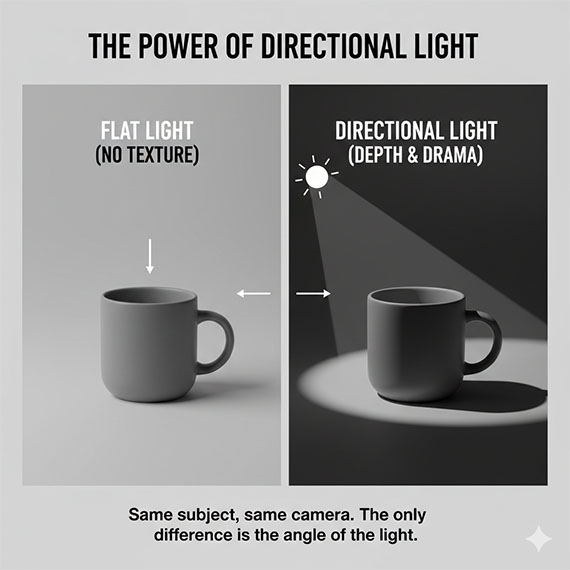
  • Direction of light (side light reveals texture best)
  • Micro-contrast between highlights and shadows
  • Repeating patterns or subtle irregularities

Camera and Lens Tips

You don’t need specialized gear for this exercise, but a few choices can help:

  • Use a macro lens if you have one, or the closest-focusing lens you own
  • Stop down slightly (around f/8–f/11) to retain texture depth
  • Use manual focus if autofocus struggles with low contrast
  • A tripod helps when working very close or in low light

Smartphone photographers can do this exercise just as effectively—use the phone’s closest lens and move slowly until texture snaps into clarity.

Why This Exercise Works

This exercise strengthens several core photography skills at once:

Macro and close-focus control
You learn how small changes in distance and angle dramatically affect detail.

Composition without obvious subjects
Without a clear focal point, balance, rhythm, and visual flow become essential.

Better photo editing later
When you learn to see subtle tonal differences in-camera, you naturally become more restrained and intentional in post-processing—avoiding over-sharpening, excessive clarity, or heavy-handed contrast.

frost

How to Review Your Results

After shooting, don’t ask, “What is this a photo of?”
Ask instead:

  • Does the texture feel tactile?
  • Is the frame visually balanced?
  • Does light enhance or flatten the surface?
  • Would this image still work in black and white?

The strongest images from this exercise often feel timeless and abstract—more about sensation than subject.

Final Thought

Texture photography teaches you to slow down and notice what’s right in front of you. When you return to more traditional subjects, you’ll find that your compositions are stronger, your use of light more deliberate, and your editing more subtle.

Seeing texture is seeing photography at its foundation.

If you want more exercises like this—clearly structured, easy to follow, and designed to build real shooting instincts—the Winter Sale on the Photography Exercises is wrapping up soon. It’s a practical way to keep improving, even when winter limits your time and motivation to shoot.

photographer exercises

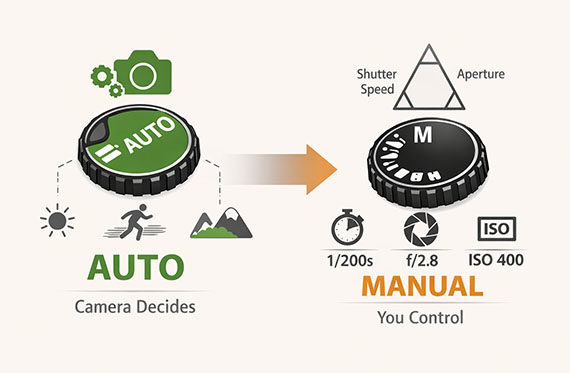
A practical way to build confidence for challenging shooting situations that often trip photographers up. Each exercise focuses on real-world scenarios—difficult light, motion, exposure decisions, and creative problem-solving—so you learn how to take control instead of relying on auto settings.

Deal ending soon: PictureCorrect Photography Exercises ❄ Winter Sale


from PictureCorrect https://ift.tt/GKC3M60
via IFTTT

sunnuntai 1. helmikuuta 2026

PictureCorrect.com: How to Nail Exposure for Portraits in the Snow

Snowy environments can produce some of the most striking portrait images—but they’re also one of the easiest ways to end up with dull, underexposed photos. If you’ve ever reviewed your images after a winter shoot and wondered why the snow looks gray and skin tones feel lifeless, the issue usually isn’t your camera or your settings. It’s your camera meter doing exactly what it was designed to do—just not what you want it to do.

Understanding how exposure meters behave in snow, and knowing when to override them, is the key to consistently strong winter portraits.

Related reminder: only a little while left for the Lighting Cheat Sheets ❄ Winter Sale

snow portrait

35mm, f/1.6, 1/8000s, ISO 1000; captured by Will McClintock

Why Snow Fools Your Camera’s Meter

Most camera meters are designed to expose scenes as a middle gray—roughly 18% gray. In average conditions, this works well. But snow-covered scenes are anything but average.

When your frame is dominated by bright white snow, your camera assumes the scene is too bright and tries to compensate by darkening the exposure. The result is predictable:

  • Snow turns dull gray
  • Shadows deepen unnecessarily
  • Skin tones lose brightness and life

The camera isn’t broken—it’s just trying to force a very bright scene into a neutral exposure. For portraits in the snow, that behavior works against you.

Using Exposure Compensation (The Simple Fix)

One of the easiest ways to correct this problem is by using exposure compensation.

In aperture priority or shutter priority modes, dial in +1 to +2 stops of exposure compensation as a starting point. The exact amount depends on:

  • How much of the frame is snow
  • Whether the light is sunny or overcast
  • The subject’s clothing and skin tone

A lightly snow-dusted background may only need +1 EV. A scene that’s nearly all white snow often benefits from closer to +2 EV.

The goal is simple: tell the camera that the brightness you’re seeing is intentional and should not be darkened.

Why Slightly Overexposing Skin Tones Matters

For portraits, skin tones matter more than the snow.

In winter scenes, underexposed skin tones are especially unforgiving. Cold light, reflective snow, and darker exposures combine to make faces look flat, gray, or muddy. Slightly brighter skin tones:

  • Look healthier and more natural
  • Preserve more usable detail
  • Are easier to fine-tune in post-processing

This doesn’t mean blowing highlights or losing texture. It means prioritizing exposure for the subject’s face, even if that pushes the snow close to the right side of the histogram.

A good rule of thumb:
If you’re choosing between perfect snow and good skin tones, choose the skin tones every time.

snow exposure

35mm, f/1.8, 1/2000s, ISO 800; captured by June Andrei George

Watch the Histogram, Not the LCD

Snow can make your camera’s rear screen misleading—especially outdoors in bright conditions. Instead of judging exposure by eye, rely on the histogram.

For well-exposed snow portraits:

  • Highlights should be close to the right edge, but not clipped
  • Skin tones should sit comfortably in the upper midtones
  • Avoid large gaps on the right side of the histogram (a sign of underexposure)

This approach helps you stay consistent even as lighting conditions change throughout a winter shoot.

Manual Mode: Helpful, Not Required

You don’t need to shoot in full manual mode to get good results in the snow—but it can help in consistent lighting.

If the light isn’t changing much:

  • Set exposure manually based on the snow
  • Lock it in
  • Focus entirely on posing, expression, and composition

If clouds are moving or the subject shifts between sun and shade, exposure compensation is often faster and more flexible.

Final Takeaway

Snowy portraits fail exposure-wise for one main reason: cameras don’t understand that white scenes are supposed to be white. Once you accept that and take control—through exposure compensation, histogram checks, and prioritizing skin tones—the problem disappears.

Get the exposure right in-camera, and snow portraits go from frustrating to effortless.

For Further Training:

Lighting is arguably the most important aspect of photography; but do you know how to use it? These Photography Lighting Cheat Sheets are designed to help. With critical information on ALL the types of natural light and artificial light you can use. They are currently 80% off today for a Winter Sale ❄

lighting cheat sheets

New! Cheat Sheets for Photography Lighting (see how they work)

Whether you’re a seasoned professional or just starting out, photography cheat sheets can be a valuable resource for improving your skills and taking your photography to the next level. By having all the key information you need in one place, you can focus on what’s important – capturing amazing photos.

Winter sale ending soon: Photo Lighting Cheat Sheets at 80% Off


from PictureCorrect https://ift.tt/FGghZYL
via IFTTT