


You carefully dial in manual focus. You zoom in on a bright star. You hit that perfect “sharp point.” And yet… your Milky Way shots still come out soft, smeared, or just slightly off.
Here’s the frustrating truth: it’s probably not your focus at all.
Most blurry Milky Way photos come down to something much less obvious—motion at the pixel level, caused by your shutter speed, the Earth’s rotation, and how your camera resolves detail.
Let’s break it down.
Quick reminder: only a little while left for the Milky Way Guide  Core Season Sale
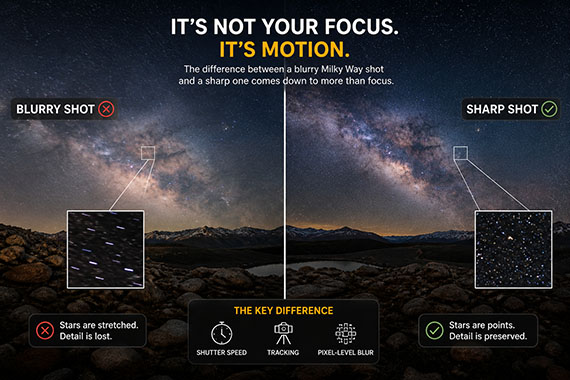
The Real Problem: The Sky Is Moving
Even though the stars look still, they’re not.
The Earth is constantly rotating, which means the stars are slowly drifting across your frame. It’s subtle—but your camera absolutely sees it.
When your shutter stays open too long, those tiny points of light stop being points and start turning into short streaks.
At first glance, it might still look “sharp.” But zoom in—and you’ll see the truth.
Why Shutter Speed Matters More Than You Think
A common mistake is pushing shutter speed too far in an attempt to capture more light.
You might think:
- “Longer exposure = brighter Milky Way = better photo”
But there’s a tradeoff:
- Longer exposure = more motion blur in the stars
This blur doesn’t always look dramatic. Often it shows up as:
- Slight softness
- Loss of fine detail
- Stars that look bloated instead of crisp
This is what people often misinterpret as a focus issue.
The “500 Rule” Isn’t Always Enough
Many photographers rely on the 500 Rule as a guideline for shutter speed. It’s helpful—but it’s not perfect.
Modern cameras have:
- Higher resolution sensors
- Better lenses
- More ability to reveal tiny flaws
Which means even when you follow the rule, you can still get subtle blur.
At the pixel level, stars may already be stretching—even if it looks fine on your camera screen.
 Get a cheat sheet on both the 500 Rule and the NPF Rule here.
Pixel-Level Blur: The Hidden Image Killer
Here’s where things get interesting.
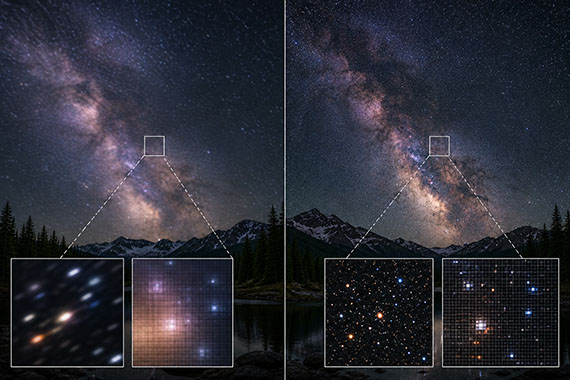
Even slight star movement affects:
- Micro-contrast
- Fine detail in the Milky Way structure
- Perceived sharpness of the entire image
So even if your focus is perfect:
- The image still feels “soft”
- The Milky Way lacks that crisp, textured look
This is why two photos with identical focus can look completely different in sharpness.
When Tracking Changes Everything
If you’ve ever seen ultra-sharp Milky Way images with incredible detail, there’s a good chance a star tracker was involved.
A tracker:
- Moves your camera in sync with the Earth’s rotation
- Keeps stars perfectly still during long exposures
This allows you to:
- Use longer shutter speeds
- Lower ISO, which means less noise
- Capture significantly more detail
Without tracking, you’re always balancing:
Light vs. motion blur
With tracking, you remove that limitation.
The Sweet Spot Without a Tracker
If you’re shooting on a tripod without tracking, your goal is simple:
Use the longest shutter speed that keeps stars looking like points—not streaks.
In practice, that often means:
- Staying more conservative than the 500 Rule
- Zooming in to check sharpness; don’t trust the full image preview
- Prioritizing star shape over brightness
A slightly darker but sharper image will almost always look better after editing than a brighter, blurry one.
Quick Signs It’s Not Your Focus
If your images look soft, check for these:
- Stars look slightly stretched when zoomed in
- The Milky Way lacks fine detail and contrast
- Bright stars appear “fat” instead of pinpoint
- Sharp foreground, soft sky
If you’re seeing this—your focus is probably fine.
Your shutter speed isn’t.
Bottom Line
Blurry Milky Way photos are rarely caused by bad focus.
They’re caused by motion you can’t see—but your camera can.
Once you understand that:
- You stop chasing focus
- You start controlling exposure more precisely
- And your images get dramatically sharper
Want Sharper Milky Way Shots Without Guessing?
If you want to consistently get sharp, detailed Milky Way images—without trial and error—the Milky Way Photography Field Guide was built for exactly that.
Right now, the Core Season Sale is ending soon, with 70% off.

It covers:
- Exact shutter speeds that actually work, not just rules of thumb
- How to balance exposure vs. sharpness in real conditions
- When to use tracking, and when you don’t need it
- Step-by-step setups for different lenses and scenarios
If you’re planning to shoot during peak Milky Way season, this will save you a lot of missed shots.
Deal ending soon: Milky Way Photography Guide Core Season Sale
from PictureCorrect https://ift.tt/01HK8jm
via IFTTT


0 kommenttia:
Lähetä kommentti