lauantai 22. marraskuuta 2025

PictureCorrect.com: The Photographer’s Journey: Enhancing Skills Through Routine Practice

Photography, like any art or skill, thrives on consistency. The journey to becoming an adept photographer is paved with continual learning, experimentation, and regular practice. Understanding why consistent practice is pivotal can be the difference between stagnation and growth in your photographic journey.

Related: Want photography to finally become a routine? PictureCorrect Premium gives you weekly practice — and until Black Friday, the first 3 months are just $1.

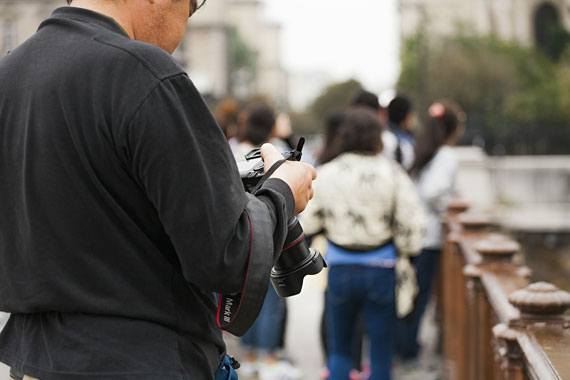
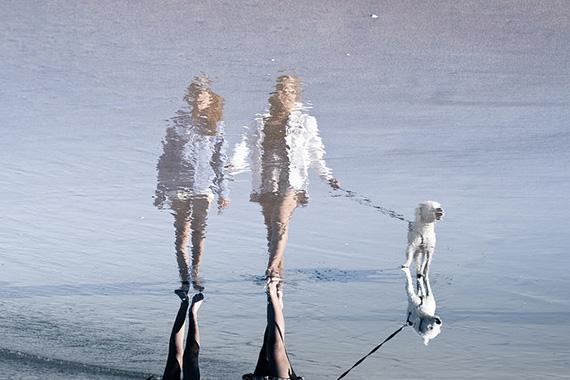
photographer practice

Photo captured by Aziz Acharki

Consistent practice in photography helps develop muscle memory and intuitive responses. Over time, adjusting your camera settings or framing a shot becomes second nature. This muscle memory allows you to focus more on creativity and less on the technicalities, enabling you to capture moments more fluidly and expressively.

Understanding Your Equipment

Frequent use of your camera and accessories familiarizes you with their quirks and features. The more you use your equipment, the better you understand its limitations and strengths, which can significantly influence your photographic outcome. This deep understanding can be the key to exploiting your gear to its fullest potential.

Cultivating a Unique Style

Regular practice provides you with the canvas to experiment and find your unique voice in photography. As you explore different styles, subjects, and techniques, you start to discern what resonates with you. This journey of discovery is essential in developing a distinctive style that sets your work apart.

Learning from Failure

Not every photo you take will be a masterpiece, and that’s part of the learning curve. Regular practice involves making mistakes, analyzing them, and learning from them. This process is invaluable in improving your skills and avoiding similar errors in the future.

Adapting to Different Situations

Photography is often about adapting to changing conditions—lighting, weather, subjects, and environments. Consistent practice equips you with the experience to swiftly adjust to these variables, enhancing your ability to capture compelling images regardless of circumstances.
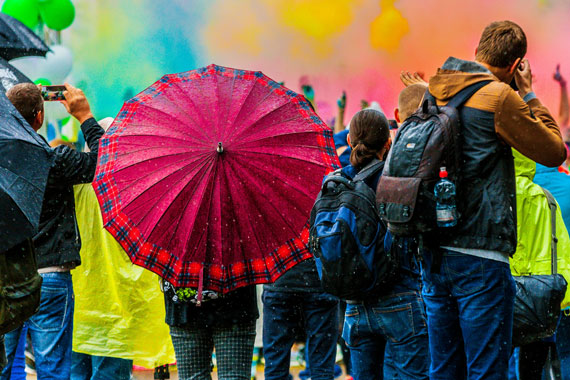
adapting as photographer

Photo captured by Kipras Streimikis

Keeping Up with Technological Advances

The field of photography is ever-evolving, with new techniques, software, and equipment continually emerging. By practicing consistently, you stay engaged with these advancements and learn how to integrate new tools and methods into your workflow.

The Role of Practice in Photo Editing

Consistent practice is crucial not only for capturing images but also in photo editing and post-processing. Regular engagement with editing tools enhances your ability to fine-tune images, helping you to express your artistic vision with greater precision. Through continuous practice, you gain a nuanced understanding of how to balance colors, adjust contrasts, and apply effects, thereby elevating your photographs from good to great.

“It takes ten thousand hours to truly master anything. Time spent leads to experience; experience leads to proficiency; and the more proficient you are the more valuable you’ll be.” – Malcolm Gladwell

Maintaining Passion and Inspiration

Lastly, consistent practice keeps your passion for photography alive and kicking. It encourages you to seek new sources of inspiration, keep your creative juices flowing, and maintain a deep connection with your art.

Early Members Are Already Ahead:

Every week, more photographers are joining PictureCorrect Premium to level up their craft — and with the Black Friday offer running, it’s the perfect moment to start. Inside, you’ll find expert-led tutorials, creative challenges, and printable exercises that make each lesson stick.

premium newsletter

Whether you’re working to improve composition, lighting, or manual control, Premium gives you the structure to make steady progress. The special $1 intro offer is ending soon, and once it’s gone, so is your chance to lock in early access.

Deal ending soon: Black Friday Discount Enrollment PictureCorrect Premium

The post The Photographer’s Journey: Enhancing Skills Through Routine Practice first appeared on PictureCorrect.


from PictureCorrect https://ift.tt/uL2OdsD
via IFTTT

torstai 20. marraskuuta 2025

PictureCorrect.com: Black Friday Deal for Tack-Sharp Photos

Topaz Labs has launched an early Black Friday deal, offering 43% off the full Topaz Studio subscription — a savings of $170 for the first year. If you’ve been waiting for the right moment to upgrade your editing workflow, this is the biggest discount Topaz puts out all year.

topaz studio

The Topaz Studio bundle packs in 8 photo-focused apps, 100+ AI models, and 300 monthly cloud credits, giving photographers a complete toolkit for sharpening, noise reduction, detail enhancement, restoration, resizing, and clean, high-quality output. It’s designed to streamline the editing process while delivering noticeably stronger results, especially in challenging lighting or high-ISO conditions.

A big advantage of the current subscription is access to Topaz’s newest cloud-based models, which often outperform local processing for fine detail, edge handling, and natural-looking texture. The included cloud credits let you use these higher-quality models right away without any additional cost.

For photographers who want faster edits, cleaner images, and better AI tools heading into 2026, this Black Friday offer is likely the best price you’ll see from Topaz Labs this year. Early savings are live now.

Deal ending soon: Topaz Studio for Tack-Sharp Photos

The post Black Friday Deal for Tack-Sharp Photos first appeared on PictureCorrect.


from PictureCorrect https://ift.tt/s2uXGlV
via IFTTT

keskiviikko 19. marraskuuta 2025

PictureCorrect.com: Focusing on the Fundamentals: Rookie Mistakes in Photography

Embarking on the journey of photography is both exhilarating and daunting. As beginners, we are often driven by passion but can be hindered by common pitfalls. Understanding these early mistakes can pave the way for a smoother, more fulfilling photographic adventure. Here are some of the most common missteps that budding photographers make.

Related: offer ending soon for the Composition Cheat Sheets 🎁 Pre-Black Friday Sale

photography mistake

Photo captured by Daniele D’Andreti

1. Overlooking Composition Basics

One of the first and most significant mistakes is neglecting the rules of composition. The Rule of Thirds, leading lines, framing, and the importance of negative space are not just artistic whims; they are the backbone of captivating images. Beginners often focus solely on their subject, forgetting how its placement and the surrounding elements can transform a good photo into a great one.

2. Ignoring Lighting Conditions

Light is the essence of photography. Beginners frequently disregard the quality, direction, and color of light. Shooting in harsh midday sun or with improper indoor lighting leads to unflattering shadows and colors. Understanding the golden hour, diffused lighting, and the basics of artificial lighting can dramatically improve your photos.

3. Relying Too Much on Post-Processing

In the age of digital photography, it’s easy to fall into the trap of “fixing it in post.” While post-processing is a powerful tool, relying on it too heavily can be a crutch. Beginners often overlook getting it right in-camera first, which is crucial for authentic and high-quality images.

4. Not Understanding Camera Settings

Auto mode is a safe haven for beginners, but it severely limits creative potential. Not learning how shutter speed, aperture, and ISO work together leads to missed opportunities in capturing images as envisioned. The fear of manual mode can be overcome with practice and experimentation.

5. Neglecting the Importance of the Subject

Sometimes, in the quest to get technically perfect shots, beginners forget about the soul of the photograph – the subject. Whether it’s a person, a landscape, or a street scene, understanding and connecting with the subject is vital. It’s this connection that breathes life into a photograph.

6. Overdoing Edits and Effects

The allure of filters and effects can be strong, especially with social media trends. However, over-editing can make photos look unnatural and unappealing. Learning restraint in editing and developing a personal style that complements the photograph is key.

7. Not Backing Up Photos

Losing photos due to a technical glitch or a lost device is heartbreaking. Beginners often overlook the importance of regularly backing up their work. Investing in reliable storage solutions and developing a habit of backing up after every shoot is essential.

Every photographer, no matter how skilled, started as a beginner and made mistakes. The key is to learn from these errors and view them as stepping stones in your photographic journey. By being mindful of these common pitfalls, you can accelerate your growth and enjoy the process of capturing the world through your lens.

For Further Training on Composition:

Are you ever tired of your photos looking dull or boring? These popular Composition Cheat Sheets have you covered. With clear, concise information on all the essential elements of composition, you’ll never be unprepared again. They are currently 81% off for a Pre-Black Friday Sale 🎁 which ends soon if you want to check them out.
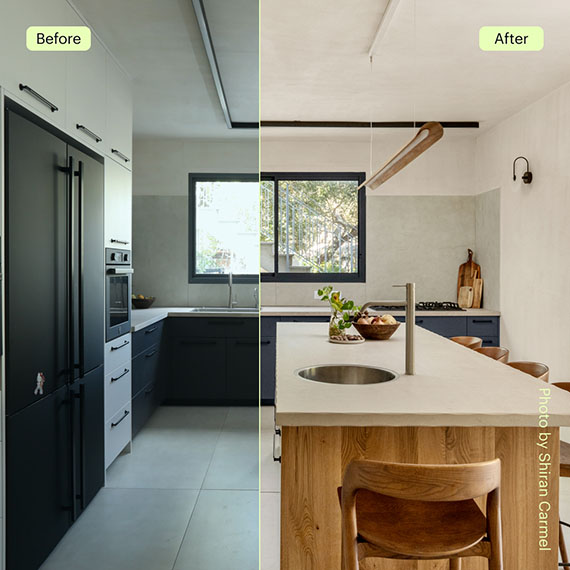
composition cheat sheets

Composition Cheat Sheets (see all the elements covered)

The perfect companion for any photographer. Print one out whenever you need it. These cheat sheets consolidate crucial composition-related information, allowing you to concentrate on what truly matters – composing striking photographs.

Deal ending soon: The Composition Cheat Sheets at 81% Off

The post Focusing on the Fundamentals: Rookie Mistakes in Photography first appeared on PictureCorrect.


from PictureCorrect https://ift.tt/bQ7FWO4
via IFTTT

tiistai 18. marraskuuta 2025

PictureCorrect.com: What to Know About ON1 Photo RAW 2026

ON1 has announced Photo RAW 2026, which they describe as their most significant update in two decades. The release arrives alongside a Black Friday sale offering up to 35% off the new version and up to 50% off individual plugins, making it a notable moment for users considering an update.

on1 photo raw

Performance Improvements

One of the main changes in Photo RAW 2026 is overall speed. The software opens images more quickly, applies adjustments with less delay, and handles larger files more smoothly. Photographers upgrading from recent versions—such as 2024 or 2025—may notice faster brushing, masking, and general navigation.

Updated AI Masking

AI Masking receives a substantial upgrade. The improved system is designed to detect subjects with greater accuracy and refine edges more cleanly, especially in complex areas like hair, foliage, or mixed lighting. These refinements aim to reduce manual cleanup and streamline editing.

New and Updated Effects Filters

Photo RAW 2026 adds several new Effects filters to expand creative control. These filters focus on stylistic edits and tonal adjustments, giving users more ways to enhance contrast, shape color, or introduce atmospheric effects without extensive manual work.

Next-Generation Resize AI

The Resize module has been rebuilt with a new AI engine designed to preserve more realistic detail during enlargement. The updated system focuses on maintaining fine textures and reducing artifacts that can occur when dramatically increasing image size.

Upgrade Context

For those coming from older versions—whether 24, 25, or earlier—the cumulative improvements in speed, AI accuracy, and creative tools represent a noticeable shift. The 2026 release is also supported by tutorials, technical resources, and additional learning materials to help users adjust.

Black Friday Sale on Now!

As part of the Black Friday promotion, ON1 is offering up to 35% off Photo RAW 2026 and up to 50% off individual plugins, along with a 30-day money-back guarantee for anyone who wants to try the new version with minimal risk.

Offer ending soon: ON1 Photo RAW Black Friday Sale

The post What to Know About ON1 Photo RAW 2026 first appeared on PictureCorrect.


from PictureCorrect https://ift.tt/jqtpfd9
via IFTTT

maanantai 17. marraskuuta 2025

PictureCorrect.com: How Aperture Blades Affect Image Quality

In the world of photography, the aperture of a lens plays a crucial role in not only controlling the amount of light that reaches the camera sensor but also in determining the quality and character of the image, especially its bokeh, or the aesthetic quality of the blur produced in the out-of-focus parts of an image. One factor that significantly influences this aspect of image quality is the number of aperture blades within the lens. But why do some lenses have more aperture blades than others? Let’s dive into the reasons behind this design choice and its implications for photographers.

Related: offer ending soon for the Camera Cheat Sheets 🔥 Pre-Black Friday Sale

aperture blades

Photo captured by Lenstravelier

Understanding Aperture Blades

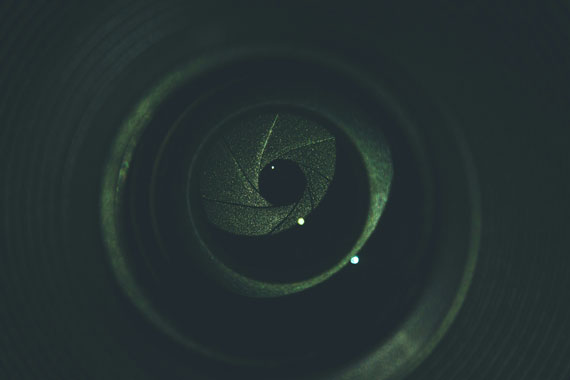
Aperture blades are the mechanical elements within a lens that can open and close to adjust the size of the aperture opening through which light passes. The configuration of these blades—how many there are and their shape—affects the shape of the aperture, which in turn influences the bokeh and the overall sharpness of the image.

More Blades for a More Circular Aperture

The primary reason for having more aperture blades is to create a more circular aperture opening. Lenses with fewer blades tend to produce an aperture that resembles a polygon (e.g., hexagonal or heptagonal) when stopped down, which can result in bokeh that mirrors this shape. More blades usually mean the aperture can form a shape closer to a true circle, leading to smoother, more pleasing bokeh. This circular bokeh is particularly sought after in portrait and macro photography, where the subject stands out against a softly blurred background.

Optical Quality and Design Considerations

Lenses designed for high-end or professional use often feature more aperture blades because manufacturers aim to optimize optical performance, including the quality of the out-of-focus areas. These lenses are typically larger, heavier, and more expensive due to the increased complexity and precision required in manufacturing a mechanism with more blades. Additionally, the shape of the blades—whether they are straight or curved—also plays a role in the quality of the bokeh.

Cost and Complexity

The number of aperture blades also reflects a balance between cost and desired optical characteristics. More blades increase the complexity of the lens design and the manufacturing process, leading to higher costs. Budget-friendly lenses often have fewer blades to keep prices low, appealing to amateur photographers or those with less demand for perfect bokeh.

Specific Photographic Needs

Different types of photography benefit from different aperture blade configurations. For instance, landscape photographers might prioritize lens sharpness and depth of field over bokeh quality and thus may opt for lenses with fewer blades, which can also be lighter and more cost-effective. Conversely, portrait photographers who value a soft background might prefer lenses with more aperture blades.

Summary:

The variation in the number of aperture blades among lenses is a result of manufacturers tailoring their products to meet specific photographic needs, balancing between cost, optical quality, and the intended use of the lens. Whether a lens has fewer or more aperture blades, each design choice impacts the character and quality of the images it produces. Understanding these differences can help photographers select the right lens for their work, ensuring that they achieve the desired artistic effect in their photographs.

For Help with Tricky Lighting & Camera Settings:

Have you ever wanted to photograph an amazing moment but missed the shot because you didn’t know the right camera settings to use? That’s where these fundamental Camera Cheat Sheets come in. They are currently 75% off for a 🔥 Pre-Black Friday Sale if you want to check them out.
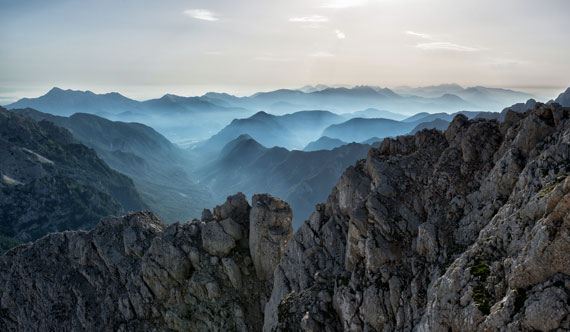
fundamental photography sheets

New: Fundamental Photography Cheat Sheets

Whether you’re a seasoned professional or just starting out, photography cheat sheets can be a valuable resource for improving your skills and taking your photography to the next level. The perfect companion for any photographer. Print one out whenever you need it.

 Offer ending soon: The Camera Cheat Sheets 🎁 Pre-Black Friday Sale

The post How Aperture Blades Affect Image Quality first appeared on PictureCorrect.


from PictureCorrect https://ift.tt/sXbdBYR
via IFTTT

sunnuntai 16. marraskuuta 2025

PictureCorrect.com: Preventing Lens Fog and Ice Crystals on Your Camera

Fogged lenses and frosty glass are two of the most common problems winter photographers face. One minute your lens is clear and sharp, and the next it’s covered in haze or tiny ice crystals that destroy contrast and detail. The good news is that both problems come down to one thing—condensation—and once you understand how it forms, it’s easy to prevent.

Related: offer ending soon for the Photo Adventure Cheat Sheets 🎁 Pre-Black Friday Sale
lens fog

Why Lenses Fog or Frost in the First Place

Fog happens when cold gear enters warm, humid air. The warm air condenses on the cold glass faster than it can evaporate, leaving a milky haze that can last up to an hour.
Frost is the same process in reverse. Take warm gear into freezing temperatures and moisture in the air freezes on the lens surface, creating tiny crystals that are almost impossible to wipe off cleanly.

Stop Fog Before It Starts

The simplest and most reliable method is to seal your camera in a zip-lock or dry bag before going indoors. While your gear warms up, all the condensation forms on the bag instead of the lens. Leave it sealed until everything reaches room temperature.

You can also minimize temperature shock by keeping your gear at a stable cold temperature whenever possible. If you’re shooting on and off throughout the day, leave your camera in a cold car trunk or garage rather than letting it repeatedly warm up and cool down.

Another common trigger for fog is hopping into a heated car after a shoot. Car heaters pump out very humid air, and lenses fog instantly. If you need to get into the car, bag the camera first or keep it in the trunk where the temperature rises slowly.

Keeping Frost Off Your Lens Outdoors

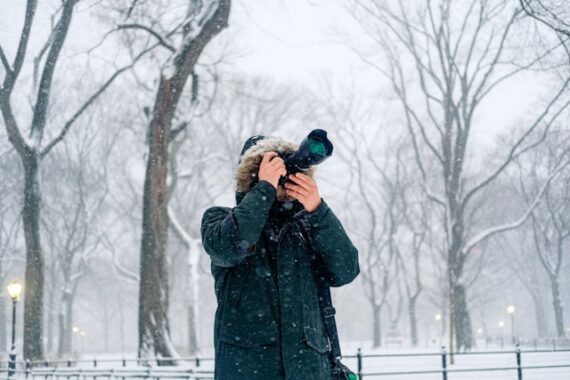
Ice crystals usually form from your own breath or body heat rather than the environment. A lens hood helps create a small barrier that keeps warm air and falling snow away from the glass. When composing, be conscious of where you’re breathing—one exhale too close to the front element can frost it over in seconds.

Letting your gear acclimate to the cold before shooting also helps. A lens that’s already cold is less likely to attract moisture or freeze it. If frost does start forming, avoid wiping it; melting and smearing creates a bigger problem. A simple rocket blower is the safest way to clear early flakes or crystals.

What to Do If Fog or Frost Already Happened

Once a lens fogs, patience is your best tool. Don’t wipe it—smearing condensation across the coatings only complicates things. Set the lens in a dry room and allow it to naturally warm up and clear. Silica gel packs inside your camera bag can speed up drying and help prevent repeated fogging throughout the day.

Final Thoughts

Winter is hard on camera gear, but fogged and frosted lenses are almost always preventable. Slow temperature changes, sealed bags, and a bit of breath awareness go a long way. With a few simple habits, your glass stays dry and crystal-clear—even in snowstorms and sub-zero conditions.

For Further Training:

For help preparing and remembering camera settings for difficult situations like this, a set of Photography Adventure Cheat Sheets are designed to help. They are currently 80% off for a Pre-Black Friday🎁 which ends soon if you want to check them out.

adventure photography

The perfect companion for any photographer. Print one out whenever you need it. Whether you’re going on vacation or seeking out a specific photography adventure, these cheat sheets can provide you with the knowledge and inspiration you need to create your best work yet.

Deal ending soon: Photo Adventure Cheat Sheets 🎁 Pre-Black Friday Sale
The post Preventing Lens Fog and Ice Crystals on Your Camera first appeared on PictureCorrect.


from PictureCorrect https://ift.tt/o7rJ5Ap
via IFTTT

lauantai 15. marraskuuta 2025

PictureCorrect.com: Low Light Photography Tips

Low light photography is something that we all must deal with as photographers. Whether you’re taking photos with a point and shoot during an evening out, shooting a wedding party or capturing a landscape at dusk it’s important to understand the basics of shooting with low light. Photography is all about light. Low light photography is no different, and it offers new challenges and opportunities for creativity. Here is a helpful infographic on the subject.

Related: only a little while left for the Lighting Cheat Sheets 🎁 Pre-Black Friday Sale

low light photography

Low Light Photography Infographic

Information provided courtesy of Snapsort

Additional Low Light Photography Tips:

1. Crank up the ISO. The higher the ISO number, the more sensitive the camera’s sensor is to the light that is reaching it. The additional noise that is generated by using a high ISO can be filtered out somewhat in post-processing. Sometimes the extra grain adds a little something special to the shot. Shooting in RAW format allows for the most flexibility in post-processing.

2. Use a larger aperture. The larger the aperture, the more light is entering the lens. Shooting at f/5.6 lets in more light than shooting at f/18 (remember, the lower the number, the larger the aperture).

3. Slow down the shutter speed. More light is captured the longer the shutter remains open. Keep in mind that a good rule of thumb for clear hand-held shots is no slower than 1/60 of a second. Use a tripod if you’re shooting at anything slower than that, though I have had success at slower hand-held shots using lenses with image stabilization.

4. If you do have to use a flash, try to avoid the on-camera pop-up. It tends to flatten the appearance of the image because the light is hitting the subject directly. Invest in an off-camera flash, angle light so that it is not directly in front of the subject, and use reflective surfaces and diffusers to soften the light. Strategically placed constant light (such as tungsten lamps using soft white bulbs) work excellently for providing additional ambient light without sacrificing the atmosphere of the setting.

5. Use your camera’s exposure compensation capabilities. The scale on many of today’s DSLR’s allow from -3 to +3 stops in 1/3 stop increments (my 7D is +/-5). Dial the exposure compensation to the positive side to purposefully overexpose the photograph.

For Further Training:

Lighting is arguably the most important aspect of photography; but do you know how to use it? These new Photography Lighting Cheat Sheets are designed to help. With critical information on ALL the types of natural light and artificial light you can use. They are currently 80% off today for a Pre-Black Friday Sale 🎁

lighting cheat sheets

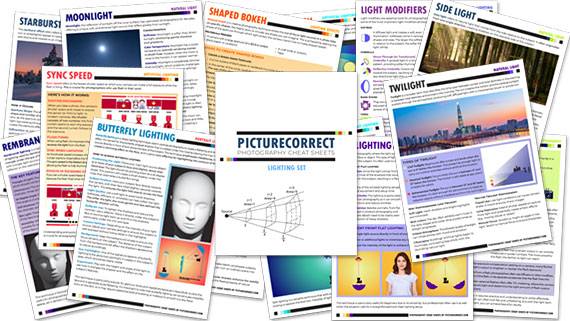
New! Cheat Sheets for Photography Lighting (see how they work)

Whether you’re a seasoned professional or just starting out, photography cheat sheets can be a valuable resource for improving your skills and taking your photography to the next level. By having all the key information you need in one place, you can focus on what’s important – capturing amazing photos.

Pre-Black Friday sale ending soon: Photo Lighting Cheat Sheets at 80% Off

The post Low Light Photography Tips first appeared on PictureCorrect.


from PictureCorrect https://ift.tt/YmQMFS9
via IFTTT

perjantai 14. marraskuuta 2025

PictureCorrect.com: Black and White Photography on Rainy Days

This article is based on concepts from the Bad Weather Photography Guide and also the Better B&W Photography Guide if you want to dig deeper for further training.

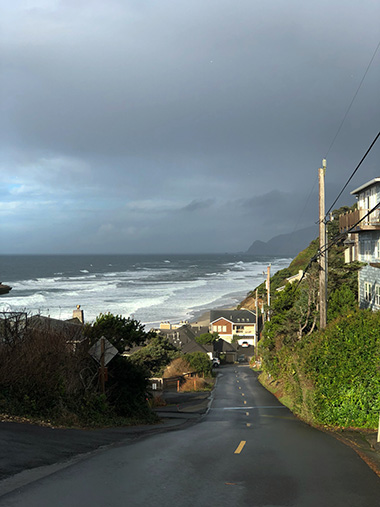
One of my favorite locations in the entire world to take pictures is coastal Oregon.

And as sure as the sunrise and taxes, most of the time I’m there, it’s going to be raining.

Rainy days are typically not a photographer’s friend, especially when you’re out creating landscape photography.

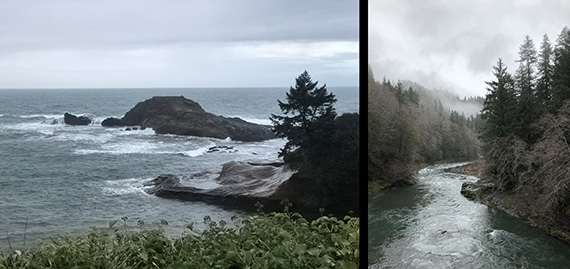
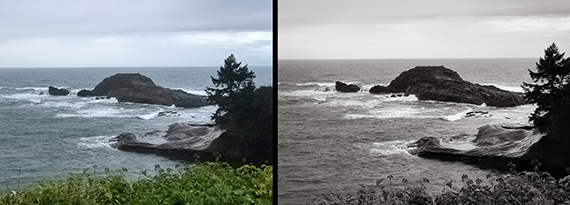
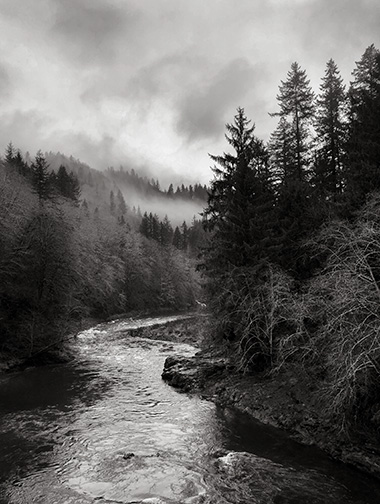
black and white landscape photography weather

Photos by Kent DuFault

Rainy days in Oregon produce photos that look like the above two examples. They not horrible, but they’re also not very exciting.

Color landscape photography needs some lighting to make it shine—literally.

This news can be disappointing if you’ve waited six months, or a year, to photograph a location that you love.

The sunshine brings color to photography. Without the sun, colors tend to go flat as a pancake.

Here is my quick tip for photography in bad weather conditions.

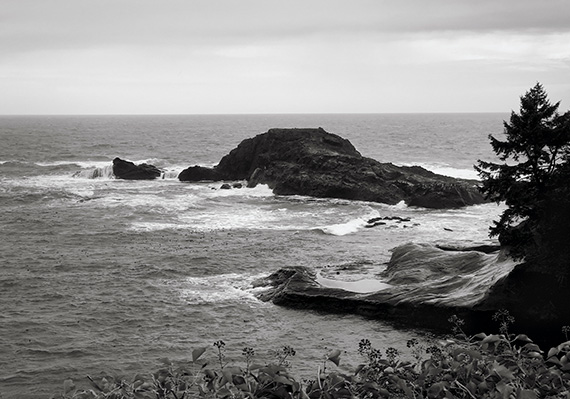
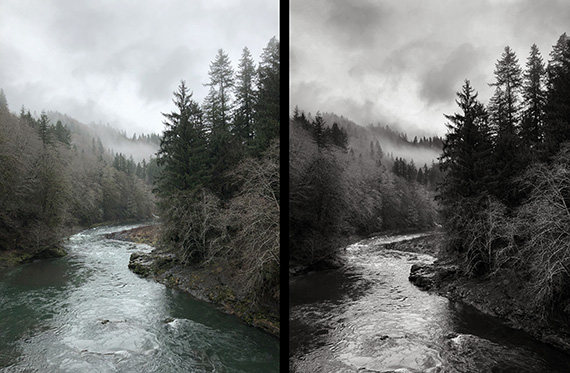
black and white landscape photography weather

Conversion in tonality using the Kodak 400 HC film preset by Topaz Labs. (Photo by Kent DuFault)

Consider going black and white. This can be done in post-processing or at the moment of taking pictures.

Why does black and white photography work better in inclement weather?

  • It relies on varying tones instead of color.
  • Black and white relies heavily on the use of shapes for interest. You don’t necessarily need sunshine to highlight shapes.
  • Black and white photography relies on texture, which can be easily accentuated in post-production—even when there was no directional lighting in the scene.
  • Manipulating tone in a realistic manner is far easier and faster than trying to manipulate color.

Using these principles, you can create a more exciting composition when color is lacking.

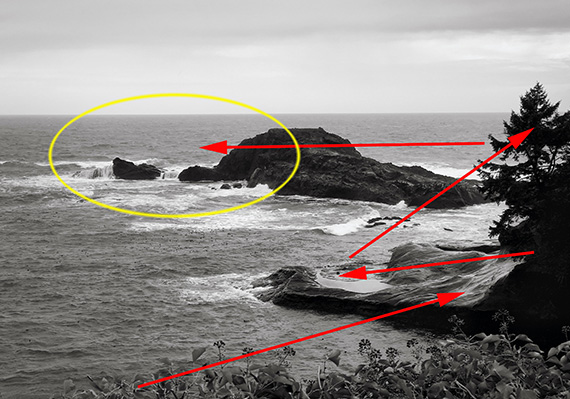
black and white landscape photography weather

I quickly created this compositional path using the elements of black and white photography described above.

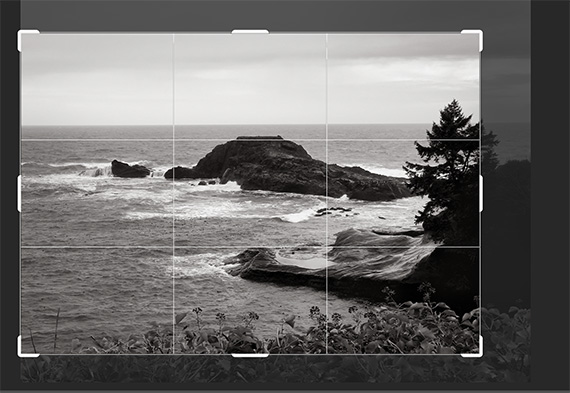
When converting to black and white in post-production, you’ll want to take a look at your frame.

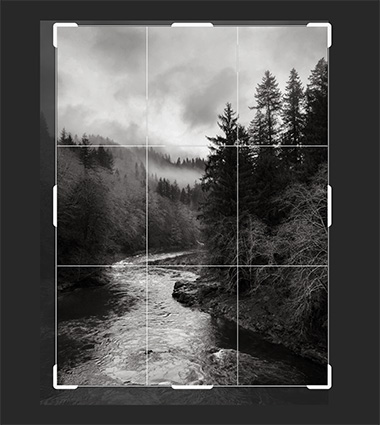
black and white landscape photography weather

Slight crop

I often end up cropping slightly to enhance my chosen black and white path through the photo versus how I composed it in color.

black and white landscape photography weather

Comparison of color to b&w crop

The black and white version most assuredly provides an increased level of visual interest.

Here is another comparison:

black and white landscape photography weather

Photo by Kent DuFault

It’s easier to manipulate tone in post-production than color, especially when striving for realism.

Using an Adjustment Brush feature, I raise and lower tonal values to create my composition path within the landscape. The software that I use to accomplish this is usually Photoshop, Lightroom or Snapseed.

black and white landscape photography weather

Another slight crop

Once again, a crop helps to solidify my black and white landscape composition.

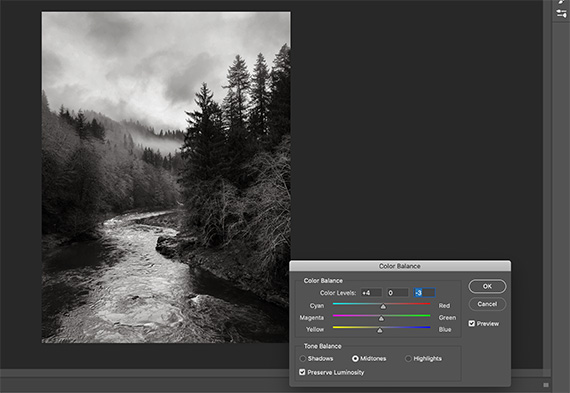
black and white landscape photography weather

Slight warm tone

I often give my black and white landscape photos a slightly warm tone as a final step.

I’m very proud of the final shot—despite the lousy weather!

black and white landscape photography weather

Final result despite the weather

This is a black and white conversion of the Wilson River near Tillamook, Oregon, edited first in Snapseed and then in Photoshop.

black and white landscape photography weather

Photo by Kent DuFault

Occasionally the sun pops out in Oregon. This time it was for about 10 minutes! No need for black and white when you’ve got the sun on your side.

About the Author:
Kent DuFault is an author and photographer with over 35 years of experience. He’s currently the director of content at the online photography school, Photzy.com.

For Further Training:

Have you ever quickly converted your shots to black & white, hoping to make them “Better”? And the result was bland to say the least? This is a very common occurrence. Knowing how to convert color to B&W with a working understanding of tone and contrast in post-processing is a very different story. This in-depth eBook is designed to cover EVERYTHING you need to know about producing your own powerful and professional B&W images.

black and white photo guide

Better Black & White Photography Guide (See What’s Inside)

Every step is detailed in all three programs: Photoshop, Lightroom, & Elements. But even if you don’t have these applications, there’s enough information in here to help you achieve the same results with the software you already have. It is currently 76% off if you want to check it out.

Deal ending soon: The Better Black & White Photography Guide at 76% Off

The post Black and White Photography on Rainy Days first appeared on PictureCorrect.


from PictureCorrect https://ift.tt/OJ6vEpi
via IFTTT

torstai 13. marraskuuta 2025

PictureCorrect.com: How Imagen AI Helps Photographers Streamline Their Workflow

Photography has always been equal parts art and logistics. After the thrill of a great shoot comes the reality: hours of sorting, editing, and fine-tuning. For many professionals, that post-production workload can take up far more time than actually shooting.

That’s where tools like Imagen AI are quietly reshaping the process — helping photographers spend less time behind the screen and more time behind the camera.

Smarter Culling for Large Shoots

Culling, or narrowing down the best images from a shoot, is one of the most time-consuming parts of the workflow. Imagen’s AI culling analyzes each frame for focus, composition, lighting, and expressions, surfacing the best options in minutes.

You can even tailor how it ranks images — for example, prioritizing shots where subjects have open eyes or natural smiles. The AI doesn’t make creative choices for you; it simply gets you to the good ones faster.

Example:
A wedding photographer handling 10,000+ RAW images from a single event can use AI culling to reduce that to a few thousand strong selects, saving hours of manual sorting. It’s especially helpful for events with repetitive scenes, like family formals or dance floor candids, where near-duplicates can pile up quickly.

wedding photo example

Black Friday Offer: Better Together

If you’ve been thinking about trying Imagen, now might be the perfect time.
From now until December 2, Imagen is running its Black Friday “Better Together” campaign — offering 50% off across nearly everything:

  • 50% off your first month for new users
  • 50% off all culling subscriptions
  • 50% off all editing profiles in their Profile Shop
  • 50% off the first installment when upgrading to an annual plan

It’s a rare opportunity to build a more efficient post-processing workflow while saving significantly on the tools that make the biggest difference.

Editing That Learns Your Style

Every photographer has a look — a subtle blend of tones, colors, and contrast that defines their brand. Imagen’s AI editing profiles learn that visual fingerprint directly from your past Lightroom catalogs. Once trained, it applies those same adjustments automatically to new shoots.

The system adapts as your style evolves, meaning your “signature look” stays consistent without you having to start from scratch each time.

Example:
A portrait or family photographer who handles several sessions per week can upload images, apply their custom profile, and have the edits ready for review within minutes. Many professionals say this process cuts their weekly editing time nearly in half — freeing them up to focus on client experience and creative direction.

family photo example

Consistency Across Every Gallery

Consistency is one of the most overlooked aspects of professional work. Whether you’re delivering 100 images from a brand shoot or 800 from a wedding, each photo should look like it belongs to the same story. Imagen helps ensure that kind of visual cohesion.

Commercial photographers, for instance, use AI editing to keep color tones identical across multiple lighting setups or product shoots — something that used to require tedious manual adjustments.

real estate photo example

More Time for What Matters

AI isn’t replacing the creative side of photography — it’s reducing the busywork. Automating repetitive steps means faster turnaround, less burnout, and more time for what originally drew most photographers to the field: making meaningful images.

Instead of spending late nights scrolling through hundreds of near-duplicates, you can move from shoot to delivery in a fraction of the time.

A Tool, Not a Shortcut

It’s important to remember that Imagen isn’t a one-click solution. The best results come from pairing its efficiency with your own creative judgment. You still have full control over the final look — the software just handles the repetitive parts with surprising precision.

Final Thoughts

Post-production doesn’t have to drain your energy or creativity. Tools like Imagen AI show how automation can support artistry, not replace it. Whether you’re managing weddings, portraits, or branding work, learning how to integrate AI-based culling and editing into your workflow can give you back one of photography’s most precious resources: time.

Try it on your Photos with 1500 Free AI Edits

The post How Imagen AI Helps Photographers Streamline Their Workflow first appeared on PictureCorrect.


from PictureCorrect https://ift.tt/iKz6cyj
via IFTTT

keskiviikko 12. marraskuuta 2025

PictureCorrect.com: Mastering the Art of Scale in Landscape Photography

One of the primary challenges in landscape photography is capturing the vastness and grandeur of a scene in a way that translates well to a two-dimensional image. This is where the concept of ‘scale’ comes into play. Including an element of scale can provide context and a sense of proportion, making your landscapes more compelling and relatable. Here are some techniques to effectively show scale in your landscape photographs.

Related: offer ending soon for the Composition Cheat Sheets 🎁 Pre-Black Friday Sale

landscape scale

Photo captured by Peter Vanosdall

1. Introduce a Human Element

Including a person in your landscape shot is one of the easiest ways to convey scale. The viewer instinctively knows the approximate size of a human, which provides an instant reference. This technique works especially well with grand landscapes such as mountains, canyons, or vast fields.

2. Use Familiar Objects

If a human figure isn’t available or doesn’t fit the context, other familiar objects can serve as a reference. This can include things like vehicles, animals, or even buildings. For example, a lone car on a winding road amidst massive mountains can effectively show the enormity of the scene.

3. Layering and Foreground Elements

Introducing layers in your image, especially with a strong foreground element, can provide depth and a sense of scale. A prominent rock, tree, or other subject in the foreground, juxtaposed with the middle and background layers, helps the viewer gauge distances and sizes in the scene.

4. Use Wide Lenses

Wide-angle lenses inherently capture more of a scene, making vast landscapes look even vaster. When you pair a wide lens with a strong foreground element, the exaggeration of perspective further amplifies the sense of scale.

5. Capture Atmospheric Perspective

Atmospheric perspective is the phenomenon where distant objects appear lighter and less saturated due to atmospheric haze. Capturing scenes with evident atmospheric perspective (like layers of mountains fading into the distance) can give a sense of vastness and depth, thus emphasizing scale.

atmospheric scale

Photo captured by Ales Krivec

6. Play with Shadows and Light

The play of light and shadow, especially during the golden hours of sunrise and sunset, can add depth and dimension to a scene. Long shadows cast by trees, rocks, or mountains can show the viewer how grand or tall these elements are.

7. Use Leading Lines

Leading lines can guide a viewer’s eye through an image and provide a visual journey that showcases the scale. Rivers, roads, or even patterns in sand dunes can serve as leading lines, drawing the viewer from the foreground to the distant horizon.

8. Drones and Aerial Photography

With the rise of drone photography, there’s a unique opportunity to capture landscapes from a bird’s-eye view. This perspective can reveal patterns and proportions that are hard to grasp from the ground, offering a fresh way to showcase scale.

Conveying scale in landscape photography is all about providing context. By giving the viewer a reference point, be it a person, object, or the play of light and shadow, you can transform a flat image into a story of vastness and grandeur. Next time you’re out with your camera, consider these techniques to infuse a sense of scale into your landscapes, making them more immersive and captivating.

For Further Training on Composition:

Are you ever tired of your photos looking dull or boring? These popular Composition Cheat Sheets have you covered. With clear, concise information on all the essential elements of composition, you’ll never be unprepared again. They are currently 81% off for a Pre-Black Friday Sale 🎁 which ends soon if you want to check them out.

composition cheat sheets

Composition Cheat Sheets (see all the elements covered)

The perfect companion for any photographer. Print one out whenever you need it. These cheat sheets consolidate crucial composition-related information, allowing you to concentrate on what truly matters – composing striking photographs.

Deal ending soon: The Composition Cheat Sheets at 81% Off

The post Mastering the Art of Scale in Landscape Photography first appeared on PictureCorrect.


from PictureCorrect https://ift.tt/pCtN1fM
via IFTTT

tiistai 11. marraskuuta 2025

PictureCorrect.com: Fixing Backlighting in the Photo Editing Stage

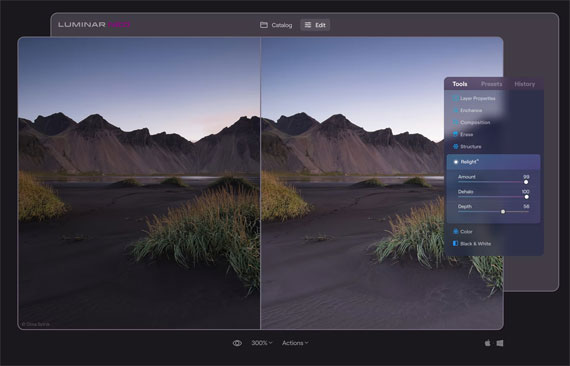
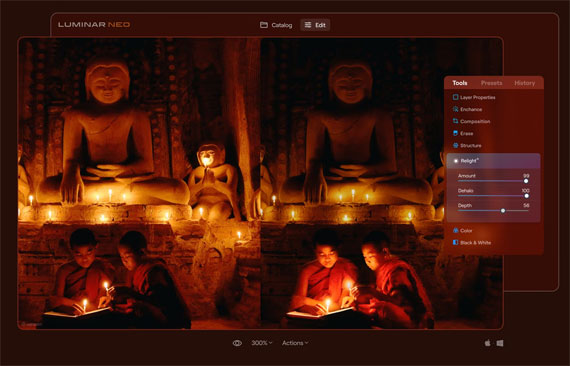
Now that Luminar Neo’s Black Friday Sale is live, it’s the perfect time for photographers to explore its most powerful tools at a steep discount. One standout is the Relight AI feature — a game-changer for reviving poorly lit or unevenly exposed photos. With just a few sliders, you can bring depth, balance, and mood back into your images — and now you can do it for less during the sale.

relight ai

Relight AI Photo Editing Tool

A typical problem that photographers of all skill levels face is accidentally backlit photos, or photos with a darker subject in the foreground. This may be caused by a lack of light sources behind the camera, the wrong exposure settings, shooting in auto modes, or bad metering. Have you ever encountered such a problem?

This is the situation for which the tool was created. Now you’ll be able to light up the foreground and background separately for a more natural effect. Advanced settings include further work with light based on image depth for realistic results and removing halos from the illuminated object in the foreground.

At its basic level, the Relight AI tool works like a smart, virtual fill light that helps control the exposure of the foreground and background independently. Such separation provides realistic results, because if only the foreground is lit up, the subject of the photo will look unrealistic. When the light in the background is also controlled, you can easily give depth to the photo, rescuing the image and turning it into what you originally intended.

landscape relight

Using Relight on the foreground of a landscape

A great feature of Relight AI is that it detects not only people in portraits but also objects, helping transform photos with buildings and vehicles and helping landscape and street photographers achieve the photos they want. Of course, portrait photographers who need to rescue backlit photos and photos with poorly lit faces will benefit the most. Still, Relight AI is useful for any photo that needs an extra source of realistic light in the foreground.

How is it different?

You might be wondering what the difference is between the instant lighting improvement provided by Relight AI and the effect of Accent AI. The technology in Accent AI is drastically different, as at its core the Accent AI tool functions by analyzing the image to identify issues with brightness, contrast, and color, then balances all of them for the optimal result. Meanwhile, Relight AI works with exposure through image depth.

candlelight relight

Brightening the foreground a bit

In fact, Luminar Neo has several tools for dealing with tough lighting in your photos. Here is a handy guide so you know what each of these tools helps you with:

  • Relight AI controls the exposure of an image based on distance from the lens. It’s useful for independently adjusting the background and foreground exposure.
  • Accent AI relights an image and improves color, tone, and contrast based on an AI analysis of image contents.
  • Sky Enhancer AI lets you improve the sky in terms of both color and exposure thanks to AI recognition.
  • Face AI lets you automatically and easily add light on human faces for better facial details.
  • Super Contrast gives precise control over highlights and shadows.

See how it works: Relight AI Tool in Luminar Neo

The post Fixing Backlighting in the Photo Editing Stage first appeared on PictureCorrect.


from PictureCorrect https://ift.tt/Y6bi51o
via IFTTT

sunnuntai 9. marraskuuta 2025

PictureCorrect.com: How to Define Yourself as a Photographer

There comes a point in time when you will need to decide what type of photography you like and the specific genres you want to focus on. Most of us start out as generalists, shooting anything and everything that tickles our fancies. But eventually you need to decide on what type of photographer you are or want to be.

Related note: only a little while left for the Earn Money with Photography 🍂 Autumn Sale

macro photography

photo by Thomas Leuthard

Pretty soon after my journey into SLR photography I decided what I liked and what I wanted to focus on. The world of close-up and macro photography was my passion. The worlds within worlds and the finer details of those worlds intrigued me. So I gradually bought the equipment that would help me create better close-ups. I began defining myself as a photographer.

Your photographs are a very personal thing, as they reflect how you see the world and what interests you. So there are a few things you need to do in order to define yourself as a photographer. We are not talking professionals here but ordinary people.

1. Take time for a little introspection

You need to look inside yourself and examine who you are and what you like. What pushes your buttons and what inspires you to create photos. The better you know yourself the better photographer you will become. I am a detail man, so close-ups really make me come alive. Whatever makes you come alive will help define you as a photographer.

introspection

photo by withbeautiful

2. Photograph what you like

All of us have very clear likes and dislikes. So with this in mind, identify all of your likes. Sit down with a piece of paper and jot down everything that you enjoy in life. Then work through this list and see if you would enjoy shooting photos of the likes. Cross out all the ones you don’t want to shoot, and there you have your list.

3. Study the pros

This is as simple as going to a library or bookstore and looking at the type of books that interest you. If it’s wildlife photography then look at photo books by great wildlife photographers. If it’s cars or trucks, then study those books. See the angles, lighting, and compositions they use and get an idea of how they have created their images. You will learn a huge amount from the pros.

4. Allow yourself to dream

Visualizing what you like and what you want to shoot will help motivate and distill in your own mind the specifics you want to shoot. Vision, plan, and goals. This can be what type of images and perhaps what kind of equipment you want to own. Working toward a goal will allow you to become what you want and help define you as a photographer. Which of the pro photographers would you like to become? Knowing this will help clarify what type of photographer you define yourself as.

5. Define your audience

By defining your audience you will also define yourself. If you want your photographs to be appreciated by people, what type of audience should they be? As a car photographer the bulk of your audience will be men of a certain economic class who pride themselves in having a great car. A pet photographer will have a different audience to wildlife photographer, and so it will go on.

defining your audience

photo by Hernán Piñera

You may ask why it’s necessary to define yourself. It may not be essential for you to know this, but most photographers who are successful have an in depth understanding which is reflected in their images. If you don’t know your definition as a photographer it will be hard to concentrate on a genre and make a success of it.

About the Author:
Wayne Turner has been teaching photography for 25 years and has written three books on photography. He has produced 21 Steps to Perfect Photos, a program of learner-based training using outcomes based education.

For Further Training:

This in-depth eBook has helped thousands of photographers turn their passion into profit—and here it’s at its lowest price ever to start the Autumn season 🍂.

photography career

Packed with proven strategies in all types of photography and even printable contract templates you can use with clients right away, it’s your shortcut to making money with photography.

Deal ending soon: Earn Money with Photography Autumn Sale

The post How to Define Yourself as a Photographer first appeared on PictureCorrect.


from PictureCorrect https://ift.tt/jPvTUC9
via IFTTT