keskiviikko 29. tammikuuta 2025

PictureCorrect.com: Silhouette Photography Tips

This article is based on concepts from The Understanding Light Photography Guide which is currently 68% off until the end of the month, January 31.

A silhouetted photograph almost always garners immediate and positive attention.

silhouette photo person diving into lake

Photo by Andrew Sharples

There is much confusion out there in Internet-land about the differences between a silhouette, a shadow, and when something is shadowed.

The picture above depicts a silhouette.
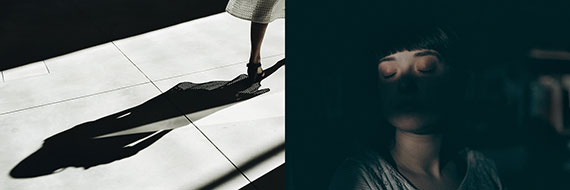
example of a shadow photo and a shadowed photo

Left photo by Martino Pietropoli, Right photo by maxime caron

The photograph on the left is a shadow, and the photo on the right is a woman who is shadowed.

A shadow occurs when light is blocked by an object, and that results in a darkened area on another object. Shadowed is when an object is hit by a shadow so that part of the object is obscured due to a lack of light.

Here’s the definition of a silhouette as taken from a dictionary: a silhouette is a dark shape and outline of a person or object as viewed against a lighter background.

Each of these three results from light has its strengths. Today, I’m going to concentrate on the silhouette.

When you finish this blog post, you’ll realize that the silhouette is one of your most powerful tools as a photographer.
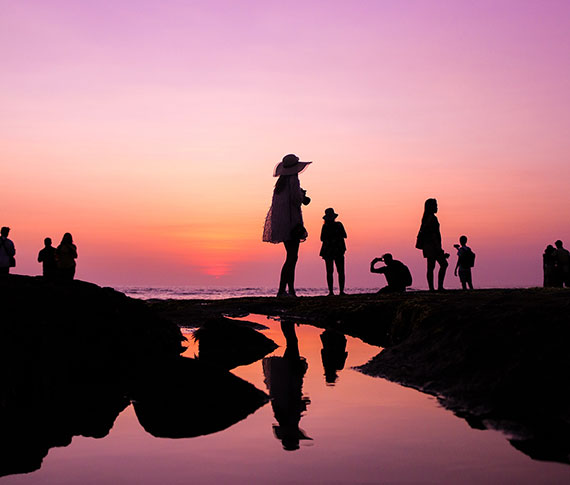
silhouettes are a powerful tool in photography

Photo by Sarah Arista

Key Thought: Silhouettes are powerful because they make use of shape. Recognizing shape is a primal instinct in the human brain. When a viewer perceives a shape within your photo, they can’t help but focus on it.

Secret to Success

The most potent silhouette photos include a storytelling element.

The above image hits every button. It has full silhouettes, a semi-silhouette (more on that in a minute), a strong story element, and fabulous color! What else could you ask for? Creating photos like this will definitely put you into the popular category.
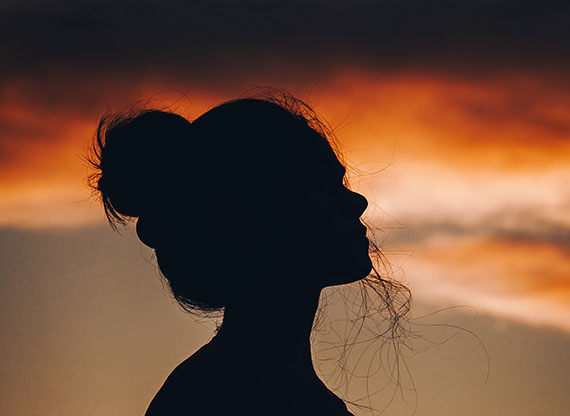
simple silhouette

Photo by Aadesh Choudhari

Here we have what is categorized as a ‘simple’ silhouette. It gives us a clearly defined shape, but it lacks a story element.

Simple silhouettes give little to a viewer other than a brief visual pleasure. This type of silhouette is a great way to begin as you master the basics if you are new to silhouette photography.

Let’s get started!

1. Get some help from a family member or a friend.
2. Take them out on a beautiful evening when the sun is setting.
3. Position them with no direct light source illuminating them on the camera side and a brightly lit sky behind them.
4. Start with a simple profile headshot (as illustrated above).
5. Use manual mode and take your meter reading from the sky behind your subject. Start with an ISO of 200, a shutter speed of 1/125th, and an aperture of f/8. Adjust the ISO as necessary to acquire correct exposure with that combination of shutter speed and aperture.
6. Set your file type to camera raw or .jpeg if not available.
7. Experiment with your exposure, using over and underexposure in ½ stop increments up to 2 stops from the nominal setting.
8. Study your results.

Key Thought: In full silhouette photography, underexposure will almost always work in your favor. It will darken the silhouette, while also adding density and color saturation to the background.

underexposure helps darken a silhouette

Photo by Adam Sherez

Let’s Recap What We’ve Learned so Far

  • A silhouette is the dark shape and outline of a person or object against a brighter background.
  • A silhouette is not a shadow or an object that is shadowed.
  • A simple silhouette displays a shape but has little storytelling value.
  • The best silhouette photography includes a storytelling element for added interest to viewers.

Time to Crank it up a Notch

1. Gather a model or two.
2. Pick out some props that could make exciting storytelling shapes, such as the fishing pole, hats, handbags, tennis racquets, a bicycle, or even a permanent structure like the dock in the opening photo for this post.
3. Plan out your story.
4. Pick a location that will put your models and props against the sky.
5. Set up your shoot time for sunset.
6. Follow the steps from the first challenge in this post.
7. Go for it!
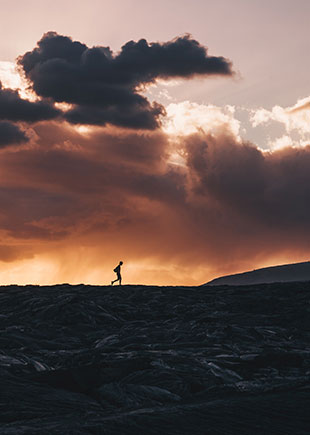
silhouette as a focal point

Photo by guile pozzi

The Silhouette as a Focal Point

Sometimes your silhouette will be the subject of the photograph as displayed in the first four example pictures.

However, another superpower of the silhouette is as a focal point. The image of the lone figure walking along the landscape (above) is a perfect example of a silhouette as a focal point.

The setting sun and stormy clouds over the landscape are the subjects. However, it’s the silhouette that rivets the eyes right where the photographer wants them and adds a storytelling element.

Try This!

Repeat the previous exercises, but now use the model(s) and/or props as a focal point to a landscape photo instead of the silhouette being the subject.
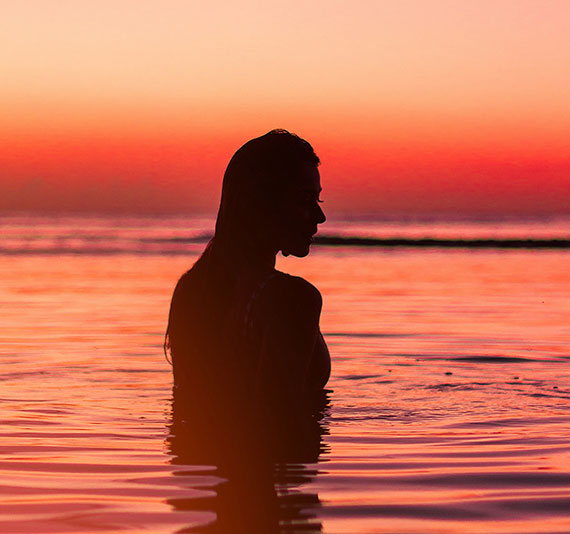
example of a semi-silhouette

Photo by diego acosta

Are there different types of silhouettes?

We often study the topic of light. We’ve come to realize that there are various types of light and that light can be manipulated to create different effects in photography.

There are also three different types of silhouettes.

1. The Full Silhouette
2. The Semi-Silhouette
3. The Translucent Silhouette

The full silhouette is what we’ve discussed so far in this blog post. The full silhouette is a dense black shape with no visual detail facing the camera. This style of silhouette relies entirely on the shape formed to generate a viewer’s interest.

The photo of the woman standing in the water at sunset (above) is an example of a semi-silhouette.

It meets the definition of a silhouette. We have a dark shape and outline against a brighter background.

However, with a semi-silhouette, there’s some degree of detail left within the silhouetted shape. If you look deeply at the woman in the water, you’ll see her arm, her hair, and other defining features of her face.

Semi-silhouettes are much harder to produce. They take greater skill in lighting and exposure control. Many semi-silhouettes are often tweaked in post-production.

When you’re ready, give the semi-silhouette a try!

1. Follow the steps in the previous challenges with the following additions.
2. Bring a photo assistant or two. Your kids can do this!
3. Bring two pieces of cardboard that you have painted white, or get foamboard, which is a bit sturdier, at the local art supply store. The boards should be at least 3 feet wide by 4 feet long.
4. Start with a simple headshot, as displayed in the 4th photo within this article.

Note: With a semi-silhouette, underexposure is not your friend.

5. Set up your model against the sky.
6. Set your meter reading pattern to matrix or evaluative (depending upon your camera)
7. Use aperture priority and set the aperture to f/8.
8. Check the shutter speed. If it’s slower than 1/125th, then raise the ISO setting until you get a shutter speed of at least 1/125th. If the shutter speed is faster than 1/125th, then you can leave it as is.
9. Without your helpers or your reflector boards, start taking pictures and vary the exposure by ½ stop increments, go both over and under by at least 2 stops, using your exposure compensation setting on the camera.
10. Finally, move your helpers into position on either side of the model. They should hold the reflector boards, just outside of the view of the camera, with the white side reflecting the bright background light onto the dark side of your silhouetted model.
11. Again, start with a proper exposure setting and then vary it using the exposure compensation feature of your camera by 2 stops over and under in ½ stop increments.
12. Study your results.
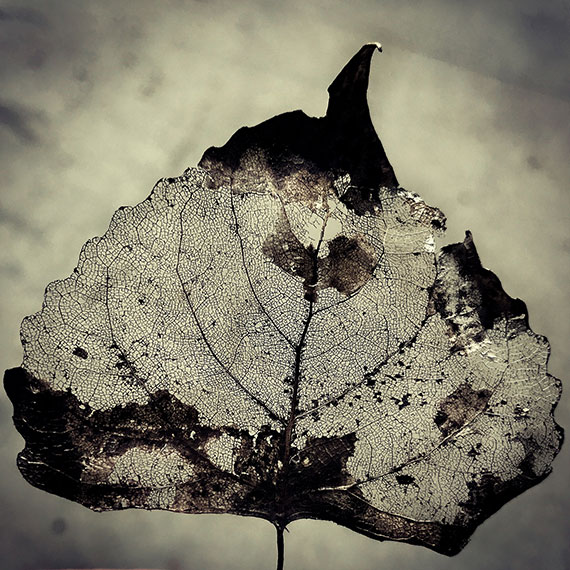
translucent silhouette

Photo by laze.life

This leaf depicts a translucent silhouette.

The leaf picture (above) meets the definition of a silhouette, but with an added dimension. When the object in silhouette isn’t wholly opaque, some of the brighter background light is going to pass through it.

This is known as translucent light.
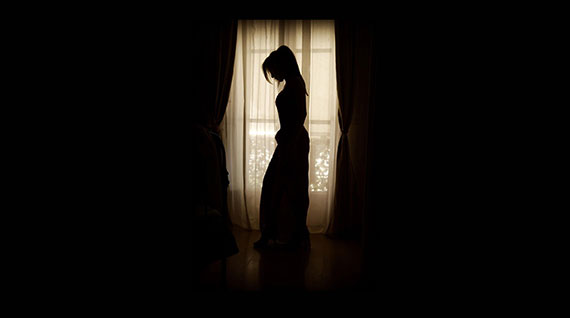
silhouette of woman standing in front of window

Photo by 272447

Idea: Locate a subject you can photograph that’s part opaque and part translucent. Follow the steps in the previous challenges. This type of subject will create new levels of creativity, storytelling, and problem solving for you.
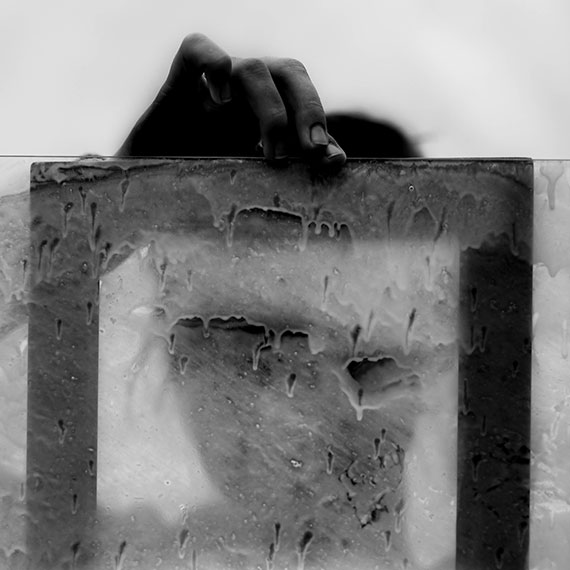
part opaque and part translucent silhouette

Photo by Rene Bohmer

By combining the three different types of silhouettes, you can create masterful pieces of artwork!

Are you up for this challenge?

Create a photograph where you mix all three types of silhouettes. Plus, don’t use the sky as the background. You have to find another background idea!

Post-Processing
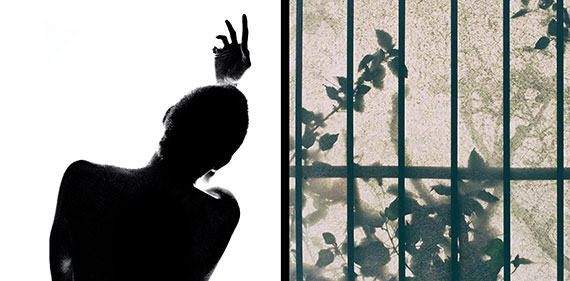
post processing silhouettes

Left photo by Nathan DeFiesta, Right photo by Gabriele Diwald

Post-processing offers additional steps to your creative process.

Silhouettes lend themselves very well toward creating high contrast photos that have a poster-like lithographic film effect.

They also work exceptionally well for double exposure effects as well as texture over overlays.

The Final Challenge

Take some of the silhouettes that you created in the earlier challenges and perform some post-processing magic on them.

A silhouette often works perfectly with various actions and presets. Don’t forget to try some textured overlays.

You can use a mobile phone app for editing if you don’t have a layer editing program like Photoshop. You can import any picture into your phone, and then get creative on your silhouette images with apps like Mextures or Lens Distortions!

When you complete your mobile phone app editing, transfer your picture back to your desktop workstation.
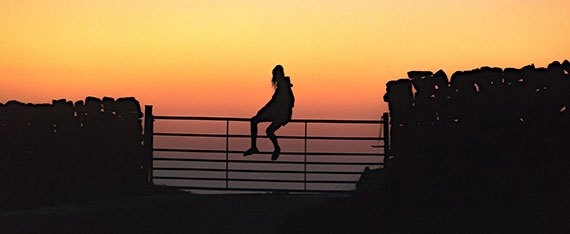
silhouette in front of sunset

Photo by Josh Millgate

How did you do?

  • Do you now understand the difference between a silhouette, a shadow, and being shadowed?
  • Do you now recognize the three different types of silhouettes?
  • Were you able to gain some experience and perspective on how to set up your camera and expose a silhouette picture?
  • Did you accomplish a semi-silhouette photo that made you happy?
  • Do you recognize the importance of adding a story element to a silhouette photo for added impact?
  • Did you try some dazzling effects in post-processing?
  • Did you attempt to create a photograph that included all three silhouette types?
  • Did you discover how slight underexposure can really bump up the color saturation in a silhouette picture?
  • Were you able to complete the challenge where you had to use a different background other than the sky?
  • Are you excited about working with more silhouettes in the future?

About the Author:
Kent DuFault is an author and photographer with over 35 years of experience. He’s currently the director of content at the online photography school, Photzy.com.

For Further Training:

Light is the basic building block of ALL photography. Hearing about great light, talking about great light, and maybe even recognizing certain types of light is not the same as UNDERSTANDING light which is what this in-depth guide covers. Understanding it means you’ll know how to “accurately” manipulate light to your advantage. It is currently 68% off until the end of the month, January 31.
understanding light

New: The Understanding Light Guide

“If you want to be the type of photographer that creates photographs, not one who just snaps them, you must understand how light works. And, once you understand how it works, it will be to your advantage to thoroughly understand how to manipulate it. These skills will help you create photographs that you can pre-visualize in your mind.”

Only 1 day left: The Understanding Light Guide at 68% Off

- - - - - - - - - - - - - - - - - - - - - - - - - - - - - - - - - - - - - - - - - - - - - - - - - - - - - - - - - - - - - - - - - - - - - - - - - -

Photography, like any art or skill, thrives on consistency. The journey to becoming an adept photographer is paved with regular practice. Learn how PictureCorrect Insiders can help.

- - - - - - - - - - - - - - - - - - - - - - - - - - - - - - - - - - - - - - - - - - - - - - - - - - - - - - - - - - - - - - - - - - - - - - - - - -

This post Silhouette Photography Tips appeared on PictureCorrect.


from PictureCorrect https://ift.tt/hAsdc9a
via IFTTT
tiistai 28. tammikuuta 2025

PictureCorrect.com: Prime Lenses: Pros and Cons

Prime lenses, or fixed focal length lenses, can offer a variety of benefits and drawbacks depending on the specific needs and preferences of the photographer. Here’s a list of some of the common pros and cons:

Today’s quick tip comes from the PictureCorrect Fundamental Cheat Sheets which are currently 75% off for a New Year sale that is wrapping up soon.

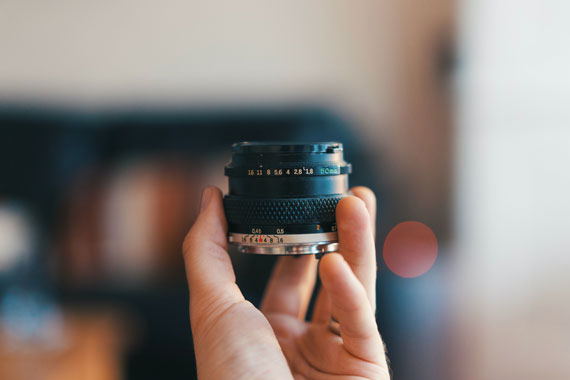
prime lens

Photo captured by Al Elmes

Pros of Prime Lenses

Image Quality: Prime lenses are often known for their superior image quality when compared to zoom lenses. They have fewer moving parts and less glass inside, which can lead to sharper images with less distortion.

Low Light Performance: Primes usually have wider maximum apertures (lower f-numbers), which let in more light. This can be a major advantage in low-light situations, and it also allows for more control over depth of field, facilitating beautiful bokeh and background blur.

Weight and Size: Prime lenses are often smaller and lighter than their zoom counterparts. This can be a significant advantage for photographers who need to carry their gear for long periods.

Price: Although there are some very expensive prime lenses, many are surprisingly affordable. Especially for beginners, they can be a cost-effective way to experiment with different focal lengths and aperture settings.

Focus on Composition: Since you cannot adjust the focal length, prime lenses encourage photographers to move around and experiment with composition, which can lead to more creative photos.

Cons of Prime Lenses

Lack of Flexibility: The most significant disadvantage of prime lenses is that they have a fixed focal length, meaning you can’t zoom in or out to adjust your composition. This lack of flexibility can be problematic in certain situations, such as when shooting wildlife, sports, or other types of photography where you can’t always control your distance from the subject.

Need for Multiple Lenses: If you need to shoot at a variety of focal lengths, you’ll need to carry multiple prime lenses. This can add weight to your bag, even though individual primes are generally lighter than zooms.

Changing Lenses: If you’re using primes and need to switch focal lengths frequently, you’ll have to change lenses often. This can be time-consuming and may expose your camera sensor to dust.

Cost: While individual prime lenses can be more affordable than zoom lenses, the cost can add up if you need to buy multiple primes to cover the same focal length range as a single zoom.

Learning Curve: Primes may have a steeper learning curve for beginners who are still getting a handle on composition and the effect of different focal lengths.

As you can see, whether a prime lens or a zoom lens is right for you largely depends on your specific needs, your shooting style, and your budget.

Have you ever wanted to photograph an amazing moment but missed the shot because you didn’t know the right camera settings to use? That’s where some of our most popular camera cheat sheets come in. They are currently 75% off for a New Year sale if you want to check them out.

fundamental photography sheets

New: Fundamental Photography Cheat Sheets

Whether you’re a seasoned professional or just starting out, photography cheat sheets can be a valuable resource for improving your skills and taking your photography to the next level. The perfect companion for any photographer. Print one out whenever you need it.

Deal ending soon: The Fundamental Camera Cheat Sheets at 75% Off

- - - - - - - - - - - - - - - - - - - - - - - - - - - - - - - - - - - - - - - - - - - - - - - - - - - - - - - - - - - - - - - - - - - - - - - - - -

Photography, like any art or skill, thrives on consistency. The journey to becoming an adept photographer is paved with regular practice. Learn how PictureCorrect Insiders can help.

- - - - - - - - - - - - - - - - - - - - - - - - - - - - - - - - - - - - - - - - - - - - - - - - - - - - - - - - - - - - - - - - - - - - - - - - - -

This post Prime Lenses: Pros and Cons appeared on PictureCorrect.


from PictureCorrect https://ift.tt/iZCNOst
via IFTTT
maanantai 27. tammikuuta 2025

PictureCorrect.com: Night or Low Light Photography Tips

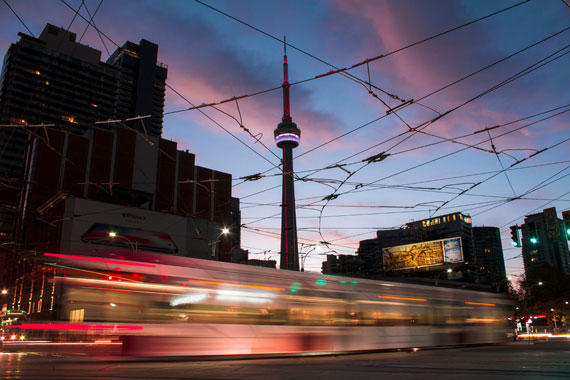
Twilight is a magical time. Just because the sun is down doesn’t mean you should put away your camera. When the sun sets, a different looking world exists for photographers. Colors don’t appear the way they do in daylight. Instead, colors display based on your camera’s white balance setting and how that setting matches the various light sources in your scene.

Relevant note: for help with noise reduction Topaz Photo AI is currently $30 Off

twilight cityscape

Photo captured by Jorge Vasconez

Backgrounds become less distracting. Street lights and lit building interiors give you outlines and shapes of various colors. Chances are not everything in your scene is lit. So what you see in your viewfinder is very close to what you’ll get if you expose carefully and properly. People in your scene don’t matter as much unless you want them to. Passers-by don’t register in your image. Even if they do, they are a blur unless you “freeze them” with a flash.

Cars show up as trails of red and amber lights. Skies take the color or aura of the city’s lights especially if there are low lying clouds to reflect it. Compared to other subjects, night photography doesn’t require a whole lot of equipment. The following are necessities:

  • a steady tripod
  • a cable release to trip the shutter. Most people can get by using the self-timer. The key is to not shake the camera when you trip the shutter.
  • a flashlight to illuminate the knobs and dials of your camera.
  • optional– a portable flash with lots of batteries

You pretty much will get what you see in your viewfinder. You don’t have to worry about trying to light anything except when you want to include a person in the picture. But I’ll discuss that later. The various elements in your picture lights itself freeing you to just concentrate on your composition and exposure. Fountains tend to have spots and colored lights on them, Christmas trees are never displayed in public without multicolored lights and beautiful majestic architecture in most civic centers are usually brightly lit up showcasing a city’s pride.

How to Set Up

  1. Change the ISO on your camera to 1600 or whatever the maximum number is.
  2. If you have a DSLR, attach your longest focal length lens on your camera and take a light reading. The idea here is to use the narrower field of view so that your light meter can give you a more accurate light reading. If you have spot meter reading mode on your camera, that will give you a similar result.
  3. Take note of the exposure reading you get in step 2.
  4. Calculate that exposure reading for ISO 200.
  5. Switch lenses to a wide angle or even a more “normal” focal length lens and compose your shot. Mount your camera to the tripod.
  6. Tighten your tripod head so that your camera doesn’t move in during the exposure.
  7. Finally, set the camera to the self-timer mode. Some cameras give you a choice of 2 seconds or 10 seconds. The whole idea is that you don’t want to jostle the camera when you press down on the shutter. Let the camera settle on its own—2 seconds ought to be enough for that.

Calculating Exposure

Making your camera’s CCD or CMOS more sensitive to light makes it easier for you to get a light reading. If you leave your camera’s ISO at 100 or even 200, your meter might not register a reading especially if the scene is something lit only by moonlight. Remember that there are always three components to exposure: ISO, aperture, and shutter speed. For the sake of our discussion, let’s say when you pointed your camera in step two at the scene, your meter recommends 1/15 of a second at f/2.8 ISO 1600.

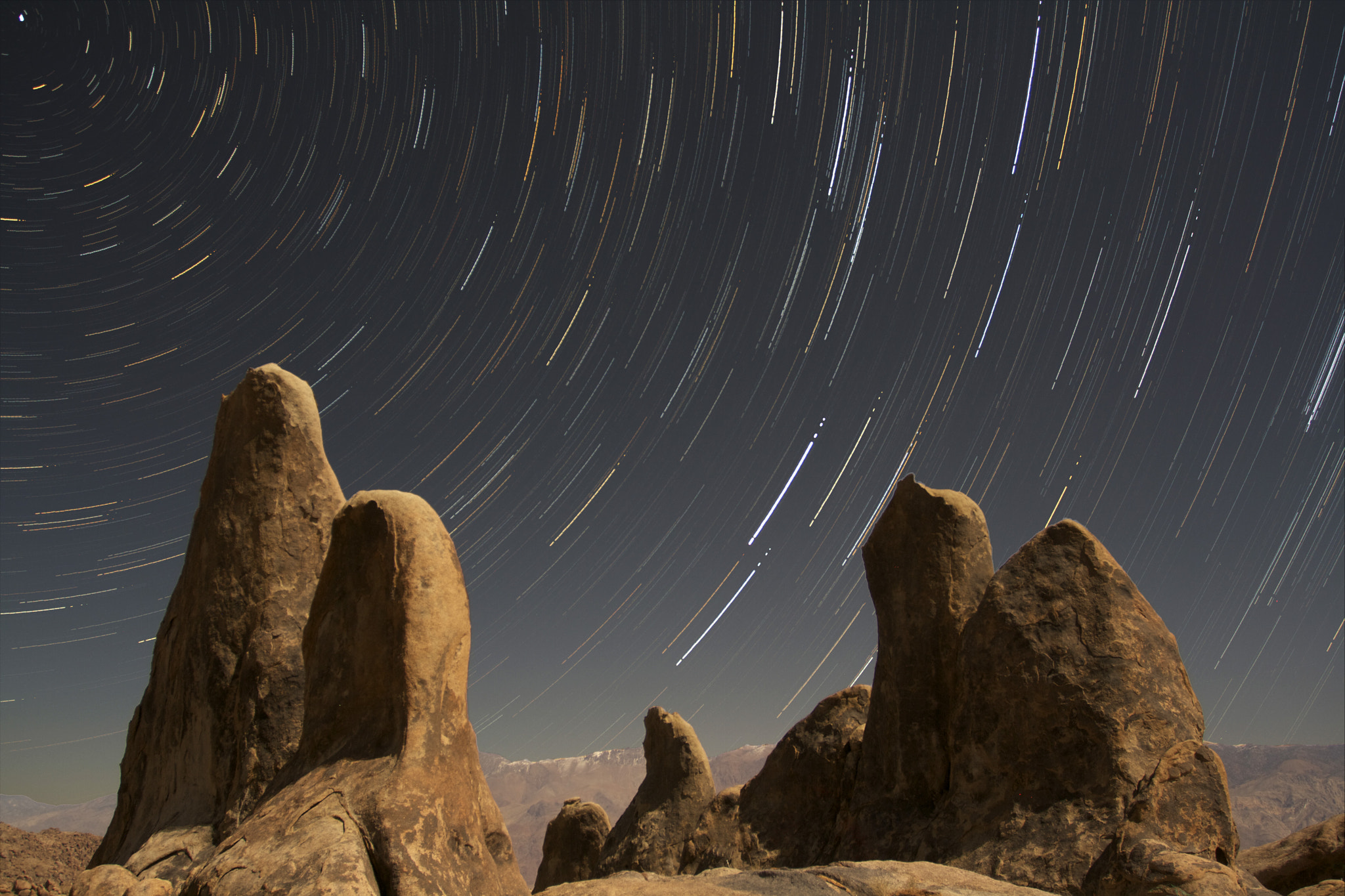
night-sky

Photo by Nick Fisher; ISO 6400, f/2.8, 6.5-second exposure.

If you haven’t read this yet, then just take my word on this. High ISO settings yield images that are extremely noisy. That’s the equivalent of grain in the analog or film world. So what we’ll do next is figure out equivalent exposure at say ISO 200. How did I arrive at a shutter speed of 1/2 a second for an aperture of f/2.8 when I switched the ISO from 1600 to 200?

ISO 200 is three f-stops less sensitive than ISO 1600. There are two ways for me to do achieve equivalent exposure. Let’s examine the first method which entails leaving the aperture the same at f/2.8 and only changing the shutter speed. That means I’m only increasing the time the shutter stays open, allowing in more light by the same three f-stop factor.

So I’ll need to set the shutter speed from 1/15 -> 1/8 -> 1/4 -> 1/2 second (counting from 1/15 second to 1/2 second = 3 stops). Now that you have your exposure for an aperture of f/2.8, let’s say your subject has some depth and you want to be sure more of it is in focus. You can figure your exposure by changing the just the aperture, leaving your ISO the same at 200.

low light exposure

Photo by Vincent Ferron.

Let’s say you decide you want make your picture at f/11 giving you more depth-of-field. You again have to increase the time the shutter stays open in the same ratio or f-stop to get the equivalent exposure. F/11 lets in four stops less light than f/2.8. So you’ll need to set a shutter speed of 4 whole seconds. (Counting the aperture settings from f/2.8 -> f/4 -> f/5.6 -> f/8.0 -> f/11 = 4 stops). (Counting the shutter speed settings from 1/2 second -> 1 second -> 2 seconds -> 4 seconds = 4 stops.) The second alternative to achieve equivalent exposure, opening the aperture to let in more light, is not always practical because I would be restricted to using my “fastest” lens, a 50 mm f/1.4. Even that lens has physical limits–its widest aperture is f/1.4. The resulting image would still be underexposed by one stop. I would need to buy a 50 mm f/1.2 lens. Have you priced one of these?

If you have a tripod, you have the luxury of dropping your shutter speed without worrying about camera shake. That is often your best option because you really don’t want to be making pictures the whole time at your widest aperture whether it is f/1.4 or f/2.8.

At those apertures, focus is critical since the depth-of-field is very shallow. If you happen to set up on a pedestrian bridge and people are working on it as you are making the exposure, then you might have to wait for a lull in foot traffic.

About the Author:
Peter Phun is an adjunct photography instructor at Riverside City College. He is a freelance photographer, web designer, and stay at home dad. He previously worked as a staff photographer for 18 years at The Press-Enterprise, SoCal’s fourth largest daily newspaper. Peter is the webmaster for the Mac group in the Inland Empire.

For Further Help with Low Light Noise Reduction:

In photo editing news, Topaz Photo AI was recently updated to version 3 and is designed to help with low light photography – removing noise and improving clarity. The company has marked it down $30 off for a short time if you want to try it out.

topaz photo ai

Topaz Photo AI (see how it works)

Sharpen, remove noise, and increase the resolution of your photos with tomorrow’s technology. Topaz Photo AI supercharges your image quality so you can focus on the creative part of photography.

Deal ending soon: Topaz Photo AI at $30 Off

- - - - - - - - - - - - - - - - - - - - - - - - - - - - - - - - - - - - - - - - - - - - - - - - - - - - - - - - - - - - - - - - - - - - - - - - - -

Photography, like any art or skill, thrives on consistency. The journey to becoming an adept photographer is paved with regular practice. Learn how PictureCorrect Insiders can help.

- - - - - - - - - - - - - - - - - - - - - - - - - - - - - - - - - - - - - - - - - - - - - - - - - - - - - - - - - - - - - - - - - - - - - - - - - -

This post Night or Low Light Photography Tips appeared on PictureCorrect.


from PictureCorrect https://ift.tt/irkJNYK
via IFTTT
lauantai 25. tammikuuta 2025

PictureCorrect.com: Finding Soft Light for Photography

Soft lighting is a sought-after technique in the world of photography. It helps in reducing harsh shadows, creating a dreamy atmosphere, and bringing out the best features in a subject. Whether you’re an amateur photographer or a seasoned professional, understanding where to find soft lighting can elevate your photographs to new heights. Here’s a guide to the best places to find soft lighting:

Related reminder: only a little while left for the Understanding Light Guide at 68% Off

Golden Hour Magic

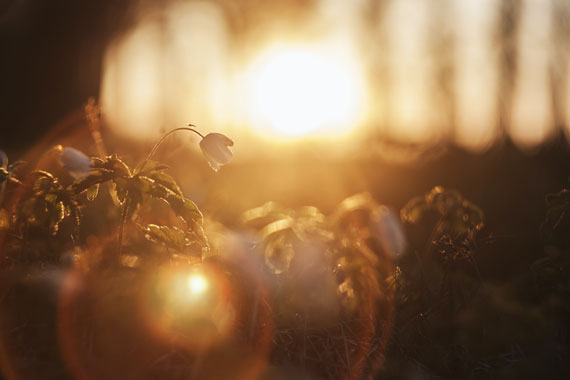
The golden hour is the short window of time just after sunrise and just before sunset. The sun is low on the horizon, casting a warm and soft glow. The shadows are long and diffused, giving images a cinematic and dreamy look. This time is ideal for portraits, landscapes, and almost any genre of photography. The exact timing of the golden hour varies depending on your geographical location and the time of year, so using apps like “Golden Hour Calculator” can be a huge help.

soft light hour

Photo captured by Ilja Tulit

Overcast Days

Contrary to popular belief, a sunny day is not always a photographer’s best friend. Bright sunlight can lead to overexposed photos and harsh shadows. Overcast days, however, act as a natural diffuser, spreading the light evenly and reducing contrasts. It’s like having a massive softbox in the sky, perfect for outdoor shoots.

Shaded Areas

On a bright day, look for areas of shade, such as under a tree, an alleyway, or the shadow side of a building. These spots provide protection from the direct sun, allowing for soft lighting conditions. Remember to adjust your camera settings to account for the lower light levels.

Indoor Windows

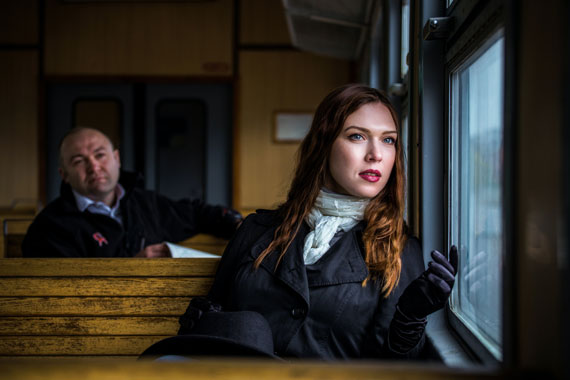
Windows can act as natural softboxes. Position your subject near a window, but not directly facing it. The light streaming in is diffused by the glass and any curtains or blinds, creating a soft illumination. Morning is often the best time for window lighting, but it depends on the direction the window faces and any obstructions outside.

window light

Photo captured by Vitaliy Shevchenko

Reflectors and Diffusers

If you’re serious about achieving soft lighting, investing in reflectors and diffusers is a wise choice. Reflectors bounce light onto your subject, filling in shadows and creating an even tone. Diffusers, on the other hand, scatter light rays, turning harsh light into a gentle glow. They can be particularly helpful when shooting in midday sun.

Artificial Lighting

Sometimes, nature won’t cooperate, and you’ll need to create your own soft lighting. Softboxes, umbrellas, and LED panels are all tools that photographers use to mimic the soft, diffused light found in nature. When using artificial lighting, it’s crucial to understand the direction and intensity of the light to achieve the desired effect.

In conclusion, soft lighting is a vital tool for photographers aiming to produce ethereal, flattering, and professional images. Whether harnessing the natural glow of the golden hour, utilizing the even illumination of overcast skies, or employing tools like reflectors and softboxes, understanding and mastering soft lighting techniques can truly transform one’s photographic output. Both natural and artificial sources offer opportunities to achieve this effect, making it accessible to photographers of all levels. By being observant, adaptive, and knowledgeable about these techniques, one can elevate their photography, capturing moments in their most beautiful light.

For Further Training:

Light is the basic building block of ALL photography. Hearing about great light, talking about great light, and maybe even recognizing certain types of light is not the same as UNDERSTANDING light which is what this in-depth guide covers. Understanding it means you’ll know how to “accurately” manipulate light to your advantage. It is currently 68% off if you want to take a look.

understanding light

New: The Understanding Light Guide

“If you want to be the type of photographer that creates photographs, not one who just snaps them, you must understand how light works. And, once you understand how it works, it will be to your advantage to thoroughly understand how to manipulate it. These skills will help you create photographs that you can pre-visualize in your mind.”

Deal ending soon: The Understanding Light Guide at 68% Off

- - - - - - - - - - - - - - - - - - - - - - - - - - - - - - - - - - - - - - - - - - - - - - - - - - - - - - - - - - - - - - - - - - - - - - - - - -

Photography, like any art or skill, thrives on consistency. The journey to becoming an adept photographer is paved with regular practice. Learn how PictureCorrect Insiders can help.

- - - - - - - - - - - - - - - - - - - - - - - - - - - - - - - - - - - - - - - - - - - - - - - - - - - - - - - - - - - - - - - - - - - - - - - - - -

This post Finding Soft Light for Photography appeared on PictureCorrect.


from PictureCorrect https://ift.tt/75ErOun
via IFTTT

perjantai 24. tammikuuta 2025

PictureCorrect.com: Afternoon Light Photography Tips

Capturing stunning photographs is not solely reliant on ideal lighting conditions. Even in mediocre lighting, you can still create beautiful images if you understand how to work with the available light. Afternoon light, in particular, can be a challenging time for photography, but with the right techniques, you can transform ordinary scenes into extraordinary moments.

Related reminder: only a little while left for the Understanding Light Guide at 68% Off

afternoon light

Photo captured by Nicholas Bartos

In this blog post, we will explore some valuable tips to enhance your afternoon light photography when faced with less-than-ideal lighting conditions.

Embrace Soft Light:

During the afternoon, the sun is often high in the sky, resulting in harsh shadows and intense highlights. To counteract this, seek out areas where the light is diffused or softened. Look for open shade or utilize objects like trees, buildings, or curtains to create a natural filter for the sunlight. This will help you achieve more balanced and flattering lighting conditions for your subjects.

Utilize Reflectors:

When dealing with mediocre lighting, reflectors become invaluable tools. They bounce light back onto your subject, filling in shadows and creating a more even and pleasing exposure. Portable reflectors are available in various sizes and colors, allowing you to experiment and adapt to different shooting scenarios. Silver reflectors provide a cooler and more intense light, while gold reflectors add warmth to the scene.

Explore Silhouettes:

Afternoon light is often ideal for creating striking silhouettes. Position your subject between the camera and a strong light source, such as the sun or a well-lit background. Expose for the brighter background, allowing your subject to be underexposed, resulting in a silhouette effect. Experiment with different angles and compositions to add depth and interest to your images.

Incorporate Shadows Creatively:

Rather than trying to eliminate shadows, learn to embrace them creatively. Shadows can add depth, texture, and drama to your photographs. Look for interesting shadow patterns cast by buildings, trees, or other objects. Experiment with composition to include shadows as an integral part of your image, adding a sense of mystery and intrigue.

afternoon shadows

Photo captured by Sven Wilhelm

Experiment with Backlighting:

Backlighting occurs when the main source of light is behind your subject. This technique can create a luminous and ethereal effect, emphasizing the contours and shapes of your subject. Use your camera’s exposure compensation feature to prevent your subject from becoming a silhouette. You may need to adjust the exposure settings to find the right balance between preserving details in the subject and retaining the beautiful backlight glow.

Incorporate Warm Colors:

During the afternoon, the sunlight tends to have a warm and golden hue. Take advantage of this by seeking out scenes or subjects that complement these tones. Look for vibrant foliage, golden-hour landscapes, or architecture with warm hues. Use the warm light to your advantage, and consider adjusting the white balance in post-processing to enhance the colors further.

Pay Attention to Composition:

In mediocre lighting conditions, strong composition becomes even more critical. Look for leading lines, interesting textures, and contrasting elements to create visual interest. Experiment with different angles and perspectives to make the most of the available light. Additionally, keep an eye out for details and smaller scenes that might be enhanced by the particular lighting conditions.

While afternoon light can present challenges for photographers, understanding how to work with mediocre lighting conditions allows you to unlock new creative possibilities. Embrace soft light, experiment with silhouettes and shadows, utilize reflectors, and explore backlighting to add depth and drama to your images. By incorporating warm colors and paying attention to composition, you can capture remarkable photographs even in less-than-ideal lighting situations. So, grab your camera and venture out during the afternoon hours to unleash your creativity and capture the magic of the moment.

For Further Training:

Light is the basic building block of ALL photography. Hearing about great light, talking about great light, and maybe even recognizing certain types of light is not the same as UNDERSTANDING light which is what this in-depth guide covers. Understanding it means you’ll know how to “accurately” manipulate light to your advantage. It is currently 68% off if you want to take a look.

understanding light

New: The Understanding Light Guide

“If you want to be the type of photographer that creates photographs, not one who just snaps them, you must understand how light works. And, once you understand how it works, it will be to your advantage to thoroughly understand how to manipulate it. These skills will help you create photographs that you can pre-visualize in your mind.”

Deal ending soon: The Understanding Light Guide at 68% Off

- - - - - - - - - - - - - - - - - - - - - - - - - - - - - - - - - - - - - - - - - - - - - - - - - - - - - - - - - - - - - - - - - - - - - - - - - -

Photography, like any art or skill, thrives on consistency. The journey to becoming an adept photographer is paved with regular practice. Learn how PictureCorrect Insiders can help.

- - - - - - - - - - - - - - - - - - - - - - - - - - - - - - - - - - - - - - - - - - - - - - - - - - - - - - - - - - - - - - - - - - - - - - - - - -

This post Afternoon Light Photography Tips appeared on PictureCorrect.


from PictureCorrect https://ift.tt/cGoPzu2
via IFTTT

torstai 23. tammikuuta 2025

PictureCorrect.com: Understanding Light for Photographers Guide

Light is the basic building block of ALL photography. Hearing about great light, talking about great light, and maybe even recognizing certain types of light is not the same as UNDERSTANDING light. Understanding it means you’ll know how to “accurately” manipulate light to your advantage. This popular eBook on the subject is currently 68% today if you want to check it out. Found here: The Understanding Light Guide at 68% Off

understanding light

New: The Understanding Light Guide

Without light there would be no photography. It’s as simple as that. Understanding light gives you the power to control the mood and feeling in your shots.

“If you want to be the type of photographer that creates photographs, not one who just snaps them, you must understand how light works. And, once you understand how it works, it will be to your advantage to thoroughly understand how to manipulate it. These skills will help you create photographs that you can pre-visualize in your mind.”

In this guide you’ll discover:

  • Exercises that will teach you how to light shapes and control light. (Pages 6 – 7)
  • Study Reflectance and Refraction, and you will jump leap years ahead of your competition. (Pages 14 – 16)
  • Knowing this one characteristic of light- will vastly improve your flash photography. (Pages 20 – 23)
  • Do you have trouble using “bounced” light? Fix your problems here. (Pages 25 – 31)
  • This characteristic of light practically dictates how someone will react to your photograph! (Pages 37 – 44)
  • Light bounces. Study “HOW” the surface you’re bouncing it from can vastly affect your photograph! (Pages 47 – 50)
  • These five tips on lighting will help you get a perfect shot every time! (Pages 51 – 60)
  • Light creates these- And they are just as important as the light itself! (Page 62)
  • Study the relationship between “Camera point-of-view” and the Light Source. (Pages 74 – 83)
  • How to judge Light by simply looking at it. (Pages 74 – 83)
  • And much more
light for photographers

The difference understanding light can make

“As a photographer, there is no greater achievement than bringing your imagination to life through the manipulation of light.” -Author Kent DuFault

How to Get a Discounted Copy Today (With Bonuses):

The eBook is currently 68% off today (normally $60, currently just $19). It also comes with an unbeatable 365-day, money-back guarantee so there’s no risk in trying it. Plus, you’ll get two bonus cheat sheets on light and color temperature – all of which ends soon.

Deal found here: The Understanding Light Guide at 68% Off

- - - - - - - - - - - - - - - - - - - - - - - - - - - - - - - - - - - - - - - - - - - - - - - - - - - - - - - - - - - - - - - - - - - - - - - - - -

Photography, like any art or skill, thrives on consistency. The journey to becoming an adept photographer is paved with regular practice. Learn how PictureCorrect Insiders can help.

- - - - - - - - - - - - - - - - - - - - - - - - - - - - - - - - - - - - - - - - - - - - - - - - - - - - - - - - - - - - - - - - - - - - - - - - - -

This post Understanding Light for Photographers Guide appeared on PictureCorrect.


from PictureCorrect https://ift.tt/6V24rJF
via IFTTT

keskiviikko 22. tammikuuta 2025

PictureCorrect.com: When to Apply Sharpening in the Photo Editing Process

Photography, in its essence, is an art of capturing light. Once that light is captured, the journey isn’t quite over – the art of post-processing begins. Photo editing allows us to accentuate the best parts of our images, fix imperfections, and achieve a final look that’s both appealing and striking. One such technique, often left for the end, is sharpening. Let’s dive into why it’s best to apply sharpening at the end of the photo editing process.

Relevant note: on sale today is the popular Topaz Photo AI Sharpener at $30 Off

sharpen edit

1. Understanding Sharpening

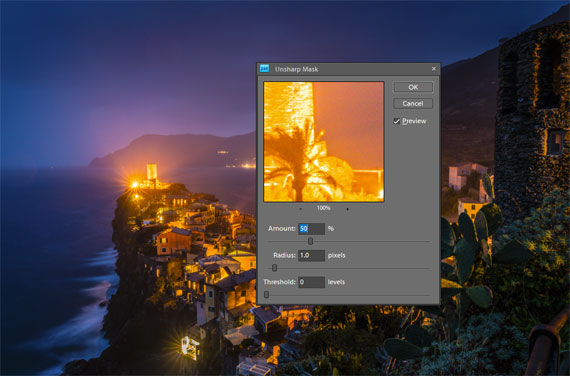
Sharpening is a post-production technique that increases the contrast along the edges within an image. This accentuates details, making the image look clearer and more refined. However, like any tool, if used excessively or inappropriately, it can lead to undesirable artifacts like halos or increased noise.

2. Maintaining Image Quality

During the editing process, numerous adjustments – be it exposure, contrast, color correction, or retouching – are made to the image. Every adjustment, especially when done in raster format (like JPEG), can potentially degrade the image quality slightly. If you sharpen early and make subsequent edits, you risk exacerbating the unwanted artifacts introduced by sharpening. By sharpening at the end, you ensure that you’re applying this effect to the final version of the image, preserving maximum detail.

3. Tailored to Output

The required amount of sharpening can vary depending on where the image will be displayed. For instance, a photo meant for Instagram might need different sharpening than one intended for a large print. By leaving sharpening to the end, you can adjust according to the specific output in mind, ensuring optimal clarity.

4. Flexibility with Layers

For those using advanced photo editing software like Adobe Photoshop, sharpening at the end allows for the use of layers. This means you can adjust the sharpening intensity on a separate layer without affecting the underlying edits. This non-destructive approach offers great flexibility, as you can easily tweak or revert the sharpening without redoing the entire editing process.

5. Avoiding Cumulative Noise

Noise is the grainy or speckled appearance often seen in photos, especially those taken in low light. Editing can amplify noise, and sharpening can make it even more pronounced. If sharpening is applied early in the process, subsequent edits can amplify this noise even further. By sharpening at the end, you can better control and minimize the enhancement of noise.

6. Better Visual Judgment

After all the edits and enhancements, the image’s overall look and feel will be different from the starting point. What might have seemed like an appropriate amount of sharpening at the beginning could be overkill by the end. By waiting, you allow yourself to judge the appropriate sharpness based on the final product.

In Conclusion

While sharpening is undeniably a powerful tool in the photographer’s post-production arsenal, its timing in the editing process is crucial. By saving sharpening for the end, photographers can ensure they’re delivering the highest quality image, tailored to its intended output, with minimized artifacts and noise. Remember, photo editing is as much about the sequence of steps as it is about the steps themselves. Happy editing!

For Further Help with Image Sharpening:

In photo editing news, Topaz Photo AI was recently updated to version 3. The company has marked it down $30 off for a short time if you want to try it out.

topaz photo ai bird

New: Topaz Photo AI (see how it works)

Sharpen, remove noise, and increase the resolution of your photos with tomorrow’s technology. Topaz Photo AI supercharges your image quality so you can focus on the creative part of photography.

Deal ending soon: Topaz Photo AI at $30 Off

- - - - - - - - - - - - - - - - - - - - - - - - - - - - - - - - - - - - - - - - - - - - - - - - - - - - - - - - - - - - - - - - - - - - - - - - - -

Photography, like any art or skill, thrives on consistency. The journey to becoming an adept photographer is paved with regular practice. Learn how PictureCorrect Insiders can help.

- - - - - - - - - - - - - - - - - - - - - - - - - - - - - - - - - - - - - - - - - - - - - - - - - - - - - - - - - - - - - - - - - - - - - - - - - -

This post When to Apply Sharpening in the Photo Editing Process appeared on PictureCorrect.


from PictureCorrect https://ift.tt/Y4qZbmH
via IFTTT

maanantai 20. tammikuuta 2025

PictureCorrect.com: How to Choose the Best Color Profile in Lightroom

When you want to adjust the colors of your photograph in Lightroom, most will typically go straight for the HSL panel. This will get you satisfactory results—most of the time.

Eventually, though, you’ll come across an outlier image that just doesn’t seem to play nice with the HSL panel.

This article is a general overview of the profile lessons from the new Lightroom for Landscapes Course (only 1 day left for 70% off) if you’d like to learn more on how to master the fantastic world of Lightroom.

For example, you want to shift the reds more towards orange, but the sliders aren’t picking up on the exact pixels you wish to change.

Or perhaps your HSL adjustments are too broad and you’re shifting other hues close to red that you want to remain untouched.

Either way, your color processing is off the mark. It can become frustrating.

best color profile lightroom

Photo by Robert Katzki

What if you could decide which pixels are considered to be a specific hue? What if you had more power to include (or exclude) areas from your color adjustments?

In comes profiles, which let you go “beneath the surface” and determine how the colors in your RAW file are interpreted and displayed on your computer.

How Color Profiles Work in Lightroom

Choosing a profile is a lot like choosing a film stock for analog photography. It determines how your colors and tones are interpreted by Lightroom from the RAW file data. The RAW file needs to be “converted” by a RAW processor in order to be displayed visually—and the profile plays a role in how your colors and tones are translated.

For example, the profile can determine if a particular pixel is either primarily red or orange. Then the HSL panel (and your other color processing tools) will target those hues depending on what pixels have been assigned to that particular color.

So the practical use of profiles extends beyond creative effects. Since they control how your colors and tones are interpreted by Lightroom, you can change which pixels are being affected by your color processing tools.

For example, if you want to adjust the blues in the sky, the HSL panel may not pick up on those pixels if the hue is not “blue” enough. By changing your profile, you can also change the inherent hue of the pixel itself, which will allow your “blue” targeting tools to more easily recognize those pixels.

Profiles are Retroactive

Another fantastic benefit of camera profiles is that you can always change them at any time during your processing workflow. Sinc profiles work “under the hood” to define your colors and tones, you won’t reverse or otherwise change any processing you’ve done to your image.

This is one reason why profiles are preferred to presets, since with presets you run the risk of removing any processing you’ve done when you select a new preset.

How to Choose the Best Color Profile

Since a profile determines how your colors are translated from the RAW file, they can also be used to enhance the detail and texture of those colors—especially if they are saturated.

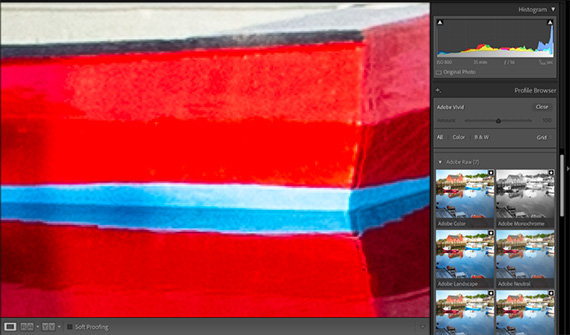
In the example image below, I zoomed into a very vibrant red boat. When my profile is set to Adobe Vivid, there is very little local contrast within that red color. The detail lacks interest and appears to be clipped.

best color profile lightroom

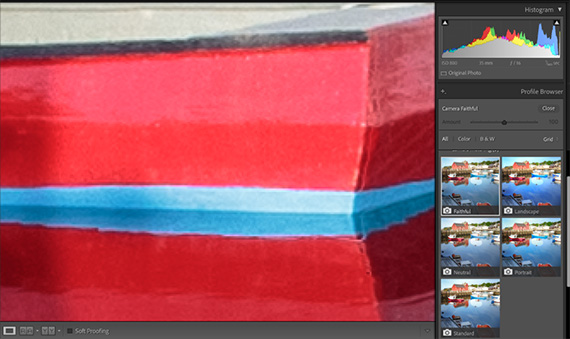
However, note what happens when I make a simple switch to the Camera Faithful profile. See how much more texture and variation of lightness there is within that red color?

best color profile lightroom

I can always add local saturation later to make this red as vibrant as Adobe Vivid, but now I have that additional light and shadow detail to work with, which was not present originally.

When choosing a profile, you should always consider the quality of your hues (how much detail is present) as opposed to the visual impact (or “wow-factor”) that your colors have. This will not only give you a higher quality image, but provides a solid foundation for your color processing later.

For Further Training:

This article is a general overview of how to choose the best profile in Lightroom, but barely scratches the surface as to what is possible. The full in-depth program will walk you through all of the extraordinary tools and techniques that Lightroom Classic has to offer.

lightroom landscapes

Complete Lightroom Training Collection

Lightroom for Landscapes is currently 70% off until tomorrow if you want to take a look. Learn a proven system for creating extraordinary, artistic photographs with complete confidence in Lightroom.

Only 1 day left: Lightroom for Landscapes at 70% Off

- - - - - - - - - - - - - - - - - - - - - - - - - - - - - - - - - - - - - - - - - - - - - - - - - - - - - - - - - - - - - - - - - - - - - - - - - -

Photography, like any art or skill, thrives on consistency. The journey to becoming an adept photographer is paved with regular practice. Learn how PictureCorrect Insiders can help.

- - - - - - - - - - - - - - - - - - - - - - - - - - - - - - - - - - - - - - - - - - - - - - - - - - - - - - - - - - - - - - - - - - - - - - - - - -

This post How to Choose the Best Color Profile in Lightroom appeared on PictureCorrect.


from PictureCorrect https://ift.tt/SQX71er
via IFTTT

sunnuntai 19. tammikuuta 2025

PictureCorrect.com: The Difference Between Contrast, Clarity & Texture in Lightroom

When it comes to adjusting your contrast in Lightroom, the overall goal is to enhance the texture and interest of your photograph in a way that both supports your creative vision and protects your tones from unintentional damage, such as clipping your shadows or highlights.

Your contrast, clarity and texture sliders are your go-to tools for manipulating the value of your tones. However, I find that many photographers aren’t aware of the differences between these three too—specifically, when it’s appropriate to use one over the other. All three are tonal adjustments, but have very different results.

This article is a general overview of the tonal slider lessons from the Lightroom for Landscapes Program (currently 70% off), if you’d like to learn more on how to master the fantastic world of Lightroom.

Contrast, Clarity and Texture are for Enhancing Detail

The first thing to understand is that contrast, clarity, and texture all accomplish the same thing: they control the contrast between your tones. Or rather, how far away they are from one another on the value scale.

Increasing contrast will push those tones further apart (making your shadows darker and highlights brighter), while decreasing contrast will bring them closer together (reducing the gap between each pixel on the value scale). This is also known as low-frequency and high-frequency detail.

The eyes are naturally drawn to areas of high frequency (or high contrast), so adding contrast is a fantastic way to accentuate certain focal points and bring more attention to them. Inversely, reducing contrast will make a focal point less obvious, which is useful for when you want to divert attention away from distracting elements in your frame.

The Contrast Slider

The contrast slider is your most brute-force adjustment to your tones because it affects the entire tonal range, pushing your shadows darker and highlights brighter and plucking away midtones in the process—and thus losing detail. Although any kind of contrast increase will essentially remove those transition values, the contrast slider can be the most damaging.

This should be reserved for only the most dramatic adjustments, when there is very little contrast in your image to begin with. A little contrast will go a very long way, and thus you can more easily damage your photo with the contrast slider.

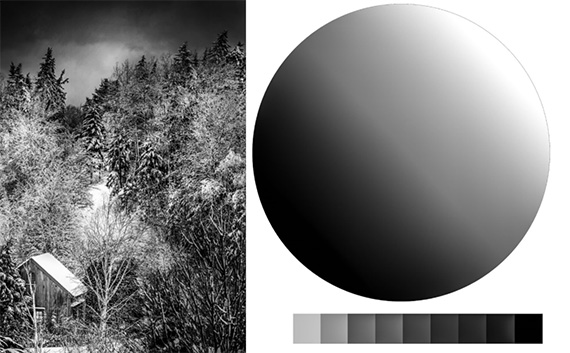
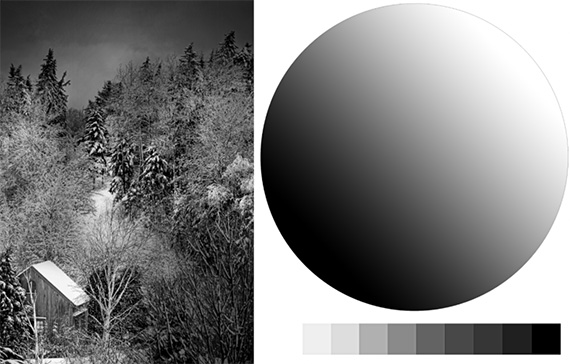
In the comparison below, you can see that contrast at 100 affects all tones globally, and is pushing some pixels beyond the dynamic range of the image (clipping detail).

lightroom contrast slider explained

The original image

lightroom contrast slider explained

The image with contrast bumped up to 100

The Clarity Slider

The clarity slider is a bit smarter, and will focus on your midtone contrast rather than all values of your image. This means that your brightest highlights and darkest shadows will be somewhat protected since clarity will not pick them up for adjustment.

Clarity will also affect the transition area between each tone (the border where a pixel of one value meets a pixel of another value) and will add local contrast along those transitions to enhance the apparent depth.

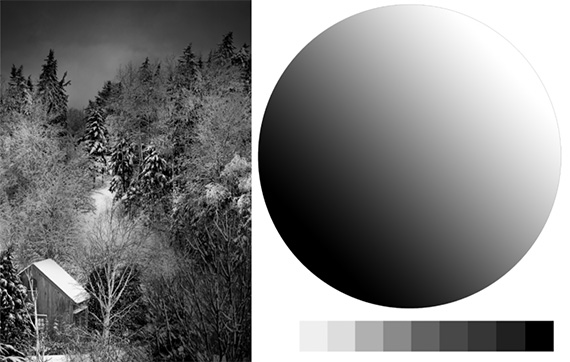
Notice in the example image below, with clarity at 100, how each swatch now has a more three-dimensional appearance, despite the pixels within each swatch being of identical value.

lightroom clarity slider explained

With the clarity slider boosted to 100

In other words, there is now variation within a specific value that enhances depth and texture. This is why the clarity slider can give your image a “glowy” or “cartoonish” appearance when used heavily.

And since clarity will target your midtones, it’s often useful to actually reduce the global contrast with the contrast slider—which will push your brightest highlights and darkest shadows more toward the midtones. This tactic can “feed” pixels into the tonal range where clarity is most effective.

The Texture Slider

Lastly, we have the texture slider. This is your finest contrast adjustment. It will enhance the detail of your midtones much like the clarity slider does, but will take it a step further and target only areas of high frequency.

If your existing texture is smooth (such as a cloudless sky or still water), adding texture will not benefit those areas, as there is no texture to begin with. The texture slider will take your existing contrast into consideration and will exclude low-frequency detail from the adjustment.

lightroom texture slider explained

With the texture slider boosted to 100

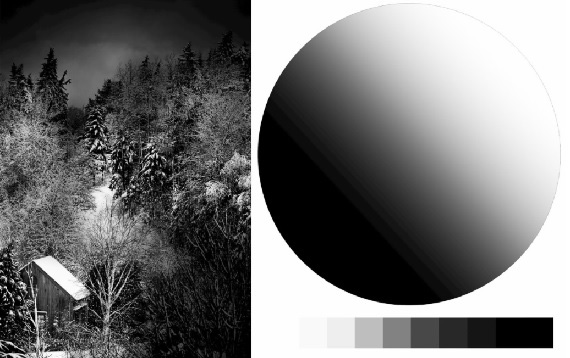
We can see here that a texture increase of 100 has made virtually no difference in the value scale or the tonal sphere, since those areas are low-frequency (smooth with unvarying tones). The only exception, if you look closely, are the sharp transitions between each tonal swatch.

When adjusting contrast to enhance detail in Lightroom, it’s best to use the contrast slider sparingly—and only on images that have a lot of breathing room on the extreme ends of your histogram. The clarity and texture sliders will be your go-to tools for adding contrast intentionally and accurately.

For Further Training:

This article is a general overview of how to add depth and interest in Lightroom, but barely scratches the surface as to what is possible. The full in-depth program will walk you through all of the extraordinary tools and techniques that Lightroom Classic has to offer.

lightroom for landscapes

Lightroom for Landscapes (see inside)

Lightroom for Landscapes is currently 70% off today if you want to take a look. Learn a proven system for creating extraordinary, artistic photographs with complete confidence in Lightroom.

Deal ending soon: Lightroom for Landscapes at 70% Off

- - - - - - - - - - - - - - - - - - - - - - - - - - - - - - - - - - - - - - - - - - - - - - - - - - - - - - - - - - - - - - - - - - - - - - - - - -

Photography, like any art or skill, thrives on consistency. The journey to becoming an adept photographer is paved with regular practice. Learn how PictureCorrect Insiders can help.

- - - - - - - - - - - - - - - - - - - - - - - - - - - - - - - - - - - - - - - - - - - - - - - - - - - - - - - - - - - - - - - - - - - - - - - - - -

This post The Difference Between Contrast, Clarity & Texture in Lightroom appeared on PictureCorrect.


from PictureCorrect https://ift.tt/q07gF4U
via IFTTT

lauantai 18. tammikuuta 2025

PictureCorrect.com: When to Use a Lens Filter

Here’s another quick tutorial from the Camera Fundamentals Cheat Sheets (New Year Sale is ending soon)!

Using a lens filter on a camera lens can be a great way to enhance your photos in certain situations and protect your lens. They are not essential, but can be helpful sometimes.

lens filter

Photo captured by Chris Yang

The most common lens filters and their uses include:

UV filters: These filters block Ultraviolet light and reduce haze, making them useful for protecting your lens and improving image clarity on hazy days.

Polarizing filters: These filters reduce glare and improve color saturation, making them great for landscape and outdoor photography.

Neutral density filters: These filters reduce the amount of light entering the lens, allowing you to use longer exposure times or wider apertures without overexposing the image. They are often used for landscape and long exposure photography.

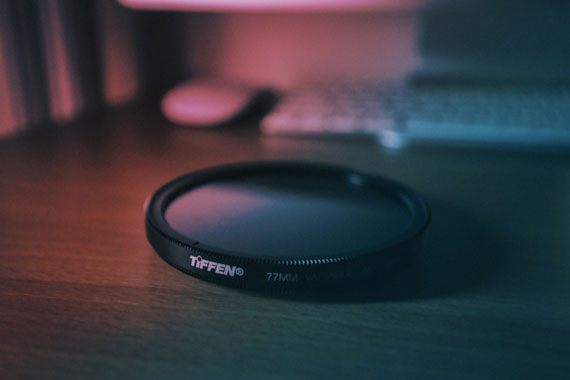
Graduated neutral density filters: These filters are clear on one half and gradually transition to a darker shade in the other half. They are often used for landscape photography to balance the exposure between the sky and the foreground.

Soft focus filters: These filters create a soft, dreamy effect by diffusing the light entering the lens. They are often used in portrait photography.

Macro filters: These filters are used for close-up photography, decreasing minimum focus distance, allowing you to focus on small objects at a very close distance.

Color Correcting filters: Also referred to as cooling and warming, color conversion, or color compensating filters, are utilized to correct and enhance the color of a scene. Warming and cooling filters are effective for adjusting indoor lighting and creating a gloomier or sunnier atmosphere, while colored filters can be used to bring out specific hues in the scene.

Lens filters can affect image sharpness, but the impact depends on the quality of the filter you are using. High-quality filters, made from good materials and with precise coatings, usually have minimal impact on image sharpness. However, low-quality filters can potentially degrade the image quality by introducing unwanted artifacts, such as:

  • Softening: A low-quality filter may cause a slight softening of the image, reducing the overall sharpness.
  • Ghosting and flaring: Poor-quality filters can introduce ghosting (duplicate reflections of bright light sources) or flaring (hazy light artifacts), which can reduce image sharpness and contrast.
  • Vignetting: Some filters, especially when stacked or used with wide-angle lenses, can cause vignetting (a gradual darkening of the image corners), which may affect image sharpness near the edges.
  • Color casts: Low-quality filters might introduce color casts, which can alter the overall color balance and make the image appear less sharp.

To minimize the impact on image sharpness, invest in high-quality lens filters from reputable manufacturers. These filters are designed to maintain optimal image quality while providing the desired effects or protection. Keep in mind that even with high-quality filters, there might be a slight impact on image quality, so it’s essential to consider when and how to use filters effectively.

For a handy cheat sheet on this subject that you can print out for reference, you may want to check out this launch sale before it is over.

Have you ever wanted to photograph an amazing moment but missed the shot because you didn’t know the right camera settings to use? That’s where some of our most popular camera cheat sheets come in. They are currently 75% off for a New Year sale if you want to check them out.

fundamental photography sheets

New: Fundamental Photography Cheat Sheets

Whether you’re a seasoned professional or just starting out, photography cheat sheets can be a valuable resource for improving your skills and taking your photography to the next level. The perfect companion for any photographer. Print one out whenever you need it.

Deal ending soon: The Fundamental Camera Cheat Sheets at 75% Off

- - - - - - - - - - - - - - - - - - - - - - - - - - - - - - - - - - - - - - - - - - - - - - - - - - - - - - - - - - - - - - - - - - - - - - - - - -

Photography, like any art or skill, thrives on consistency. The journey to becoming an adept photographer is paved with regular practice. Learn how PictureCorrect Insiders can help.

- - - - - - - - - - - - - - - - - - - - - - - - - - - - - - - - - - - - - - - - - - - - - - - - - - - - - - - - - - - - - - - - - - - - - - - - - -

This post When to Use a Lens Filter appeared on PictureCorrect.


from PictureCorrect https://ift.tt/FE0nNuR
via IFTTT

perjantai 17. tammikuuta 2025

PictureCorrect.com: Five “Hidden” Features of the Histogram in Lightroom

This article is a general overview of the histogram lessons from the Lightroom for Landscapes Tutorials if you’d like to learn more on how to master the fantastic world of Lightroom.

The Histogram is Directly Connected to Your Tonal Sliders

If you ever wondered what exact tones you are adjusting with the basic panel sliders (exposure, highlights, shadows, whites, blacks), then the histogram can be of great assistance.

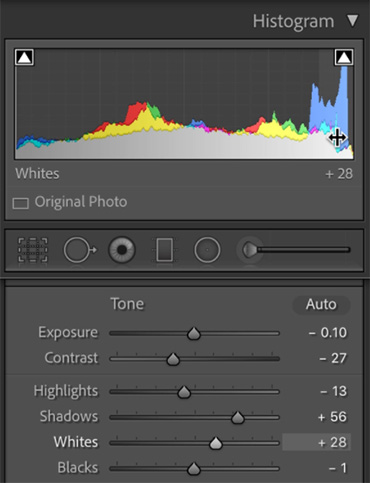
When you hover over the histogram with your mouse, notice that certain tonal groups will be highlighted. These “ranges” represent your five tonal sliders in the basic panel. They offer a visual representation of how many tones in your image are within each group.

You can also adjust these tones directly on the histogram. Place your mouse over the histogram until a tonal group becomes highlighted. Then click and drag your mouse left and right to make an adjustment to the corresponding slider in the basic panel.

lightroom histogram secrets

Histogram Tonal Groups

For example: if you hover over the “whites” group in the histogram and move to the right, your whites slider in the Basic panel will move to the right as well, thus brightening the lightness value of those particular pixels.

You Can Monitor Your Color Channels

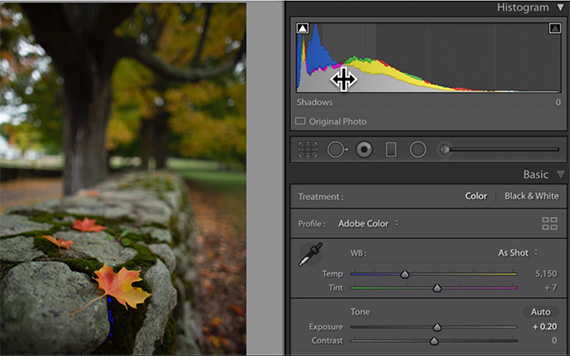
In color photographs that have not been converted to black and white, the histogram will also reflect the lightness values for each hue. This is helpful for identifying clipped detail for a specific color, which may not be reflected in the RGB (grey) histogram.

lightroom histogram secrets

For example: in the RAW file above, you can see that the blue color histogram is vastly different from the RGB histogram—especially for the shadows. This tells you that the blue color channel has more of a risk of being clipped and will need to be monitored in order to preserve detail in that color… especially when you start to make shifts in the HSL panel.

This becomes especially helpful for sunrise/sunset photographs since those environments will typically clip the yellows and reds long before your other colors.

The Tone Curve Will Show the Exact Value of a Sampled Pixel

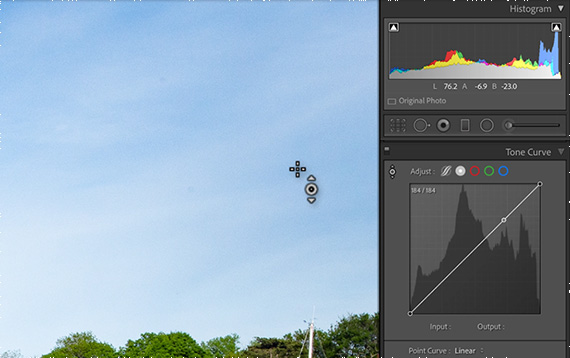
When using the tone or point curve, you’ll notice that the histogram for your selected image is in the background. While this reference is helpful for making your tonal adjustments along the curve baseline, it’s also useful for sampling the value of a specific pixel.

Select the target adjustment tool and hover over your image. You’ll see a moving dot appear on the baseline of your tone/point curve, showing you exactly where that pixel falls on the value scale (0-255).

lightroom histogram secrets

This is particularly helpful on color images, where the hue can influence how light or dark a pixel appears.

You Can Monitor Clipped Color Detail

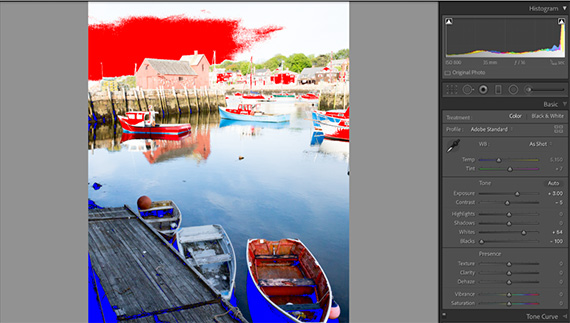
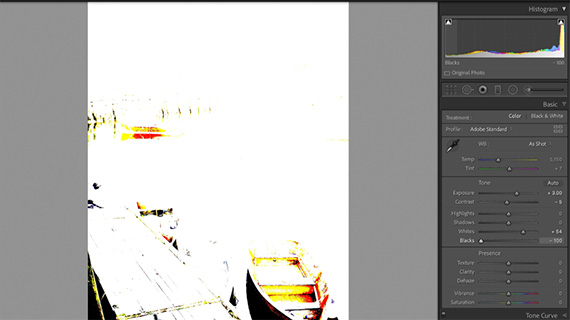
Most Lightroom users know that the histogram can help to identify clipped pixels if you turn the clipping warning indicators on. Press “J” to toggle this feature on and off, and Lightrroom will automatically show you clipped shadows as a blue overlay and clipped highlights as a red overlay.

lightroom histogram secrets

However, you can also monitor clipped highlights and shadows with a black or white mask—which is especially helpful if you want to know the exact color channel(s) a pixel is being clipped in.

While hovering over a specific tonal group in the histogram (exposure, highlights, shadows, whites or blacks), press and hold the “Alt” key as you adjust those sliders. A black/white overlay will appear over the image, and any clipped detail will become highlighted in either white or black (or the specific color channel).

lightroom histogram secrets

While adjusting the blacks in the histogram, a white overlay will appear. Here you can see that some shadows are being clipped globally (highlighted in black), while other shadow pixels are only clipped in the red and yellow channels.

Not only will you instantly know which color channel is being clipped through live feedback, but the black/white mask makes it easier to identify those pixels.

This feature will also work when holding the “Alt” key and adjusting the corresponding sliders in the Basic panel.

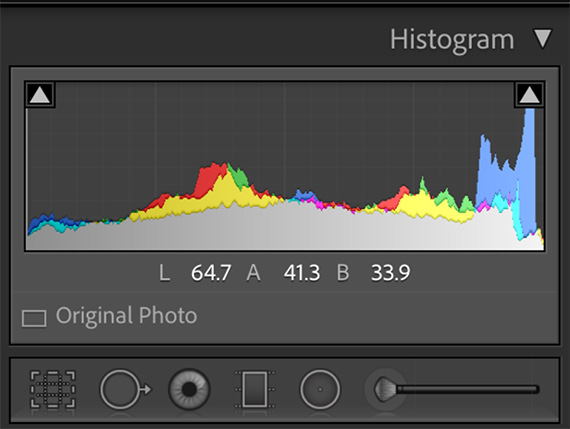
You Can View the LAB Color Values

If you like to work with the LAB color space, then you’ll greatly appreciate the ability to see the LAB value of any pixel in your photograph.

While hovering over your histogram, right-click to open up a context menu to customize the histogram. Make sure that “Show LAB Color Values” is selected, and you will now see the LAB value of a pixel when you hover over it, as seen below.

lightroom histogram secrets

Even if you do not work in the LAB color space, I still recommend using this feature as you can instantly see the Lightness value (L) of a pixel.

For Further Training:

This article is a general overview of the histogram lessons from the Lightroom for Landscapes Tutorials, but barely scratches the surface as to what is possible. The full course will walk you through all of the extraordinary tools and techniques that Lightroom Classic has to offer:

lightroom landscapes

Complete Lightroom Training Collection

Lightroom for Landscapes is currently 70% off today if you want to take a look. The offer also comes with 3 bonuses: full workflow videos, creative assignments and lifetime access with updates.

Deal ending soon: Lightroom for Landscapes at 70% Off

- - - - - - - - - - - - - - - - - - - - - - - - - - - - - - - - - - - - - - - - - - - - - - - - - - - - - - - - - - - - - - - - - - - - - - - - - -

Photography, like any art or skill, thrives on consistency. The journey to becoming an adept photographer is paved with regular practice. Learn how PictureCorrect Insiders can help.

- - - - - - - - - - - - - - - - - - - - - - - - - - - - - - - - - - - - - - - - - - - - - - - - - - - - - - - - - - - - - - - - - - - - - - - - - -

This post Five “Hidden” Features of the Histogram in Lightroom appeared on PictureCorrect.


from PictureCorrect https://ift.tt/ztBQFLx
via IFTTT

torstai 16. tammikuuta 2025

PictureCorrect.com: Demystifying Deductions & Write-Offs for Photographers

Tax season can be stressful for anyone, but it’s especially challenging for photographers juggling gear, editing software, travel, and more. The good news? Many of your professional expenses may be deductible, helping to reduce your tax burden and keep more cash in your pocket. In today’s article, we’ll explore common tax deductions and write-offs specifically relevant to photographers, along with a few strategies for staying organized year-round.

Also thanks to our new friends at finance-tips.ai, who helped us put together these valuable insights!

photography tax deductions

First—Who Can Claim These Deductions?

If you earn income as a photographer, you may qualify to deduct ordinary and necessary business expenses. This generally applies whether you’re:

A Sole Proprietor

If you haven’t formed a formal entity (like an LLC or corporation) but still earn income through your photography, you can typically file your photography income and expenses on your personal tax return (Schedule C in the U.S.).

A Single-Member LLC or Other Small Business Entity

Forming a limited liability company (LLC) or S corporation can offer certain legal protections and tax advantages, but it’s not a requirement to claim business-related deductions. However, some structures may help you separate personal and business finances more cleanly.

Regardless of your structure, the key requirement is that the expense is both ordinary (common in the photography industry) and necessary (helpful or required for running your photography business). Always keep meticulous records of what you spend and how it relates to your work.

1. Camera Equipment & Accessories

From your DSLR or mirrorless camera body and lenses to tripods, memory cards, and camera bags, essential gear directly related to your photography business is often deductible. Keep clear documentation of your purchases:

  • Receipts & Dates: Note the purchase date and cost, whether bought new or used.
  • Proper Classification: If an item is used partly for personal reasons, only the business percentage is deductible.

Pro Tip: If you’re replacing multiple pieces of major equipment in one year, consult your tax professional to determine whether to deduct the full cost in the current tax year or depreciate it over multiple years—both approaches can have different tax implications.

2. Editing Software & Subscriptions

Most photographers rely on software for post-processing, album design, or organizational tasks. These include:

  • Subscriptions: Adobe Creative Cloud, Capture One, or other editing tools
  • Apps & Online Services: Portfolio hosting platforms, cloud storage (Dropbox, Google Drive), etc.
  • Photo Editing Presets/Plugins: Purchased for business use

Maintain separate records of these ongoing costs to simplify your bookkeeping. As with gear, only the portion used for business is deductible if you also use these tools personally.

3. Home Office Deduction

If you work from home, you may be eligible for a home office deduction. This applies if:

  • You have a dedicated area exclusively used for business (e.g., a room for editing photos and meeting clients).
  • It’s the principal place of your photography operations (where most work and admin happen).

You can deduct a portion of expenses like rent, mortgage interest, utilities, and internet based on the percentage of your home’s total square footage that’s dedicated to business use. This deduction can apply whether you’re a sole proprietor or have formed an LLC—what matters is proper documentation and exclusive business use of that space.

4. Website & Marketing Costs

Your website is your digital storefront, and promoting your services is essential for growth. Potential deductions include:

  • Domain & Hosting Fees
  • Website Design & Maintenance
  • Social Media Advertisements
  • Printed Marketing Materials (business cards, brochures)

Keep detailed records of your marketing expenditures, as these costs can quickly add up over the course of a year.

5. Travel & Mileage

Photographers often travel for location shoots, weddings, or client meetings. If the travel is strictly business-related, these costs can be deductible:

  • Mileage or Transportation Costs: Keep a log of business-related miles driven or track ride-share costs (Uber, Lyft, taxi).
  • Lodging & Meals (with limits): If you travel out of town for a shoot, reasonable hotel and meal expenses may also be deductible.

Make sure you’re separating personal travel from business trips—mixed-use vacations often require nuanced documentation for partial deductions.

6. Insurance & Memberships

Many photographers carry:

  • Equipment Insurance: Protects against theft, damage, or loss.
  • Liability Insurance: Covers accidents or lawsuits related to your business.
  • Professional Organization Fees: Such as memberships in PPA (Professional Photographers of America) or local photography guilds.

These are typically considered ordinary and necessary expenses for your photography business, so they can be written off. Be sure to save policy paperwork and membership invoices.

7. Educational Expenses

Continued learning is vital in such a fast-evolving field. Online courses, seminars, and workshops geared toward improving your photography skills or running your business can be deductible. Just ensure the course content directly applies to your photography business goals.

8. Keeping Accurate Records

One of the best ways to ensure you’re claiming the right deductions—and not missing any—is to stay organized throughout the year:

  1. Use Accounting Software: Tools like QuickBooks, FreshBooks, or Wave can automatically track and categorize expenses.
  2. Separate Bank Accounts: Keep personal and business finances separate, making it easier to pull up relevant transactions.
  3. Save Your Receipts: Digital or paper, make sure you keep them all. Many apps allow you to snap photos of receipts and store them directly.

9. Consult a Professional

Tax laws can change, and each photographer’s situation is unique. What works for a wedding photographer may differ from a stock photographer. Talk to a qualified tax professional or accountant familiar with creative freelancers. They can guide you on:

  • Optimal Business Structure (sole proprietor, LLC, S corp) for your specific needs
  • Depreciation Schedules for expensive gear
  • State & Local Taxes that may affect your write-offs

By understanding and leveraging available deductions, photographers can lighten their tax load and put more resources into growing their craft. Whether you’re a part-time hobbyist making side income or a full-time pro, keep precise records and consult experts when in doubt.

Here’s to a smoother tax season—and more time spent doing what you love: capturing stunning images!

For Further Help:

Did you know that personal finance is the #1 topic students wish they had learned more about in school? Whether you’re just starting your financial journey or navigating retirement, these new Personal Finance Cheat Sheets are here to guide you every step of the way.

finance-cheat-sheets

They are designed for quick reference, so you can easily access the information you’re looking for in seconds. Plus, their printable format means you can have a physical copy at your fingertips anytime.

Found here: Personal Finance Cheat Sheets Launch Sale

- - - - - - - - - - - - - - - - - - - - - - - - - - - - - - - - - - - - - - - - - - - - - - - - - - - - - - - - - - - - - - - - - - - - - - - - - -

Photography, like any art or skill, thrives on consistency. The journey to becoming an adept photographer is paved with regular practice. Learn how PictureCorrect Insiders can help.

- - - - - - - - - - - - - - - - - - - - - - - - - - - - - - - - - - - - - - - - - - - - - - - - - - - - - - - - - - - - - - - - - - - - - - - - - -

This post Demystifying Deductions & Write-Offs for Photographers appeared on PictureCorrect.


from PictureCorrect https://ift.tt/kgSVvfU
via IFTTT